Introduction
Network Inventory Tools provide IT teams with centralized visibility into all devices connected to their networks, including routers, switches, servers, workstations, printers, and IoT devices. These tools help track hardware, monitor software deployments, maintain compliance, and streamline IT operations. Accurate inventory management allows organizations to proactively prevent issues, optimize resources, and plan capacity effectively.
Real-world use cases include automated network discovery, real-time asset monitoring, license management, reporting for compliance audits, integration with ITSM platforms, and mapping of complex network topologies. Buyers evaluating these tools should focus on device discovery capabilities, automated inventory updates, reporting and analytics, scalability, ITSM and monitoring integrations, compliance features, security controls, ease of deployment, multi-site support, and cost-effectiveness.
Best for: IT administrators, network engineers, IT operations teams, MSPs, and enterprises with large or complex networks requiring accurate device tracking.
Not ideal for: Very small IT environments with minimal devices, organizations relying on manual spreadsheets, or teams without formal IT management processes.
Key Trends in Network Inventory Tools
- Automated device discovery using SNMP, WMI, and network scanning
- Integration with ITSM, monitoring, and configuration management tools
- Real-time inventory updates and alerts
- Cloud-based monitoring and reporting dashboards
- AI-assisted anomaly detection for assets and network issues
- Hardware and software tracking for compliance
- Support for hybrid, multi-site networks
- Visualization dashboards and network topology mapping
- Mobile accessibility for IT teams and field engineers
- Enhanced security and audit trails for regulatory compliance
How We Selected These Tools
- Evaluated market adoption and enterprise recognition
- Assessed feature completeness, including discovery, reporting, and compliance
- Reviewed reliability, performance, and scalability
- Verified security and compliance features where publicly stated
- Checked integrations with ITSM, monitoring, and CMDB platforms
- Assessed suitability for SMB, mid-market, and enterprise IT teams
- Evaluated AI and automation capabilities for anomaly detection
- Reviewed ease of deployment and configuration
- Assessed analytics and visualization capabilities
- Reviewed vendor support, documentation, and community resources
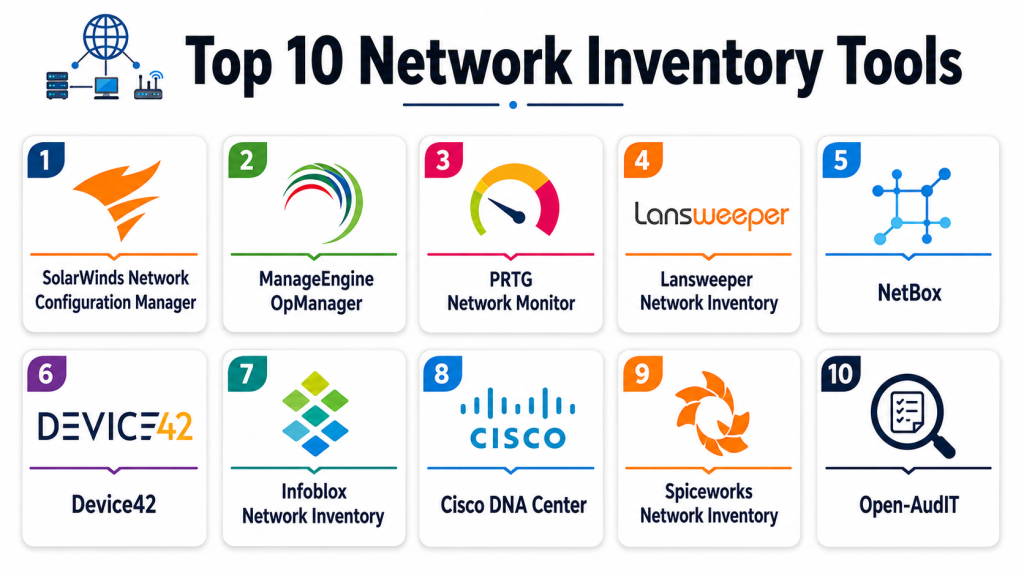
Top 10 Network Inventory Tools
#1 — SolarWinds Network Configuration Manager
Short description: SolarWinds NCM automates network inventory management, configuration tracking, and compliance reporting, ideal for large enterprise networks.
Key Features
- Automated device discovery and configuration tracking
- Compliance auditing and reporting
- Real-time alerts for configuration changes
- Integration with SolarWinds NPM and ITSM
- Network topology visualization
- Automated device backups
- Role-based access controls
Pros
- Enterprise scalability
- Strong automation and reporting
- Comprehensive compliance features
- Seamless SolarWinds ecosystem integration
Cons
- High cost for SMBs
- Complex initial setup
- Steep learning curve
- Vendor lock-in for full functionality
Platforms / Deployment
Web / Windows
Cloud / On-premise
Security & Compliance
- Role-based access, encryption
- SOC 2 (as publicly stated)
Integrations & Ecosystem
- SolarWinds NPM, ITSM platforms
- Slack, email alerts
Support & Community
Documentation, training, enterprise support.
#2 — ManageEngine OpManager
Short description: OpManager provides automated network discovery, monitoring, and inventory tracking for mid-market and enterprise IT teams.
Key Features
- Real-time device discovery
- Hardware and software inventory
- Alerts for device status changes
- Network topology mapping
- ITSM integration
- Reporting dashboards
- Role-based access control
Pros
- Affordable for mid-market
- Easy deployment and configuration
- Strong monitoring and inventory
- Visualization dashboards
Cons
- Limited AI-assisted insights
- Integration depth less than enterprise suites
- Reporting customization may require add-ons
- Multi-site configuration can be complex
Platforms / Deployment
Web / Windows / Linux
Cloud / On-premise
Security & Compliance
- SSO, role-based access, encryption
- GDPR, SOC 2 (as publicly stated)
Integrations & Ecosystem
- ITSM, CMDB, monitoring
- Slack, email alerts
Support & Community
Documentation, training videos, customer support.
#3 — Lansweeper
Short description: Lansweeper provides automated network and asset discovery with deep software and hardware tracking, ideal for enterprises and MSPs.
Key Features
- Automatic network discovery
- Hardware and software inventory
- License management and compliance tracking
- Alerts for hardware changes
- ITSM integrations
- Reporting dashboards
- Web-based management interface
Pros
- Comprehensive asset visibility
- Strong software and license tracking
- Automated scanning
- MSP-friendly for distributed networks
Cons
- Limited real-time network performance monitoring
- Advanced reporting may require paid tiers
- Initial discovery can be time-intensive
- Some features require enterprise licensing
Platforms / Deployment
Web / Windows
Cloud / On-premise
Security & Compliance
- Role-based access, encryption
- Not publicly stated
Integrations & Ecosystem
- ITSM, monitoring tools
- Email alerts, API access
Support & Community
Documentation, tutorials, and technical support.
#4 — Paessler PRTG Network Monitor
Short description: PRTG combines network monitoring with inventory tracking, offering real-time device visibility and reporting for IT teams managing complex networks.
Key Features
- Network device discovery
- SNMP, WMI, and packet sniffing
- Real-time monitoring
- Alerts for hardware/software changes
- Reporting dashboards
- Maps and visual topology
- Role-based access
Pros
- Integrated monitoring and inventory
- Customizable alerts and dashboards
- Scalable for large networks
- Easy deployment for mid-market
Cons
- Limited AI or predictive insights
- Reporting customization may require scripting
- Licensing can be complex
- Cloud deployment requires add-ons
Platforms / Deployment
Web / Windows
Cloud / On-premise
Security & Compliance
- Role-based access, encryption
- SOC 2, GDPR (as publicly stated)
Integrations & Ecosystem
- ITSM, CMDB, monitoring
- Slack, email, API
Support & Community
Documentation, forums, enterprise support.
#5 — Spiceworks Network Inventory
Short description: Spiceworks Network Inventory offers free network inventory management with automatic discovery, asset tracking, and reporting, ideal for small to mid-sized IT teams.
Key Features
- Automatic device discovery
- Hardware and software inventory
- Reporting dashboards
- Alerts for new devices or changes
- Integration with Spiceworks ITSM
- Web-based interface
- Role-based access
Pros
- Free option for small IT teams
- Simple setup
- Easy hardware and software tracking
- Community support
Cons
- Limited advanced features
- No AI-assisted monitoring
- Basic reporting
- Less scalable for large networks
Platforms / Deployment
Web / Windows
Cloud / On-premise
Security & Compliance
- Role-based access, encryption
- Not publicly stated
Integrations & Ecosystem
- ITSM tools, email alerts
- API access
Support & Community
Community forums, documentation, email support.
#6 — Device42
Short description: Device42 provides network discovery, inventory, and CMDB capabilities for complex hybrid IT environments.
Key Features
- Automated discovery and mapping
- Hardware and software inventory
- Dependency mapping and topology visualization
- Alerts for changes
- ITSM integrations
- Reporting and analytics
- Role-based access
Pros
- Visibility into hybrid environments
- Advanced topology mapping
- ITSM integration
- Scalable enterprise solution
Cons
- Higher cost
- Setup complexity
- Limited AI features
- Learning curve
Platforms / Deployment
Web / Windows / Linux
Cloud / On-premise
Security & Compliance
- SSO, encryption, RBAC
- Not publicly stated
Integrations & Ecosystem
- ITSM, CMDB, monitoring
- API, Slack, email notifications
Support & Community
Documentation, onboarding, enterprise support.
#7 — NetBrain
Short description: NetBrain automates network discovery, mapping, and inventory for large enterprise networks with multi-site support.
Key Features
- Automated network discovery
- Real-time topology maps
- Device and software inventory
- Alerts for changes
- Monitoring integration
- Reporting dashboards
- Role-based access
Pros
- Excellent for complex networks
- Strong visualization
- Scalable for enterprises
- Alerts and reporting
Cons
- High cost
- Steep learning curve
- Limited AI
- Setup complexity
Platforms / Deployment
Web / Windows
Cloud / On-premise
Security & Compliance
- Role-based access, encryption
- Not publicly stated
Integrations & Ecosystem
- ITSM, monitoring, CMDB
- Slack, email, API
Support & Community
Documentation, onboarding, enterprise support.
#8 — Auvik
Short description: Auvik offers cloud-based network inventory, discovery, and monitoring with automated alerts for IT teams.
Key Features
- Automatic discovery
- Real-time monitoring and inventory
- Alerts for configuration or status changes
- Topology visualization
- Reporting dashboards
- ITSM integration
- Role-based access
Pros
- Cloud-based, easy deployment
- Real-time monitoring and alerts
- Scalable mid-market and enterprise
- Topology visualization
Cons
- Paid subscription required
- Limited AI features
- Custom reporting requires effort
- Less control over on-prem networks
Platforms / Deployment
Web / Windows
Cloud
Security & Compliance
- SSO, encryption, RBAC
- Not publicly stated
Integrations & Ecosystem
- ITSM, monitoring, CMDB
- Slack, API, email
Support & Community
Documentation, training, enterprise support.
#9 — Lansweeper (Enterprise)
Short description: Lansweeper Enterprise offers enhanced license and software tracking, automated discovery, and multi-site support for MSPs and large organizations.
Key Features
- Device and software discovery
- License management
- Alerts for changes
- Reporting dashboards
- CMDB integration
- Web interface
- API access
Pros
- Strong enterprise asset tracking
- Automated scanning
- MSP-friendly
- License compliance tracking
Cons
- Advanced reporting requires add-ons
- Discovery can be time-intensive
- Paid tiers required for full functionality
- Limited AI
Platforms / Deployment
Web / Windows
Cloud / On-premise
Security & Compliance
- Role-based access, encryption
- Not publicly stated
Integrations & Ecosystem
- ITSM, monitoring, email alerts
- API access
Support & Community
Documentation, tutorials, technical support.
#10 — Spiceworks Inventory
Short description: Spiceworks Inventory provides simple network inventory for small IT teams with automated discovery, tracking, and reporting.
Key Features
- Automatic device discovery
- Hardware and software tracking
- Alerts for new devices or changes
- Reporting dashboards
- Web-based interface
- Role-based access
- ITSM integration
Pros
- Free or affordable
- Simple deployment
- Easy asset tracking
- Community support
Cons
- Limited advanced features
- No AI insights
- Basic reporting
- Less scalable for large networks
Platforms / Deployment
Web / Windows
Cloud / On-premise
Security & Compliance
- Role-based access, encryption
- Not publicly stated
Integrations & Ecosystem
- ITSM integration, email alerts
- API access
Support & Community
Community forums, documentation, email support.
Comparison Table
| Tool Name | Best For | Platform Supported | Deployment | Standout Feature | Public Rating |
|---|---|---|---|---|---|
| SolarWinds NCM | Enterprise | Web / Windows | Cloud / On-premise | Automated configuration tracking | N/A |
| ManageEngine OpManager | Mid-market / Enterprise | Web / Windows / Linux | Cloud / On-premise | Real-time network discovery | N/A |
| Lansweeper | MSP / Enterprise | Web / Windows | Cloud / On-premise | Hardware & software tracking | N/A |
| Paessler PRTG | Mid-market / Enterprise | Web / Windows | Cloud / On-premise | Integrated monitoring & inventory | N/A |
| Spiceworks Network Inventory | Small IT | Web / Windows | Cloud / On-premise | Free inventory solution | N/A |
| Device42 | Enterprise / Hybrid IT | Web / Windows / Linux | Cloud / On-premise | Dependency mapping & discovery | N/A |
| NetBrain | Large Enterprise | Web / Windows | Cloud / On-premise | Automated topology mapping | N/A |
| Auvik | Mid-market / Enterprise | Web / Windows | Cloud | Real-time monitoring & alerts | N/A |
| Lansweeper Enterprise | MSP / Enterprise | Web / Windows | Cloud / On-premise | License & software tracking | N/A |
| Spiceworks Inventory | Small IT | Web / Windows | Cloud / On-premise | Simple device tracking | N/A |
Evaluation & Scoring
| Tool Name | Core 25% | Ease 15% | Integrations 15% | Security 10% | Performance 10% | Support 10% | Value 15% | Weighted Total |
|---|---|---|---|---|---|---|---|---|
| SolarWinds NCM | 9 | 7.5 | 9 | 9 | 8.5 | 8 | 7.5 | 8.4 |
| ManageEngine OpManager | 8.5 | 8 | 8.5 | 8 | 8 | 7.5 | 8 | 8.0 |
| Lansweeper | 8 | 8 | 7.5 | 7.5 | 7.5 | 7 | 7.5 | 7.7 |
| Paessler PRTG | 8 | 7.5 | 8 | 7.5 | 7.5 | 7 | 7.5 | 7.7 |
| Spiceworks Network Inventory | 7.5 | 8.5 | 7 | 7 | 7 | 7 | 8 | 7.5 |
| Device42 | 8.5 | 7.5 | 7.5 | 7.5 | 7.5 | 7 | 7.5 | 7.7 |
| NetBrain | 9 | 7 | 8 | 7.5 | 7.5 | 7 | 7 | 7.6 |
| Auvik | 8 | 8 | 7.5 | 7 | 7.5 | 7 | 7.5 | 7.6 |
| Lansweeper Enterprise | 8 | 7.5 | 7.5 | 7 | 7.5 | 7 | 7.5 | 7.5 |
| Spiceworks Inventory | 7.5 | 8 | 7 | 7 | 7 | 7 | 7.5 | 7.3 |
Which Network Inventory Tool Is Right for You?
Solo / Freelancer
Spiceworks Network Inventory or Spiceworks Inventory provide lightweight, free solutions for small IT teams with limited assets.
SMB
ManageEngine OpManager or Paessler PRTG offer real-time monitoring, automated discovery, and analytics for mid-market networks.
Mid-Market
Lansweeper or Auvik support hybrid networks, detailed asset tracking, and license management with visualization dashboards.
Enterprise
SolarWinds NCM, Device42, or NetBrain provide large-scale automated discovery, dependency mapping, compliance reporting, and enterprise-grade scalability.
Budget vs Premium
Free or low-cost tools suit SMBs and small IT teams. Enterprise solutions like SolarWinds NCM or Device42 are premium options with advanced capabilities.
Feature Depth vs Ease of Use
Enterprise tools have rich features but require technical expertise. Mid-market and SMB tools are easier to adopt but offer fewer advanced analytics.
Integrations & Scalability
Large organizations should select tools with deep ITSM, CMDB, and monitoring integrations. Mid-market teams prioritize flexibility and cloud deployment.
Security & Compliance Needs
Ensure platforms support SSO, MFA, encryption, RBAC, and audit logging. SOC 2 or ISO 27001 certifications provide additional confidence.
Frequently Asked Questions
1. What is a Network Inventory Tool?
A platform that discovers, tracks, and manages all network-connected devices, providing centralized visibility and reporting.
2. Can small IT teams benefit?
Yes, lightweight solutions like Spiceworks allow small teams to maintain device inventories and basic reporting without heavy infrastructure.
3. How do these tools discover devices?
They use protocols like SNMP, WMI, SSH, and network scanning to automatically detect hardware and software on the network.
4. Do these tools include software tracking?
Most tools track installed software, licenses, and versions, helping maintain compliance and reduce security risks.
5. Are cloud deployments common?
Yes, many tools offer SaaS deployment for easier scaling, remote management, and simplified maintenance.
6. Can these tools integrate with ITSM platforms?
Yes, most network inventory tools integrate with ITSM, CMDB, monitoring, and ticketing platforms for end-to-end asset management.
7. How is network topology visualized?
Tools like NetBrain and PRTG provide topology maps showing device interconnections and dependencies.
8. How often is inventory updated?
Many platforms provide real-time updates or scheduled scans to ensure accurate inventory data.
9. Do they include alerts for changes?
Yes, alerts notify IT teams when devices are added, removed, or configurations are modified.
10. Are these tools compliant?
Most enterprise-grade tools offer audit logging, RBAC, encryption, and may have SOC 2 or ISO 27001 certifications.
Conclusion
Network Inventory Tools are essential for IT teams to maintain visibility, manage assets, and ensure compliance across modern, complex networks. Small teams can leverage Spiceworks tools for basic discovery and reporting, while mid-market organizations benefit from OpManager, PRTG
Continue generating

This article offers a very clear comparison of network inventory tools with practical insights and easy-to-understand explanations. The structured format made it simple to evaluate the strengths of each platform.
A critical challenge that is often underrepresented in network inventory discussions is maintaining inventory accuracy over time rather than simply discovering assets. Initial network scans can produce impressive results, but inventory data begins to lose value as devices are moved, decommissioned, virtualized, or provisioned dynamically through cloud and automation workflows. In modern hybrid environments, a network inventory platform should function as a continuously validated source of truth, integrating with CMDBs, identity systems, cloud providers, monitoring platforms, and infrastructure-as-code pipelines. Without automated reconciliation and ownership tracking, organizations frequently end up with stale records, duplicate assets, and blind spots that undermine security audits and incident response. The real differentiator is not how many devices a tool can discover on day one, but how reliably it can maintain asset integrity months or years later as the environment evolves.
Accurate network inventory is not just about discovering assets—it’s about keeping that information reliable as environments change. In fast-moving organizations, cloud resources, virtual devices, and temporary infrastructure can appear and disappear within hours, making inventory data stale very quickly. A discussion on continuous discovery, automated reconciliation, and integration with CMDB or asset governance processes would add valuable operational context for teams managing dynamic infrastructures.
Network inventory accuracy is often challenged by the rapid adoption of cloud, SD-WAN, and ephemeral infrastructure, where assets can change far more frequently than traditional discovery cycles. Without continuous validation, outdated inventory can impact troubleshooting, security audits, and capacity planning. Including strategies for real-time synchronization, automated dependency mapping, and lifecycle tracking would give readers a stronger understanding of how these tools perform in modern hybrid environments.