Introduction
Retail Workforce Scheduling Tools are platforms designed to create, manage, and optimize employee work schedules based on demand, availability, and business needs. These tools automate shift planning, track attendance, and ensure that the right number of employees are scheduled at the right time.
In retail environments, where customer traffic fluctuates throughout the day, scheduling manually can lead to overstaffing, understaffing, and increased labor costs. Modern scheduling tools use AI, demand forecasting, and automation to align workforce planning with real-time store activity, improving efficiency and profitability.
Real-world use cases
- Creating employee shift schedules
- Managing time and attendance
- Forecasting staffing needs based on demand
- Enabling shift swaps and flexibility
- Monitoring labor costs and productivity
What buyers should evaluate
- Automated scheduling and forecasting
- Mobile access for employees
- Integration with payroll and POS systems
- Labor cost tracking and optimization
- Compliance with labor laws
- Multi-location scheduling support
- Reporting and analytics
- Ease of use for managers and staff
Best for: Retail chains, stores with hourly workers, operations teams, and HR managers.
Not ideal for: Businesses with fixed schedules or very small teams.
Key Trends in Retail Workforce Scheduling
- AI-driven demand forecasting and scheduling
- Mobile-first scheduling for frontline workers
- Real-time shift swaps and availability tracking
- Integration with POS and payroll systems
- Automation of compliance with labor regulations
- Data-driven labor cost optimization
- Cloud-based scheduling platforms
- Employee self-service scheduling
- Real-time workforce analytics
- Predictive staffing based on customer traffic
How We Selected These Tools
- Evaluated adoption across retail and service industries
- Assessed scheduling automation and forecasting features
- Considered ease of use and onboarding
- Reviewed integration with payroll and POS systems
- Analyzed scalability for multi-store retailers
- Evaluated mobile accessibility for staff
- Considered labor cost tracking capabilities
- Assessed vendor support and ecosystem strength
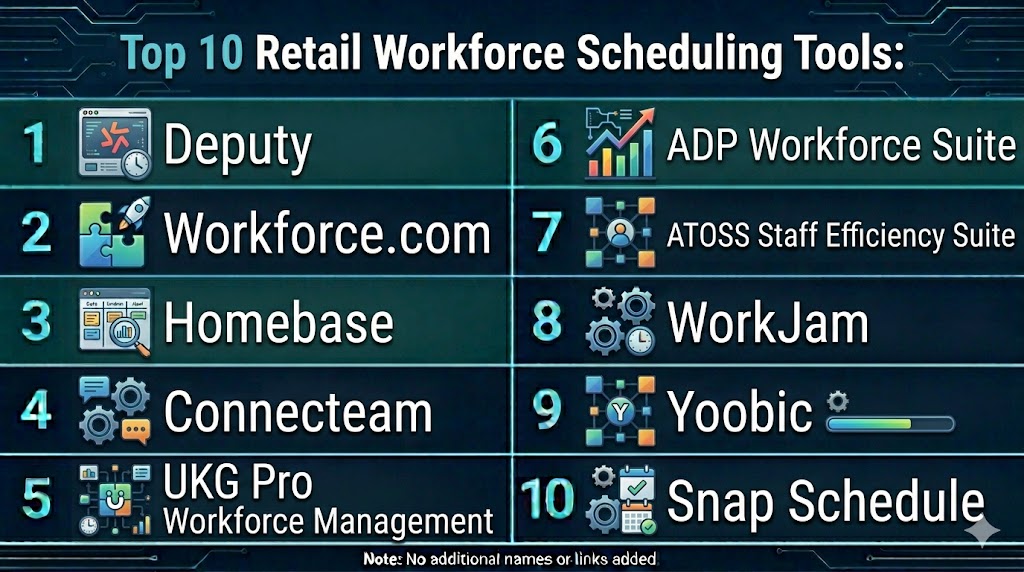
Top 10 Retail Workforce Scheduling Tools
#1 — Deputy
Short description: Deputy is a retail-focused scheduling platform that helps managers create schedules quickly while allowing employees to swap shifts and manage availability.
Key Features
- Shift scheduling
- Time tracking
- Shift swapping
- Labor cost management
- Mobile app
Pros
- Easy scheduling
- Strong mobile support
- Good integrations
Cons
- Pricing for larger teams
- Limited advanced analytics
- Customization limits
Platforms / Deployment
- Web Mobile
- Cloud
Security & Compliance
- Role-based access
- Not publicly stated
Integrations & Ecosystem
Integrates with payroll, POS, and HR systems.
- APIs
- Payroll tools
- POS systems
Support & Community
Good support and documentation
#2 — Workforce.com
Short description: Workforce.com is an AI-powered scheduling platform that aligns staffing with demand and optimizes labor costs.
Key Features
- Demand-based scheduling
- Forecasting
- Shift templates
- Labor analytics
- Compliance tracking
Pros
- Strong forecasting
- Scalable
- Data-driven
Cons
- Complex setup
- Pricing
- Learning curve
Platforms / Deployment
- Web
- Cloud
Security & Compliance
- Not publicly stated
Integrations & Ecosystem
Supports integration with enterprise systems.
- APIs
- HR tools
Support & Community
Enterprise support
#3 — Homebase
Short description: Homebase is a user-friendly scheduling tool designed for small retail businesses with built-in time tracking and communication features.
Key Features
- Scheduling
- Time tracking
- Team messaging
- Payroll integration
- Reporting
Pros
- Easy to use
- Free plan available
- Good for SMB
Cons
- Limited advanced features
- Smaller ecosystem
- Scaling limitations
Platforms / Deployment
- Web Mobile
- Cloud
Security & Compliance
- Not publicly stated
Integrations & Ecosystem
Supports integration with payroll and POS.
- APIs
- Payroll
Support & Community
Strong SMB support
#4 — Connecteam
Short description: Connecteam provides workforce scheduling with communication and task management features for retail teams.
Key Features
- Shift scheduling
- Time tracking
- Task management
- Communication tools
- Reporting
Pros
- All-in-one platform
- Affordable
- Mobile-friendly
Cons
- Limited enterprise features
- Smaller ecosystem
- Basic analytics
Platforms / Deployment
- Web Mobile
- Cloud
Security & Compliance
- Not publicly stated
Integrations & Ecosystem
Supports integrations with business tools.
- APIs
- HR tools
Support & Community
Good support
#5 — UKG Pro Workforce Management
Short description: UKG provides enterprise workforce management with advanced scheduling and compliance features.
Key Features
- AI scheduling
- Time and attendance
- Compliance management
- Analytics
- Reporting
Pros
- Enterprise-grade
- Strong compliance
- Scalable
Cons
- Expensive
- Complex
- Learning curve
Platforms / Deployment
- Web
- Cloud
Security & Compliance
- Compliance features included
- Not publicly stated
Integrations & Ecosystem
Integrates with enterprise HR systems.
- APIs
- HR platforms
Support & Community
Enterprise support
#6 — ADP Workforce Suite
Short description: ADP offers workforce scheduling as part of its broader HR and payroll ecosystem.
Key Features
- Scheduling
- Payroll integration
- Time tracking
- Reporting
- Compliance tools
Pros
- Strong HR integration
- Reliable
- Scalable
Cons
- Expensive
- Complex setup
- Less flexible
Platforms / Deployment
- Web
- Cloud
Security & Compliance
- Not publicly stated
Integrations & Ecosystem
Integrates with HR and payroll systems.
- APIs
- Payroll
Support & Community
Enterprise support
#7 — WorkJam
Short description: WorkJam focuses on employee engagement and scheduling for retail frontline workers.
Key Features
- Scheduling
- Task management
- Communication
- Analytics
- Mobile app
Pros
- Strong mobile experience
- Employee engagement
- Scalable
Cons
- Pricing
- Complex
- Learning curve
Platforms / Deployment
- Web Mobile
- Cloud
Security & Compliance
- Not publicly stated
Integrations & Ecosystem
Supports enterprise integrations.
- APIs
- HR tools
Support & Community
Good support
#8 — Yoobic
Short description: Yoobic combines workforce scheduling with task execution and performance tracking.
Key Features
- Scheduling
- Task management
- Reporting
- Analytics
- Mobile support
Pros
- Strong execution tracking
- Easy to use
- Scalable
Cons
- Limited advanced scheduling
- Smaller ecosystem
- Pricing
Platforms / Deployment
- Web Mobile
- Cloud
Security & Compliance
- Not publicly stated
Integrations & Ecosystem
Supports integrations with retail tools.
- APIs
- Retail systems
Support & Community
Good support
#9 — Snap Schedule
Short description: Snap Schedule offers flexible scheduling and workforce management tools for businesses of all sizes.
Key Features
- Scheduling
- Time tracking
- Reporting
- Analytics
- Workforce management
Pros
- Flexible
- Customizable
- Reliable
Cons
- UI complexity
- Smaller ecosystem
- Pricing
Platforms / Deployment
- Web Windows
- Cloud On premise
Security & Compliance
- Not publicly stated
Integrations & Ecosystem
Supports integrations via APIs.
- APIs
- Tools
Support & Community
Good support
#10 — When I Work
Short description: When I Work is a simple scheduling tool designed for retail teams to manage shifts and communication efficiently.
Key Features
- Scheduling
- Time tracking
- Team communication
- Mobile app
- Reporting
Pros
- Easy to use
- Mobile-friendly
- Affordable
Cons
- Limited enterprise features
- Basic analytics
- Smaller ecosystem
Platforms / Deployment
- Web Mobile
- Cloud
Security & Compliance
- Not publicly stated
Integrations & Ecosystem
Supports integration with payroll and HR tools.
- APIs
- Payroll
Support & Community
Good support
Comparison Table
| Tool Name | Best For | Platform Supported | Deployment | Standout Feature | Public Rating |
|---|---|---|---|---|---|
| Deputy | SMB retail | Web Mobile | Cloud | Shift swapping | N/A |
| Workforce.com | Enterprise | Web | Cloud | Demand forecasting | N/A |
| Homebase | Small business | Web Mobile | Cloud | Free plan | N/A |
| Connecteam | SMB teams | Web Mobile | Cloud | All-in-one | N/A |
| UKG | Enterprise | Web | Cloud | Compliance | N/A |
| ADP | HR integration | Web | Cloud | Payroll integration | N/A |
| WorkJam | Engagement | Web Mobile | Cloud | Mobile-first | N/A |
| Yoobic | Execution | Web Mobile | Cloud | Task tracking | N/A |
| Snap Schedule | Flexible use | Web Windows | Cloud On premise | Customization | N/A |
| When I Work | Small teams | Web Mobile | Cloud | Simplicity | N/A |
Evaluation & Scoring of Retail Workforce Scheduling Tools
| Tool Name | Core | Ease | Integrations | Security | Performance | Support | Value | Weighted Total |
|---|---|---|---|---|---|---|---|---|
| Deputy | 8 | 9 | 8 | 7 | 8 | 8 | 9 | 8.3 |
| Workforce.com | 9 | 7 | 9 | 8 | 9 | 8 | 7 | 8.4 |
| Homebase | 7 | 9 | 7 | 7 | 7 | 7 | 9 | 7.8 |
| Connecteam | 8 | 9 | 7 | 7 | 8 | 7 | 9 | 8.0 |
| UKG | 10 | 6 | 9 | 9 | 9 | 9 | 6 | 8.6 |
| ADP | 9 | 6 | 9 | 8 | 9 | 9 | 6 | 8.2 |
| WorkJam | 8 | 8 | 8 | 7 | 8 | 8 | 7 | 7.9 |
| Yoobic | 8 | 8 | 7 | 7 | 8 | 7 | 8 | 7.9 |
| Snap Schedule | 7 | 7 | 7 | 7 | 7 | 7 | 8 | 7.3 |
| When I Work | 7 | 9 | 7 | 7 | 7 | 7 | 9 | 7.8 |
Scores are comparative and reflect strengths in automation, usability, and scalability.
Which Retail Workforce Scheduling Tool Is Right for You
Solo / Small Retailers
Homebase and When I Work are simple and affordable.
SMB
Deputy and Connecteam provide strong value.
Mid-Market
Workforce.com and Yoobic offer balanced features.
Enterprise
UKG and ADP are ideal.
Budget vs Premium
Homebase is budget-friendly, UKG is premium.
Feature Depth vs Ease of Use
UKG for depth, When I Work for simplicity.
Integrations & Scalability
Workforce.com and ADP are strong options.
Security & Compliance Needs
Enterprise tools provide stronger compliance capabilities.
Frequently Asked Questions
1. What is retail workforce scheduling software
It is software used to create and manage employee schedules. It helps align staffing with demand and improve efficiency.
2. Why is workforce scheduling important
It reduces labor costs and ensures proper staffing. It also improves customer experience.
3. How do these tools work
They use data and automation to create schedules. They consider availability and demand. This improves productivity.
4. Are these tools suitable for small businesses
Yes, many tools offer affordable plans for small teams. Others are designed for large enterprises.
5. How much do these tools cost
Pricing varies widely. Some tools offer free plans, while enterprise solutions are expensive.
6. Do they integrate with retail systems
Yes, most tools integrate with POS, payroll, and HR systems. This improves workflow efficiency.
7. How long does implementation take
Implementation can take hours to weeks. It depends on complexity and integrations.
8. What are common mistakes
Manual scheduling and ignoring demand data are common issues. Automation helps avoid them.
9. Are these tools secure
Most tools include access control and data protection. Security varies by provider.
10. Are there alternatives
Spreadsheets can be used, but they lack automation and scalability.
Conclusion
Retail Workforce Scheduling Tools have become essential for managing modern retail operations where staffing needs fluctuate constantly. These platforms enable businesses to move beyond manual scheduling by using data-driven insights, automation, and AI to align workforce availability with customer demand. From simple tools like Homebase and When I Work to enterprise solutions like UKG and ADP, each platform offers unique advantages depending on business size and complexity. The best choice depends on your workforce scale, budget, and need for automation rather than a one-size-fits-all solution. Retailers should prioritize ease of use, integration capabilities, and labor cost optimization when selecting a tool. A practical next step is to shortlist a few tools, test scheduling scenarios, and evaluate their impact on productivity and labor efficiency before full deployment.
