GitHub Pages is one of the most popular free website hosting platforms for developers, software engineers, open-source communities and technical content creators.
Although GitHub Pages is designed for static website hosting, modern web technologies allow developers to build interactive websites, automated blogs, technical documentation portals, searchable directories and API-driven applications using GitHub Pages.
By combining GitHub Pages with JavaScript, REST APIs, static site generators and GitHub Actions, you can build sophisticated websites with dynamic functionality without maintaining a dedicated frontend web server.
This tutorial explains the architecture, implementation, automation, SEO benefits, link-building opportunities, limitations and best practices of GitHub Pages.
1. What is GitHub Pages?
GitHub Pages is a static website hosting service provided by GitHub that publishes HTML, CSS and JavaScript files from GitHub repositories.
It can also build websites using automated workflows before publishing them. GitHub Enterprise Cloud Docs+1
Official website: https://pages.github.com/
Key features
- Free hosting for eligible public repositories.
- HTTPS support.
- Custom domain support.
- Git-based version control.
- Automated CI/CD using GitHub Actions.
- Static site generator support.
- JavaScript and REST API integration.
- Publicly accessible website URLs.
- Search engine indexing eligibility.
- No dedicated frontend server maintenance.
GitHub Pages URL structure
| Website type | URL format |
|---|---|
| Personal website | username.github.io |
| Organization website | organization.github.io |
| Project website | username.github.io/repository/ |
| Custom domain | docs.example.com |
| Blog | username.github.io/blog/ |
| Documentation | username.github.io/documentation/ |
2. Can GitHub Pages host dynamic websites?
Yes, GitHub Pages can support dynamic website experiences, but it cannot execute server-side application code when a user requests a page.
Understanding this distinction is extremely important.
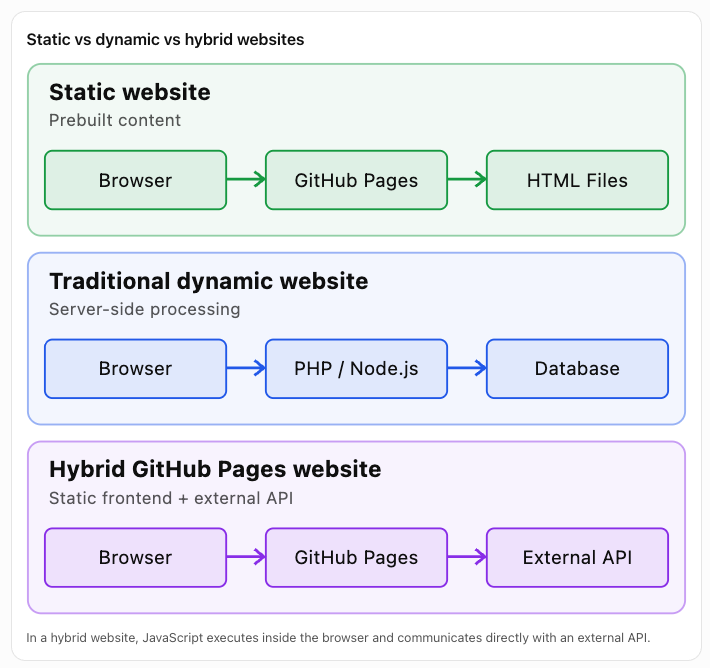
Static vs dynamic vs hybrid websites
In a hybrid website, JavaScript executes inside the browser and communicates directly with an external API.
Technology compatibility
| Technology | Supported | Execution location |
|---|---|---|
| HTML5 | Yes | Browser |
| CSS3 | Yes | Browser |
| JavaScript | Yes | Browser |
| jQuery | Yes | Browser |
| Bootstrap | Yes | Browser |
| React | Yes | Browser |
| Angular | Yes | Browser |
| Vue.js | Yes | Browser |
| Next.js static export | Yes | Build and browser |
| PHP | External only | Backend server |
| Laravel | External only | Backend server |
| Node.js backend | External only | Backend server |
| Python / Django | External only | Backend server |
| Java / Spring Boot | External only | Backend server |
| MySQL | External only | Database server |
| PostgreSQL | External only | Database server |
| MongoDB | External only | Database server |
| Firebase | Yes, via integration | Cloud backend |
| Supabase | Yes, via integration | Cloud backend |
| WordPress | Static export only | Build or external server |
| REST APIs | Yes, via integration | External backend |
| WebSockets | Yes, via integration | External backend |
3. Different ways to build dynamic GitHub Pages websites
| Approach | Technology | Best use case |
|---|---|---|
| Client-side dynamic rendering | JavaScript | Interactive websites |
| API-driven frontend | React, Vue, Angular | Data-driven applications |
| Static site generation | Hugo, Astro, Jekyll | Blogs and content websites |
| Backend as a Service | Firebase, Supabase | Application prototypes |
| Headless CMS | WordPress, Strapi | Content publishing |
| Scheduled static generation | GitHub Actions | Automated content updates |
| Serverless backend | AWS Lambda, Cloudflare Workers | API integrations |
| External backend | Laravel, Node.js | Complex application logic |
4. Architecture of a dynamic GitHub Pages website
A hybrid architecture separates the frontend, backend, database and deployment pipeline.
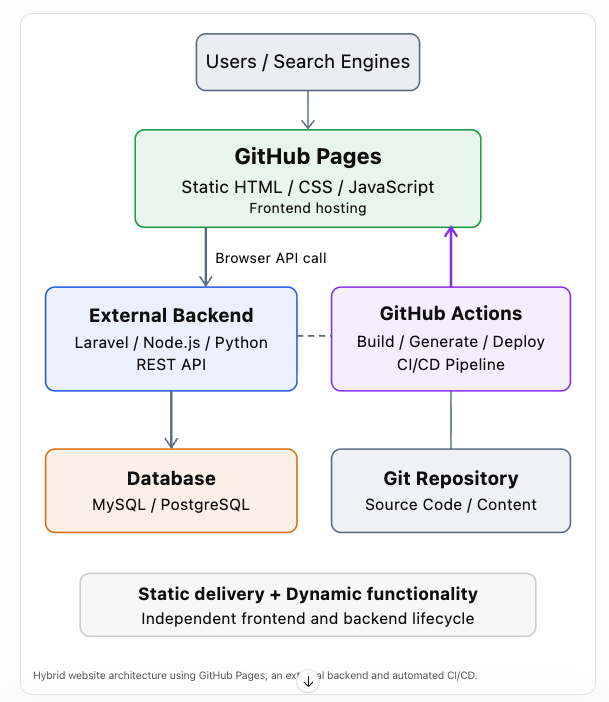
Hybrid website architecture using GitHub Pages, an external backend and automated CI/CD.
The frontend is hosted on GitHub Pages, while the external backend handles database operations, business logic and API requests. GitHub Actions automates the website build and deployment process.
5. Hands-on Lab 1: Create your first GitHub Pages website
Step 1: Create a GitHub repository
Log in to https://github.com/.
Create a new repository with the following configuration:
| Setting | Value |
|---|---|
| Repository name | dynamic-website |
| Visibility | Public |
| Add README | Yes |
| Default branch | main |
Step 2: Create an HTML file
Create a file named index.html.
<!DOCTYPE html>
<html lang="en">
<head>
    <meta charset="UTF-8">
    <meta name="viewport"
          content="width=device-width, initial-scale=1.0">
    <title>My GitHub Pages Website</title>
</head>
<body>

    <h1>Welcome to My Website</h1>

    <p>This website is hosted using GitHub Pages.</p>

    <p>
        <a href="https://docs.github.com/">
            Explore GitHub Documentation
        </a>
    </p>

</body>
</html>
Commit the file to the main branch.
Step 3: Enable GitHub Pages
Navigate to:
Repository
    → Settings
        → Pages
            → Build and deployment
Configure the following settings:
| Setting | Value |
|---|---|
| Source | Deploy from a branch |
| Branch | main |
| Folder | / (root) |
Click Save.
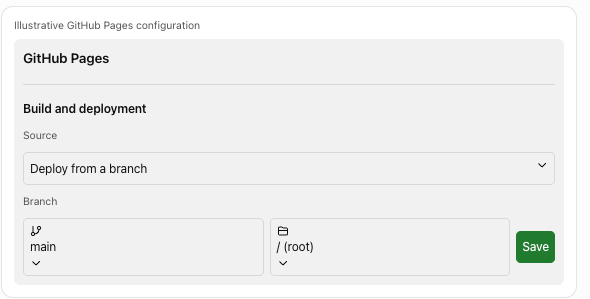
Illustrative GitHub Pages configuration
GitHub Pages
Build and deployment
Source
Deploy from a branch
Branch
main
/ (root)
Save
Step 4: Access your website
Once the deployment completes, access:
https://YOUR-USERNAME.github.io/dynamic-website/Replace YOUR-USERNAME with your GitHub username.
Congratulations! Your first GitHub Pages website is ready.
6. Hands-on Lab 2: Add dynamic functionality using JavaScript
JavaScript allows GitHub Pages websites to display interactive content without a backend server.
Replace your index.html with the following code.
<!DOCTYPE html>
<html lang="en">
<head>
    <meta charset="UTF-8">
    <title>Dynamic GitHub Pages Website</title>
</head>
<body>

    <h1>Dynamic GitHub Pages Demo</h1>

    <button onclick="showTime()">
        Show Current Time
    </button>

    <h2 id="output"></h2>

    <script>
        function showTime() {
            document.getElementById("output")
                .textContent = new Date().toLocaleString();
        }
    </script>

</body>
</html>
Commit the changes and refresh the published website after deployment.
Live demonstration
Dynamic GitHub Pages Demo
Show Current Time
Click the button to execute JavaScript dynamically.
This functionality executes entirely within the user’s browser. GitHub Pages does not need to run any server-side application.
7. Hands-on Lab 3: Build an API-driven dynamic website
Now let us create a website that retrieves real-time data from the public GitHub REST API.
Step 1: Create the HTML application
Replace the contents of index.html.
<!DOCTYPE html>
<html lang="en">
<head>
    <meta charset="UTF-8">

    <title>GitHub Repository Explorer</title>

    <style>
        body {
            font-family: Arial, sans-serif;
            max-width: 800px;
            margin: 40px auto;
            padding: 20px;
        }

        input, button {
            padding: 10px;
        }

        article {
            padding: 15px;
            margin: 10px 0;
            border: 1px solid #ddd;
            border-radius: 5px;
        }
    </style>
</head>
<body>

    <h1>GitHub Repository Explorer</h1>

    <input id="username"
           placeholder="Enter GitHub username"
           value="kubernetes">

    <button onclick="loadRepositories()">
        Search
    </button>

    <p id="status"></p>

    <div id="repositories"></div>

    <script>
        async function loadRepositories() {

            const username = document
                .getElementById("username").value.trim();

            const container = document
                .getElementById("repositories");

            const status = document
                .getElementById("status");

            container.replaceChildren();

            status.textContent = "Loading...";

            try {
                const response = await fetch(
                    "https://api.github.com/users/" +
                    encodeURIComponent(username) +
                    "/repos?per_page=10&sort=updated"
                );

                if (!response.ok) {
                    throw new Error(
                        "HTTP " + response.status
                    );
                }

                const repositories = await response.json();

                status.textContent =
                    repositories.length + " repositories found";

                repositories.forEach(repo => {

                    const article =
                        document.createElement("article");

                    const link =
                        document.createElement("a");

                    link.href = repo.html_url;
                    link.textContent = repo.name;

                    const description =
                        document.createElement("p");

                    description.textContent =
                        repo.description || "No description";

                    const stars =
                        document.createElement("p");

                    stars.textContent =
                        "Stars: " + repo.stargazers_count;

                    article.append(
                        link, description, stars
                    );

                    container.append(article);
                });

            } catch (error) {
                status.textContent =
                    "Unable to load: " + error.message;
            }
        }
    </script>

</body>
</html>
Step 2: Understand how it works
User enters a GitHub username
JavaScript sends an HTTP GET request
GitHub REST APIapi.github.com
API returns JSON data
JavaScript renders repositories dynamically
Step 3: Verify the application
Open your website and enter a GitHub username such as:
kubernetes
hashicorp
ansible
docker
jenkinsci
The website will retrieve public repositories dynamically.
Remember that GitHub’s unauthenticated API has rate limits. This example intentionally does not embed any private access tokens.
8. Integrating GitHub Pages with PHP, Laravel and MySQL
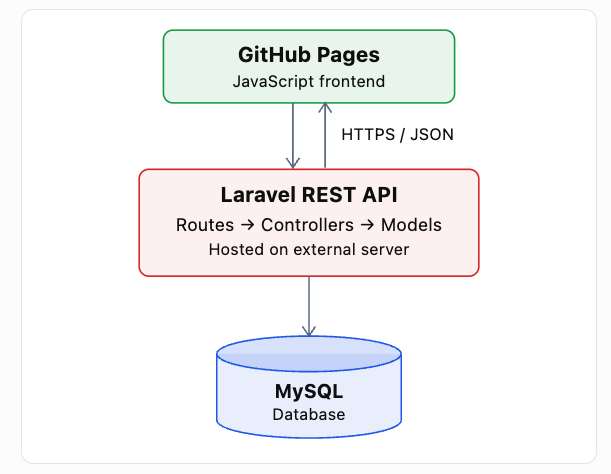
If you already have a Laravel application with a MySQL database, you can expose selected public information through REST APIs and consume it from GitHub Pages.
Step 1: Create a Laravel API endpoint
In your Laravel application, register the following route in routes/api.php. Ensure API routing is enabled in your Laravel installation.
<?php

use Illuminate\Support\Facades\Route;

Route::get('/articles', function () {

    return response()->json([
        [
            'title' => 'Kubernetes Documentation',
            'url' => 'https://kubernetes.io/docs/'
        ],
        [
            'title' => 'Terraform Documentation',
            'url' => 'https://developer.hashicorp.com/terraform'
        ]
    ]);

});
Step 2: Verify the API
Assuming your Laravel application is deployed at api.example.com:
curl https://api.example.com/api/articlesExpected response:
[
    {
        "title": "Kubernetes Documentation",
        "url": "https://kubernetes.io/docs/"
    },
    {
        "title": "Terraform Documentation",
        "url": "https://developer.hashicorp.com/terraform"
    }
]
Step 3: Consume the API from GitHub Pages
<h1>Technical Resources</h1>

<div id="articles"></div>

<script>
    fetch("https://api.example.com/api/articles")
        .then(response => {
            if (!response.ok) {
                throw new Error("API request failed");
            }
            return response.json();
        })
        .then(articles => {
            const container =
                document.getElementById("articles");

            articles.forEach(article => {

                const paragraph =
                    document.createElement("p");

                const link =
                    document.createElement("a");

                const url = new URL(article.url);

                if (url.protocol !== "https:") {
                    return;
                }

                link.href = url.href;
                link.textContent = article.title;

                paragraph.append(link);
                container.append(paragraph);
            });
        })
        .catch(() => {
            document.getElementById("articles")
                .textContent = "Unable to load resources.";
        });
</script>
Replace the example API domain with your actual domain.
Configure your Laravel CORS policy to permit requests from your GitHub Pages origin, such as https://YOUR-USERNAME.github.io.
Your Laravel application can now retrieve information from MySQL and provide it to GitHub Pages through the API.
9. Client-side rendering vs static site generation for SEO
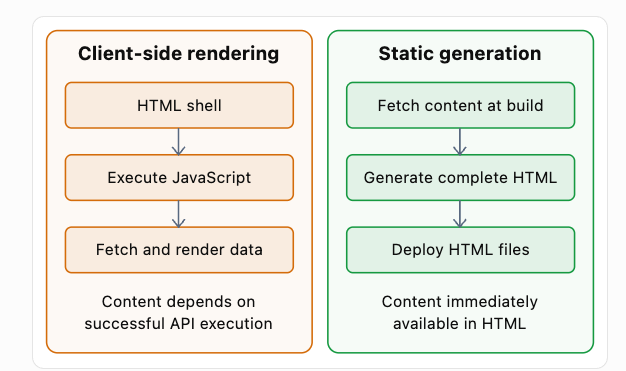
This is one of the most important architectural decisions when building content websites.
| Factor | Client-side rendering | Static generation |
|---|---|---|
| Initial HTML content | May be incomplete | Complete |
| Real-time data | Excellent | Requires rebuild |
| Search engine crawlability | Rendering dependent | Generally easier |
| SEO implementation | More complex | Simpler |
| API dependency during page visit | Yes | Not required |
| Page loading | Variable | Generally fast |
| Large content websites | Possible | Well suited |
| Technical blogs | Good | Excellent |
| Interactive dashboards | Excellent | Limited without JavaScript |
Google can render JavaScript, but recommends rendering approaches such as static generation and server-side rendering where appropriate to make content more accessible and reliable. Google for Developers+1
For SEO-focused websites, static site generation combined with selective JavaScript functionality is generally the preferred architecture.
10. Hands-on Lab 4: Automatically generate and publish websites using GitHub Actions
Instead of manually creating hundreds of HTML files, we can generate them automatically from structured content, REST APIs or an external database.
Automated publishing architecture
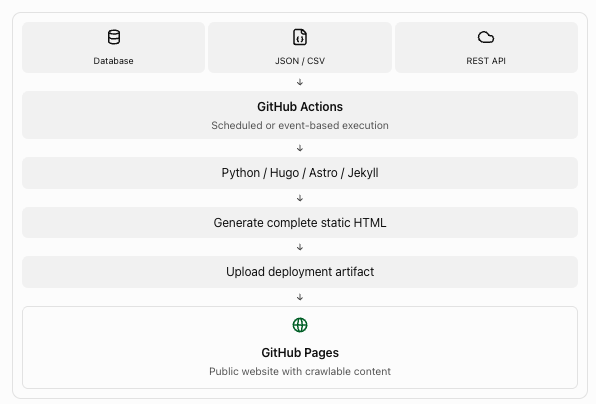
Database
JSON / CSV
REST API
GitHub ActionsScheduled or event-based execution
Python / Hugo / Astro / Jekyll
Generate complete static HTML
Upload deployment artifact
GitHub PagesPublic website with crawlable content
Step 1: Create the project structure
Create a new repository named automated-website.
automated-website/
│
├── data/
│   └── articles.json
│
├── scripts/
│   └── generate.py
│
└── .github/
    └── workflows/
        └── deploy.yml
Step 2: Create the content data
File: data/articles.json
[
    {
        "slug": "kubernetes-guide",
        "title": "Getting Started with Kubernetes",
        "description": "Learn Kubernetes fundamentals.",
        "url": "https://kubernetes.io/docs/"
    },
    {
        "slug": "terraform-guide",
        "title": "Getting Started with Terraform",
        "description": "Learn Infrastructure as Code.",
        "url": "https://developer.hashicorp.com/terraform"
    },
    {
        "slug": "docker-guide",
        "title": "Getting Started with Docker",
        "description": "Learn container fundamentals.",
        "url": "https://docs.docker.com/"
    }
]
Step 3: Create the static website generator
File: scripts/generate.py
import json
import re
from pathlib import Path
from html import escape
from urllib.parse import urlparse

articles = json.loads(
    Path("data/articles.json").read_text()
)

output = Path("public")
output.mkdir(exist_ok=True)

links = []

for article in articles:

    slug = article["slug"]

    if not re.fullmatch(r"[a-z0-9-]+", slug):
        raise ValueError("Invalid slug")

    url = article["url"]

    if urlparse(url).scheme != "https":
        raise ValueError("Only HTTPS URLs are allowed")

    title = escape(article["title"])
    description = escape(article["description"])
    url = escape(url, quote=True)

    folder = output / slug
    folder.mkdir(exist_ok=True)

    html = f"""
<!DOCTYPE html>
<html lang="en">
<head>
    <meta charset="UTF-8">
    <meta name="viewport"
          content="width=device-width, initial-scale=1">
    <title>{title}</title>
    <meta name="description"
          content="{description}">
</head>
<body>

    <h1>{title}</h1>

    <p>{description}</p>

    <p>
        <a href="{url}">Official documentation</a>
    </p>

    <p>
        <a href="../">Back to homepage</a>
    </p>

</body>
</html>
"""

    (folder / "index.html").write_text(
        html, encoding="utf-8"
    )

    links.append(
        f'<li><a href="{slug}/">{title}</a></li>'
    )

homepage = f"""
<!DOCTYPE html>
<html lang="en">
<head>
    <meta charset="UTF-8">
    <title>Technical Learning Resources</title>
    <meta name="description"
          content="Explore technical learning resources.">
</head>
<body>

    <h1>Technical Learning Resources</h1>

    <ul>
        {''.join(links)}
    </ul>

</body>
</html>
"""

(output / "index.html").write_text(
    homepage, encoding="utf-8"
)

print(f"Generated {len(articles)} article pages")
This Python script reads structured JSON data, creates individual HTML pages and automatically generates a homepage.
Step 4: Test locally
From the repository root, run:
python3 scripts/generate.py

python3 -m http.server 8000 --directory public
Open:
http://localhost:8000Expected generated directory structure:
public/
├── index.html
├── kubernetes-guide/
│   └── index.html
├── terraform-guide/
│   └── index.html
└── docker-guide/
    └── index.html
Step 5: Configure GitHub Pages for GitHub Actions
Navigate to:
Repository → Settings → PagesUnder Build and deployment, select GitHub Actions as the source.
Step 6: Create the CI/CD pipeline
File: .github/workflows/deploy.yml
name: Build and Deploy Website

on:
  push:
    branches:
      - main

  workflow_dispatch:

  schedule:
    - cron: "15 0 * * *"

permissions:
  contents: read
  pages: write
  id-token: write

concurrency:
  group: github-pages
  cancel-in-progress: false

jobs:

  build:
    runs-on: ubuntu-latest

    steps:

      - name: Checkout Repository
        uses: actions/checkout@v6

      - name: Configure GitHub Pages
        uses: actions/configure-pages@v5

      - name: Generate Website
        run: python3 scripts/generate.py

      - name: Upload Website
        uses: actions/upload-pages-artifact@v4
        with:
          path: public

  deploy:
    needs: build

    runs-on: ubuntu-latest

    environment:
      name: github-pages
      url: ${{ steps.deployment.outputs.page_url }}

    steps:

      - name: Deploy Website
        id: deployment
        uses: actions/deploy-pages@v4
The workflow follows GitHub’s documented artifact-based Pages deployment architecture. GitHub Docs+1
Step 7: Understand the pipeline
| Component | Purpose |
|---|---|
| Push trigger | Rebuild on code or content changes |
| Schedule | Request an automated daily rebuild |
| Workflow dispatch | Allow manual execution |
| Checkout | Download repository files |
| Configure Pages | Prepare Pages deployment |
| Python generator | Generate HTML files |
| Upload artifact | Package the generated website |
| Deploy Pages | Publish the website |
| Concurrency | Prevent overlapping deployments |
The scheduled workflow requests execution at 00:15 UTC, equivalent to 9:15 AM JST or 5:45 AM IST. Actual execution can be delayed by GitHub.
Step 8: Verify the deployment
Navigate to:
Repository → Actions → Build and Deploy WebsiteAfter successful deployment, open:
https://YOUR-USERNAME.github.io/automated-website/Individual pages will be available at:
/automated-website/kubernetes-guide/
/automated-website/terraform-guide/
/automated-website/docker-guide/
Unlike client-side API rendering, these URLs contain pre-generated HTML that search engines can crawl directly.
11. Automatically generate content from a Laravel REST API
To move from local JSON files to dynamic database-driven content, replace the JSON file loading section of the Python generator with an API request.
import json
from urllib.request import urlopen

API_URL = "https://api.example.com/api/articles"

with urlopen(API_URL, timeout=30) as response:
    articles = json.load(response)
Ensure your API returns the same fields expected by the generator: slug, title, description and url.
The architecture becomes:
MySQL Database
Laravel REST API
Scheduled GitHub Actions
Python Static Site Generator
GitHub Pages Website
This approach allows your central content management application to control which public content gets published, while GitHub Pages serves generated HTML files independently of your backend.
For private API authentication, use GitHub Actions Secrets and pass credentials only to the build process. Never include those credentials in the generated HTML or JavaScript.
12. Best static website generators for GitHub Pages
What theme does Hugo’s doc site use? – Using Themes – HUGO
Hugo
Go-based static site generator designed for fast builds. Excellent for large technical blogs, documentation and content websites.
Astro
Content-focused web framework combining static generation with selectively interactive JavaScript components.
Migrating from WordPress to Jekyll – John Wordsworth
Jekyll
Ruby-based static website generator with native GitHub Pages build integration.
Docusaurus logo – Icono gratis PNG, SVG
Docusaurus
React-based framework particularly useful for developer documentation and open-source projects.
React2Shell: Kerentanan Baru CVE-2025-55182 Ancam Server React dan Next.js –
Next.js
React framework that supports static exports for GitHub Pages, provided server-dependent features are not required.
Comparison table
| Tool | Language | Best use case | Website |
|---|---|---|---|
| Hugo | Go | Large content websites | gohugo.io |
| Astro | JavaScript | Modern SEO websites | astro.build |
| Jekyll | Ruby | Simple blogs | jekyllrb.com |
| Docusaurus | JavaScript | Documentation | docusaurus.io |
| MkDocs | Python | Technical documentation | mkdocs.org |
| Eleventy | JavaScript | Lightweight websites | 11ty.dev |
| Gatsby | JavaScript | Static React websites | gatsbyjs.com |
| VitePress | JavaScript | Documentation | vitepress.dev |
| Next.js | JavaScript | Hybrid frontend projects | nextjs.org |
| Pelican | Python | Blogs and articles | getpelican.com |
| Zola | Rust | Fast static websites | getzola.org |
| Hexo | JavaScript | Blogging | hexo.io |
13. Can GitHub Pages help in SEO and link building?
Yes. GitHub Pages websites can be publicly accessible, crawlable and indexable by search engines.
Unlike platforms that restrict outbound link attributes, GitHub Pages gives you direct control over your HTML.
A normal HTML link can be created as follows:
<a href="https://www.example.com/tutorial/">
    Complete technical tutorial
</a>
There is no mandatory nofollow attribute imposed by GitHub Pages on ordinary HTML links you author.
However, this does not guarantee that Google will assign ranking value to those links.
SEO opportunities
| SEO feature | Supported |
|---|---|
| SEO-friendly URLs | Yes |
| Page title | Yes |
| Meta description | Yes |
| Canonical URLs | Yes |
| Sitemap.xml | Yes |
| Robots.txt | Yes, subject to site location |
| Schema markup | Yes |
| Contextual backlinks | Yes |
| Normal followed links | Yes |
| Image ALT text | Yes |
| Internal linking | Yes |
| Google Search Console | Yes |
| Custom domain | Yes |
| HTTPS | Yes |
| Mobile-friendly websites | Yes |
| Guaranteed ranking improvement | No |
Best link-building opportunities
| Website or content type | Potential SEO value |
|---|---|
| Original open-source projects | High |
| Technical documentation | High |
| Free developer tools | High |
| Technical cheat sheets | High |
| Infrastructure templates | High |
| Free educational resources | High |
| Technical interview guides | Medium–High |
| Original research and datasets | High |
| Technical resource directories | Medium |
| Personal portfolios | Medium |
| Generic promotional articles | Low |
| Websites created only for backlinks | Negligible or harmful |
These values are qualitative assessments, not official Google ranking scores. Earned links from independent websites are generally more meaningful than links you create yourself.
14. Practical GitHub Pages SEO strategy for technical websites
Consider creating independent, genuinely useful educational resources such as:
| GitHub Pages project | Content |
|---|---|
kubernetes-cheatsheet | Kubernetes commands and examples |
terraform-examples | Infrastructure as Code templates |
docker-labs | Docker practical exercises |
ansible-playbooks | Reusable automation scripts |
jenkins-pipelines | CI/CD pipeline examples |
devops-roadmap | DevOps learning paths |
aws-examples | AWS architecture examples |
linux-commands | Linux administration references |
python-examples | Python programming examples |
sre-runbooks | Site Reliability Engineering runbooks |
helm-charts | Helm chart templates |
prometheus-queries | PromQL examples |
grafana-dashboards | Monitoring dashboard examples |
Each project can reference relevant, authoritative external tutorials where doing so benefits readers.
Google recommends meaningful anchor text and crawlable HTML links. Creating links primarily to manipulate rankings can violate its spam policies. Google for Developers+1
15. Essential on-page SEO configuration
Every generated content page should contain appropriate metadata.
SEO metadata
<head>

    <title>Kubernetes Commands Cheat Sheet</title>

    <meta name="description"
          content="A practical Kubernetes command reference
                   for developers and DevOps engineers.">

    <meta name="robots"
          content="index, follow">

    <link rel="canonical"
          href="https://USERNAME.github.io/kubernetes-cheatsheet/">

    <meta name="viewport"
          content="width=device-width, initial-scale=1">

    <meta property="og:title"
          content="Kubernetes Commands Cheat Sheet">

    <meta property="og:type"
          content="website">

</head>
Replace the canonical URL with the actual published URL.
Sitemap.xml
<?xml version="1.0" encoding="UTF-8"?>

<urlset xmlns="http://www.sitemaps.org/schemas/sitemap/0.9">

    <url>
        <loc>https://USERNAME.github.io/automated-website/</loc>
    </url>

    <url>
        <loc>https://USERNAME.github.io/automated-website/kubernetes-guide/</loc>
    </url>

</urlset>
Publish the sitemap with your generated website and submit it to Google Search Console.
Robots.txt
User-agent: *
Allow: /

Sitemap: https://USERNAME.github.io/automated-website/sitemap.xml
Note that search engines look for robots.txt at the hostname root. A robots.txt inside a project subdirectory does not establish an independent robots policy for that project.
SEO publishing checklist
SEO readiness checklist
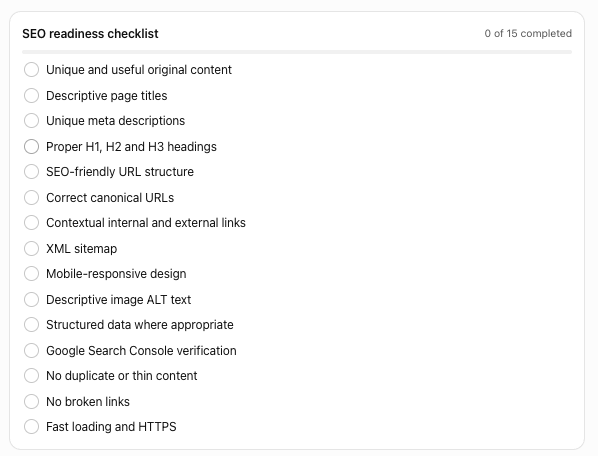
0 of 15 completedUnique and useful original contentDescriptive page titlesUnique meta descriptionsProper H1, H2 and H3 headingsSEO-friendly URL structureCorrect canonical URLsContextual internal and external linksXML sitemapMobile-responsive designDescriptive image ALT textStructured data where appropriateGoogle Search Console verificationNo duplicate or thin contentNo broken linksFast loading and HTTPS
16. Integrating GitHub Pages with different content management systems
| Content source | Integration method |
|---|---|
| WordPress | WordPress REST API |
| Laravel | Custom REST API |
| MySQL | Backend API or build-time export |
| PostgreSQL | Backend API or build-time export |
| Markdown | Static site generator |
| CSV | Python or Node.js parser |
| JSON | Build-time or client-side integration |
| Google Sheets | Google Sheets API |
| Strapi | Headless CMS REST API |
| Contentful | Content Delivery API |
| Firebase | JavaScript SDK |
| Supabase | JavaScript SDK or REST API |
| GitHub repositories | GitHub REST API |
A centralized content management system can provide approved educational content to multiple independent project websites.
17. Security best practices
GitHub Pages serves files publicly for ordinary public sites. Any sensitive information included in the generated frontend should therefore be treated as exposed.
| Security practice | Recommendation |
|---|---|
| Database credentials | Never expose |
| Private API keys | Never embed in JavaScript |
| GitHub personal access tokens | Store securely outside the frontend |
| CI/CD credentials | GitHub Actions Secrets |
| Database connections | Through a protected backend |
| API communication | HTTPS |
| CORS | Restrict allowed origins appropriately |
| API abuse | Apply rate limiting |
| HTML generation | Escape and validate untrusted input |
| GitHub Actions permissions | Apply least privilege |
| Dependency management | Regular security updates |
| Third-party GitHub Actions | Prefer trusted actions pinned to verified commit SHAs |
Remember that CORS is not a replacement for authentication or authorization. Your backend must independently enforce access controls.
18. GitHub Pages limitations
According to GitHub’s documented usage limits: GitHub Docs
| Limitation | Details |
|---|---|
| Published website size | Maximum 1 GB |
| Recommended repository size | 1 GB |
| Monthly bandwidth | Soft limit of 100 GB |
| Deployment timeout | 10 minutes |
| Builds per hour | Soft limit of 10; custom Actions workflows are exempt from this particular limit |
| Personal website | One per account |
| Project website | One per repository |
| Server-side execution | Not supported |
| Native database hosting | Not supported |
| Commercial SaaS hosting | Restricted |
| E-commerce hosting | Restricted |
| Sensitive transactions | Unsuitable |
GitHub Pages should not be used as free hosting for operating an online business, commercial SaaS application or e-commerce platform.
19. GitHub Pages alternatives for dynamic websites
| Platform | Static hosting | Backend capabilities | Free tier availability* |
|---|---|---|---|
| GitHub Pages | Yes | External only | Yes |
| Cloudflare Pages | Yes | Workers / Functions | Yes |
| Vercel | Yes | Serverless functions | Yes |
| Netlify | Yes | Serverless functions | Yes |
| Firebase Hosting | Yes | Cloud backend integrations | Yes |
| Render | Yes | Application servers | Yes |
| AWS Amplify | Yes | Backend integrations | Conditional |
| Azure Static Web Apps | Yes | Azure Functions | Yes |
| GitLab Pages | Yes | External only | Yes |
| DigitalOcean App Platform | Yes | Application servers | Limited |
| Traditional VPS | Yes | Full backend control | Generally paid |
*Free-tier quotas, commercial usage terms and supported features vary by provider and may change.
20. Recommended architecture by website type
| Website type | Recommended architecture |
|---|---|
| Technical documentation | GitHub Pages + Docusaurus |
| Educational blog | GitHub Pages + Hugo |
| SEO-focused website | GitHub Pages + Astro |
| Open-source project website | GitHub Pages + Jekyll |
| Public resource directory | GitHub Pages + Python + JSON |
| Automated learning portal | GitHub Actions + Static Generator |
| API-driven website | JavaScript + External REST API |
| Database-driven content website | Laravel API + Static Generator |
| Full commercial web application | Laravel or Node.js on dedicated hosting |
| E-commerce website | Dedicated application hosting |
| Commercial SaaS platform | Cloud application hosting |
21. Frequently asked questions
Can GitHub Pages run PHP?
No. PHP must execute on an external server. You can use GitHub Pages as a frontend and communicate with PHP through REST APIs.
Can GitHub Pages run Laravel?
Not directly. Laravel can run on a VPS or cloud server and provide public APIs or build-time content to GitHub Pages.
Can GitHub Pages connect to MySQL?
Indirectly, through an external backend or a build-time data export. Never expose MySQL credentials in browser-side JavaScript.
Can GitHub Pages run WordPress?
A traditional WordPress installation cannot run directly on GitHub Pages. You can use an externally hosted WordPress installation as a headless CMS or publish a static export.
Can I create thousands of pages automatically?
Technically, yes, provided the generated website stays within platform limits and contains useful, legitimate content.
Can GitHub Pages publish content every day automatically?
Yes. GitHub Actions supports scheduled workflows that can retrieve data, generate pages and deploy updated content.
Can I automate GitHub Pages using Claude, Codex or other AI coding tools?
Yes. AI coding tools can help generate source code, templates, GitHub Actions workflows, content generation scripts and tests. Repository access and appropriate permissions are required for automated commits.
Are GitHub Pages backlinks dofollow?
Ordinary HTML links can be created without a nofollow attribute. Whether a search engine crawls or assigns ranking value to those links is a separate decision.
Does GitHub’s domain authority automatically transfer to my website?
No. A GitHub Pages website must establish its own relevance, credibility and quality signals. Third-party domain authority metrics do not guarantee Google rankings.
Can I use GitHub Pages purely for link building?
Creating websites primarily to manipulate search rankings is not recommended. Focus instead on original educational content, useful tools and open-source resources that naturally attract links.
Can I use GitHub Pages with my own domain?
Yes. GitHub Pages supports custom domain configuration and HTTPS.
22. Final recommended enterprise architecture
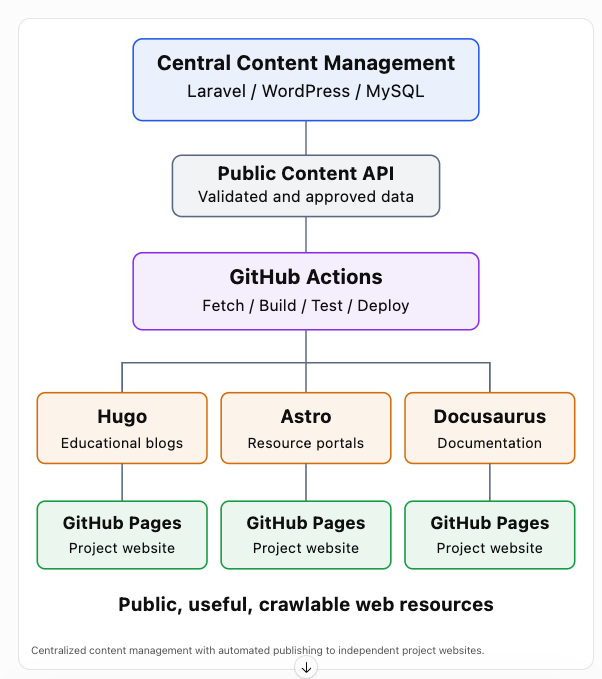
For organizations managing technical documentation, educational resources and multiple content projects, the following architecture provides a scalable foundation.
Centralized content management with automated publishing to independent project websites.
23. Conclusion
GitHub Pages is much more than a simple static website hosting platform. When combined with JavaScript, REST APIs, GitHub Actions, static site generators and external backends, it becomes a powerful platform for building interactive websites and automated content publishing systems.
For technical education, documentation, open-source projects and SEO-friendly content publishing, the recommended technology stack is:
| Layer | Recommended technology |
|---|---|
| Content management | Laravel or WordPress |
| Database | MySQL or PostgreSQL |
| API | REST API |
| Static site generator | Hugo or Astro |
| Dynamic functionality | JavaScript |
| Automation | GitHub Actions |
| Version control | GitHub |
| Hosting | GitHub Pages |
| SEO monitoring | Google Search Console |
The greatest advantage of this architecture is that it combines centralized content management, automated publishing, fast static website delivery and dynamic frontend functionality without requiring a separate frontend hosting server.
The key to sustainable SEO success is not generating the largest possible number of websites or backlinks. It is publishing original, helpful, technically accurate resources that people genuinely want to discover, use and reference.
Official references
- GitHub Pages
- GitHub Pages Documentation
- GitHub Actions Documentation
- GitHub REST API
- GitHub Pages Usage Limits
- Google JavaScript SEO Guide
- Google Search Spam Policies
WordPress SEO publishing metadata
| Field | Recommended value |
|---|---|
| SEO title | How to Build Dynamic Websites Using GitHub Pages |
| URL slug | github-pages-dynamic-website-tutorial |
| Focus keyword | GitHub Pages dynamic website |
| Secondary keywords | GitHub Pages SEO, GitHub Actions website hosting, GitHub Pages link building, Laravel GitHub Pages, static site generation |
| Category | DevOps, GitHub, Web Development |
| Search intent | Informational and practical tutorial |
| Difficulty | Beginner to Advanced |
Meta description: Learn how to build dynamic websites using GitHub Pages, JavaScript, Laravel REST APIs, GitHub Actions and static site generators for automated, SEO-friendly publishing.
Tutorial verification note: The GitHub Pages configuration, deployment action versions and usage limitations were checked against official documentation. The code examples are instructional implementations and have not been deployed to a live repository during this conversation.

I’m a DevOps/SRE/DevSecOps/Cloud Expert passionate about sharing knowledge and experiences. I am working at Cotocus. I blog tech insights at DevOps School, travel stories at Holiday Landmark, stock market tips at Stocks Mantra, health and fitness guidance at My Medic Plus, product reviews at I reviewed , and SEO strategies at Wizbrand.
Please find my social handles as below;
Rajesh Kumar Personal Website
Rajesh Kumar at YOUTUBE
Rajesh Kumar at INSTAGRAM
Rajesh Kumar at X
Rajesh Kumar at FACEBOOK
Rajesh Kumar at LINKEDIN
Rajesh Kumar at PINTEREST
Rajesh Kumar at QUORA
Rajesh Kumar at WIZBRAND