Introduction
Kitchen Display Systems (KDS) are digital screens used in restaurant kitchens to manage orders, streamline communication between front-of-house and back-of-house teams, and improve operational efficiency. Instead of relying on paper tickets, KDS solutions display orders in real time, helping kitchen staff prioritize tasks and reduce errors.
As restaurants continue to modernize operations, KDS platforms have become a critical part of the tech stack. They integrate with POS systems, automate order routing, and provide performance insights that help kitchens operate faster and more accurately. Whether it’s a quick-service restaurant or a multi-location chain, KDS solutions improve speed, consistency, and customer satisfaction.
Common use cases include:
- Managing incoming orders from POS and online channels
- Reducing order errors and miscommunication
- Optimizing kitchen workflow and preparation time
- Tracking order status in real time
- Improving coordination between kitchen stations
Key evaluation criteria:
- Order routing and display flexibility
- POS and third-party integrations
- Ease of use for kitchen staff
- Real-time performance tracking
- Hardware compatibility
- Scalability across locations
- Customization of workflows
- Reporting and analytics
- Reliability during peak hours
- Security and access control
Best for: Quick-service restaurants, cloud kitchens, fast-casual chains, and full-service restaurants looking to improve kitchen efficiency and order accuracy.
Not ideal for: Very small kitchens with low order volume where manual processes are sufficient.
Key Trends in Kitchen Display Systems (KDS)
- Touchscreen-based kitchen workflows replacing printed tickets
- Real-time synchronization with POS and delivery platforms
- AI-driven order prioritization and prep-time optimization
- Multi-station routing for complex kitchen operations
- Integration with online ordering and delivery apps
- Cloud-based systems enabling remote monitoring
- Data analytics for kitchen performance optimization
- Mobile and tablet-based KDS solutions
- Automation of order status updates
- Enhanced reliability with offline mode support
How We Selected These Tools
- Evaluated tools with strong adoption in restaurant operations
- Focused on systems with robust order management capabilities
- Considered performance under high order volumes
- Reviewed integration support with POS and delivery platforms
- Assessed usability for kitchen staff
- Included solutions for SMBs and enterprise restaurants
- Looked at scalability across multi-location setups
- Considered innovation in automation and analytics
- Evaluated support quality and onboarding experience
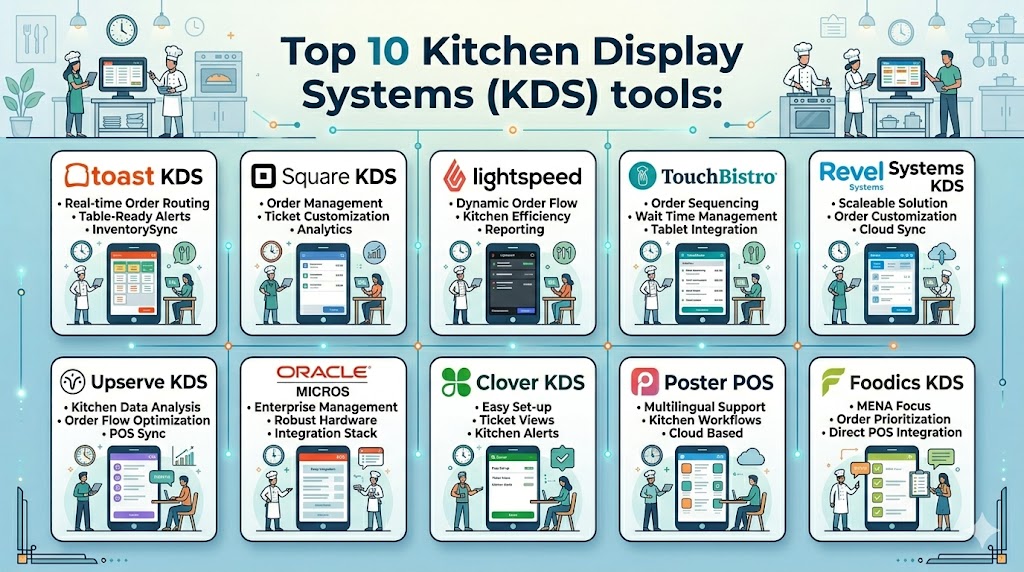
Top 10 Kitchen Display Systems (KDS) Tools
#1 — Toast KDS
Short description: A powerful KDS solution tightly integrated with Toast POS, designed to streamline kitchen workflows and improve order accuracy. Ideal for restaurants already using the Toast ecosystem.
Key Features
- Real-time order display
- Station-based routing
- Order prioritization
- POS integration
- Performance tracking
- Customizable workflows
Pros
- Seamless POS integration
- Easy to use
- Reliable performance
Cons
- Limited outside Toast ecosystem
- Requires Toast POS
- Pricing varies
Platforms / Deployment
Web, Android
Cloud
Security & Compliance
Encryption, role-based access
Other details: Not publicly stated
Integrations & Ecosystem
Strong integration within Toast ecosystem with limited external extensibility.
- POS integration
- Online ordering tools
Support & Community
Good support with onboarding assistance.
#2 — Square KDS
Short description: A simple and efficient KDS solution for restaurants using Square POS, offering real-time order management and easy setup.
Key Features
- Order display system
- Ticket management
- Real-time updates
- POS sync
- Simple interface
Pros
- Easy to deploy
- Affordable
- Clean interface
Cons
- Limited advanced features
- Best only with Square POS
- Limited customization
Platforms / Deployment
iOS, Android
Cloud
Security & Compliance
Not publicly stated
Integrations & Ecosystem
Integrated with Square POS and ecosystem tools.
- POS integration
- Payment tools
Support & Community
Standard support with strong documentation.
#3 — Lightspeed KDS
Short description: A flexible KDS solution designed for restaurants using Lightspeed POS, offering efficient order management and kitchen coordination.
Key Features
- Real-time order display
- Station routing
- Custom workflows
- POS integration
- Reporting tools
Pros
- Strong POS integration
- Flexible configuration
- Scalable
Cons
- Limited outside ecosystem
- Learning curve
- Pricing varies
Platforms / Deployment
Web, iOS, Android
Cloud
Security & Compliance
Not publicly stated
Integrations & Ecosystem
Works within Lightspeed ecosystem and supports integrations.
- POS systems
- Third-party tools
Support & Community
Reliable support and onboarding.
#4 — TouchBistro KDS
Short description: A KDS solution designed for restaurants using TouchBistro POS, helping streamline kitchen operations and improve order flow.
Key Features
- Order display
- Table-based routing
- POS integration
- Real-time updates
- Reporting
Pros
- Easy to use
- Strong POS sync
- Good for SMBs
Cons
- Limited advanced features
- Ecosystem dependency
- Less customization
Platforms / Deployment
iOS, Web
Cloud
Security & Compliance
Not publicly stated
Integrations & Ecosystem
Primarily integrated with TouchBistro ecosystem.
- POS integration
- Basic APIs
Support & Community
Good support for small and mid-sized businesses.
#5 — Revel Systems KDS
Short description: An enterprise-grade KDS solution that supports high-volume restaurants and multi-location operations.
Key Features
- Multi-station routing
- Real-time updates
- POS integration
- Order tracking
- Analytics
Pros
- Enterprise-ready
- Scalable
- Reliable
Cons
- Complex setup
- Higher cost
- Requires training
Platforms / Deployment
iOS
Cloud
Security & Compliance
Not publicly stated
Integrations & Ecosystem
Supports integrations with POS and third-party tools.
- POS systems
- Delivery platforms
Support & Community
Dedicated support for enterprise customers.
#6 — Upserve KDS
Short description: A KDS system focused on improving kitchen efficiency and providing insights into restaurant performance.
Key Features
- Order management
- Real-time updates
- POS integration
- Analytics tools
- Workflow optimization
Pros
- Strong analytics
- Easy to use
- Reliable
Cons
- Limited customization
- Ecosystem dependency
- Pricing varies
Platforms / Deployment
iOS
Cloud
Security & Compliance
Not publicly stated
Integrations & Ecosystem
Works within Upserve POS ecosystem.
- POS integration
- Reporting tools
Support & Community
Good support and onboarding.
#7 — Oracle MICROS KDS
Short description: A robust KDS solution designed for large enterprises and hospitality chains, offering advanced features and scalability.
Key Features
- Advanced order routing
- Multi-location support
- POS integration
- Reporting and analytics
- Custom workflows
Pros
- Highly scalable
- Feature-rich
- Enterprise-grade
Cons
- Complex setup
- High cost
- Requires training
Platforms / Deployment
Web, Windows
Cloud / Hybrid
Security & Compliance
Role-based access, encryption
Other details: Not publicly stated
Integrations & Ecosystem
Strong integration with Oracle ecosystem and third-party systems.
- POS systems
- Enterprise tools
Support & Community
Enterprise-level support with structured onboarding.
#8 — Clover KDS
Short description: A KDS solution designed for Clover POS users, offering simple order management and kitchen display features.
Key Features
- Order display
- Ticket management
- POS integration
- Real-time updates
- Basic reporting
Pros
- Easy setup
- Affordable
- Good for small businesses
Cons
- Limited features
- Not scalable
- Basic analytics
Platforms / Deployment
Android
Cloud
Security & Compliance
Not publicly stated
Integrations & Ecosystem
Integrated with Clover ecosystem.
- POS integration
- Payment tools
Support & Community
Basic support with documentation.
#9 — Poster POS KDS
Short description: A lightweight KDS solution suitable for small restaurants looking for a simple and efficient kitchen display system.
Key Features
- Order display
- Real-time updates
- POS integration
- Table management
- Basic analytics
Pros
- Affordable
- Easy to use
- Quick setup
Cons
- Limited advanced features
- Not ideal for large operations
- Basic reporting
Platforms / Deployment
iOS, Android
Cloud
Security & Compliance
Not publicly stated
Integrations & Ecosystem
Supports POS integration and basic extensibility.
- POS systems
- APIs
Support & Community
Basic support with limited resources.
#10 — Foodics KDS
Short description: A modern KDS solution designed for cloud-based restaurant operations, offering automation and integration capabilities.
Key Features
- Real-time order display
- Multi-channel order integration
- POS sync
- Workflow automation
- Reporting tools
Pros
- Modern interface
- Good integrations
- Scalable
Cons
- Pricing varies
- Learning curve
- Limited offline capabilities
Platforms / Deployment
Web, iOS, Android
Cloud
Security & Compliance
Not publicly stated
Integrations & Ecosystem
Supports integrations with POS and delivery platforms.
- POS systems
- Delivery apps
Support & Community
Responsive support and onboarding.
Comparison Table
| Tool Name | Best For | Platform Supported | Deployment | Standout Feature | Public Rating |
|---|---|---|---|---|---|
| Toast KDS | Toast users | Web, Android | Cloud | POS integration | N/A |
| Square KDS | Small restaurants | iOS, Android | Cloud | Ease of use | N/A |
| Lightspeed KDS | Scalable setups | Web, iOS, Android | Cloud | Flexibility | N/A |
| TouchBistro KDS | SMB restaurants | iOS, Web | Cloud | POS sync | N/A |
| Revel KDS | Enterprise | iOS | Cloud | Multi-location | N/A |
| Upserve KDS | Analytics focus | iOS | Cloud | Insights | N/A |
| Oracle MICROS | Enterprise chains | Web, Windows | Hybrid | Scalability | N/A |
| Clover KDS | Small business | Android | Cloud | Simplicity | N/A |
| Poster KDS | Small cafes | iOS, Android | Cloud | Affordability | N/A |
| Foodics KDS | Cloud kitchens | Web, iOS, Android | Cloud | Automation | N/A |
Evaluation & Scoring
| Tool Name | Core | Ease | Integrations | Security | Performance | Support | Value | Weighted Total |
|---|---|---|---|---|---|---|---|---|
| Toast KDS | 9 | 8 | 9 | 7 | 9 | 8 | 7 | 8.4 |
| Square KDS | 7 | 9 | 7 | 6 | 8 | 7 | 8 | 7.6 |
| Lightspeed KDS | 8 | 7 | 8 | 6 | 8 | 7 | 7 | 7.6 |
| TouchBistro KDS | 7 | 8 | 7 | 6 | 7 | 7 | 7 | 7.2 |
| Revel KDS | 9 | 6 | 8 | 7 | 9 | 8 | 6 | 7.9 |
| Upserve KDS | 8 | 8 | 7 | 6 | 8 | 7 | 7 | 7.6 |
| Oracle MICROS | 9 | 6 | 9 | 7 | 9 | 8 | 6 | 8.0 |
| Clover KDS | 6 | 9 | 6 | 5 | 7 | 6 | 8 | 7.0 |
| Poster KDS | 6 | 9 | 5 | 5 | 6 | 6 | 9 | 6.8 |
| Foodics KDS | 8 | 7 | 8 | 6 | 8 | 7 | 7 | 7.6 |
These scores are comparative and reflect general platform capabilities. The best tool depends on your operational needs, budget, and ecosystem preferences.
Which Kitchen Display System Is Right for You
Solo / Freelancer
Poster KDS and Clover KDS offer simple and affordable solutions.
SMB
Square KDS and TouchBistro KDS provide balanced features and usability.
Mid-Market
Lightspeed KDS and Foodics KDS offer flexibility and integrations.
Enterprise
Toast KDS, Revel Systems, and Oracle MICROS are suitable for large operations.
Budget vs Premium
Budget users should focus on Poster and Clover, while premium users can consider Toast or Oracle.
Feature Depth vs Ease of Use
Advanced tools offer more customization, while simpler tools prioritize usability.
Integrations & Scalability
Choose tools with strong POS integration for long-term growth.
Security & Compliance Needs
Enterprise users should prioritize systems with strong access controls and data protection.
Frequently Asked Questions
1. What is a Kitchen Display System
A Kitchen Display System is a digital screen used in restaurants to display and manage orders. It replaces paper tickets and helps streamline kitchen workflows. It improves speed, accuracy, and communication between staff.
2. How much does a KDS cost
Costs vary depending on the provider, number of screens, and features. Some systems are bundled with POS software, while others are standalone solutions. Pricing can include hardware, subscription fees, or both.
3. Is KDS better than paper tickets
Yes, KDS systems reduce errors, improve communication, and provide real-time updates. They also allow better tracking of order status. This leads to faster service and improved customer satisfaction.
4. Can KDS integrate with POS systems
Most modern KDS solutions are designed to integrate directly with POS systems. This ensures seamless order flow from front-of-house to kitchen. Integration also enables better reporting and analytics.
5. Is it difficult to set up a KDS
Setup is usually straightforward for cloud-based systems. However, complex kitchen workflows may require configuration and staff training. Most vendors provide onboarding support.
6. Does KDS work for multiple locations
Yes, many systems support multi-location management. This allows centralized monitoring and reporting across outlets. It is useful for restaurant chains and franchises.
7. What are common mistakes when choosing KDS
Choosing a system without considering POS compatibility is a common mistake. Ignoring scalability and ease of use can also create issues. Always evaluate long-term needs.
8. Can KDS improve kitchen efficiency
Yes, KDS improves order accuracy and reduces delays. It helps staff prioritize tasks and track progress. This leads to better kitchen performance overall.
9. Is KDS suitable for small restaurants
Yes, but only if order volume justifies it. For very small operations, simple solutions may be enough. However, even small restaurants can benefit from improved workflow.
10. Can I switch KDS providers later
Yes, but switching may involve data migration and retraining staff. Some vendors offer migration support. Planning ahead can minimize disruption.
Conclusion
Kitchen Display Systems have become an essential part of modern restaurant operations, replacing manual processes with real-time digital workflows. They improve order accuracy, reduce delays, and enhance communication between kitchen and service staff. From simple solutions for small cafes to advanced systems for enterprise chains, there is a wide range of options available. The right KDS depends on your restaurant size, operational complexity, and integration needs. Instead of focusing only on features, evaluate usability, scalability, and compatibility with your existing systems. Shortlist a few tools, test them in real scenarios, and ensure they align with your workflow. A well-implemented KDS can significantly improve efficiency, customer satisfaction, and overall business performance.

One thing that often determines the effectiveness of a KDS is how clearly it prioritizes orders during peak hours. Better visibility and workflow management can help kitchens reduce delays and maintain consistency when demand is high.