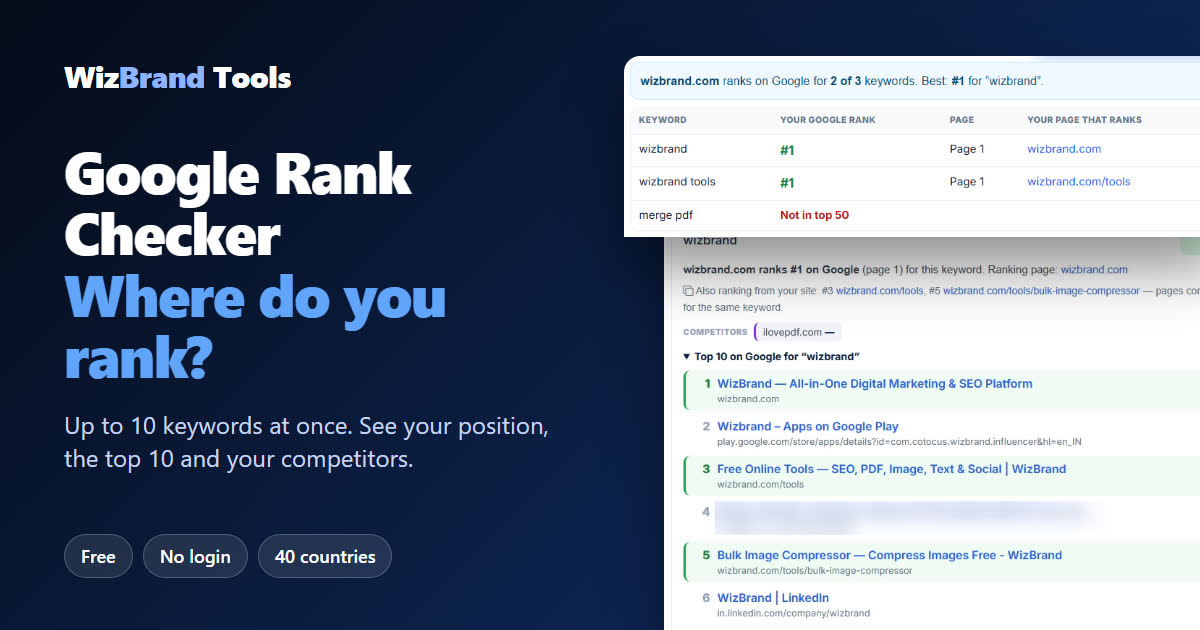
“Are we even on Google?”
You built a website, wrote the pages, maybe even paid someone for “SEO”. Now the real question: when a customer types your keyword into Google, where do you show up? Page 1? Page 4? Nowhere?
Searching it yourself doesn’t give a true answer. Google personalises results by your location, history and device, so your own search usually looks better than what a new customer sees.
The free Google Rank Checker by WizBrand answers it in seconds. Enter your website and up to 10 keywords – or let the tool pick the keywords from your page – and it shows your position, the page that ranks, the top 10 results and where your competitors stand. No sign-up needed.
Below is a real check of our own website, wizbrand.com, done on 18 November 2026. We show the good results and the bad ones.
What the Google Rank Checker does
| Feature | What it means for you |
|---|---|
| Up to 10 keywords at once | Check all your important searches in one go, one per line. |
| Keywords picked for you | Not sure what to check? Enter a page address and click “Suggest keywords from my page”. The tool reads your page and what people search for. |
| Domain or exact page | Enter example.com to find the best page of your whole site, or a full page address to check that one page. |
| 40 countries, 23 languages | Google shows different results in each country. Pick where your customers are. |
| Top 10 for every keyword | See exactly which pages rank, with your own pages highlighted. |
| Compare up to 3 competitors | Their position comes from the same Google results as yours, so the comparison is fair. |
| Other pages from your site | Shows when several of your pages compete for the same keyword. |
| How to improve your rank | After the check you get a checklist for each keyword and a suggested title and meta description. See our guide How to improve your Google ranking. |
| Change since last check | Check again later and see how many places you moved. It is saved in your own browser only. |
| CSV, Copy and Print / PDF | Send the result to your team or client. |
How to check your Google ranking (3 easy steps)
Step 1: Enter your website and keywords
Open the Google Rank Checker. Type your website (for example wizbrand.com) and the keywords people would type into Google, one per line. In our test we checked wizbrand, wizbrand tools and merge pdf, and added ilovepdf.com as a competitor.
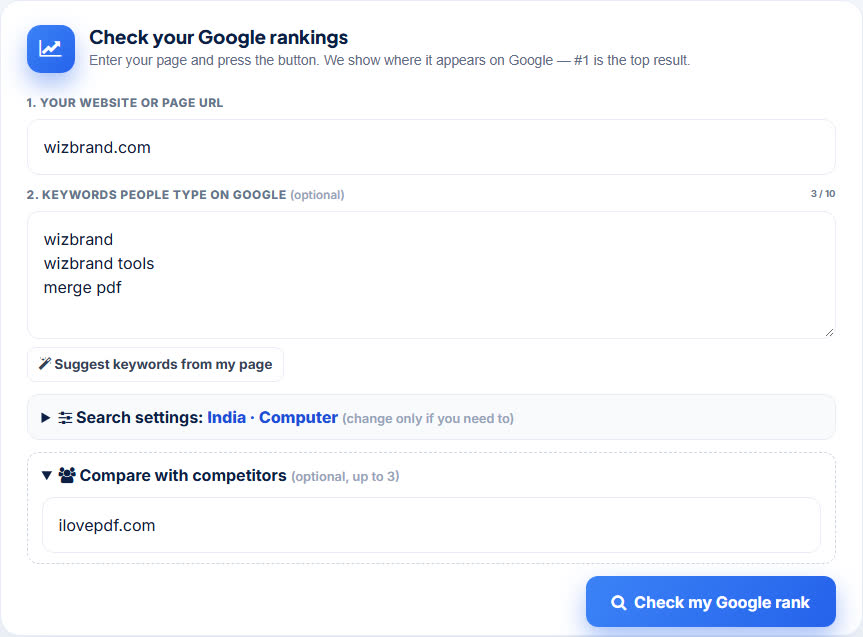
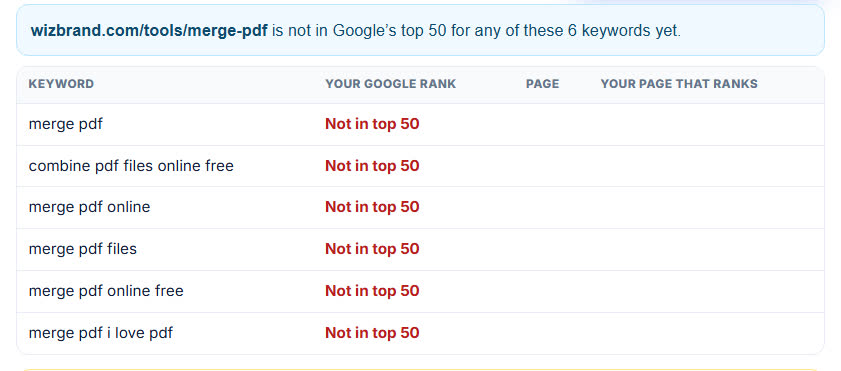
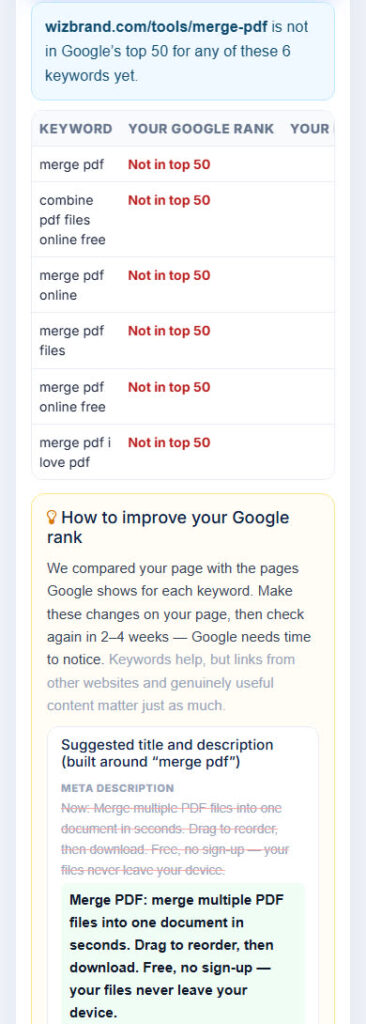
Don’t know your keywords? Enter a page address and click Suggest keywords from my page. For our Merge PDF page it picked 6 keywords by itself: “merge pdf”, “combine pdf files online free”, “merge pdf online”, “merge pdf files”, “merge pdf online free” and “merge pdf i love pdf”. You can edit them before checking.
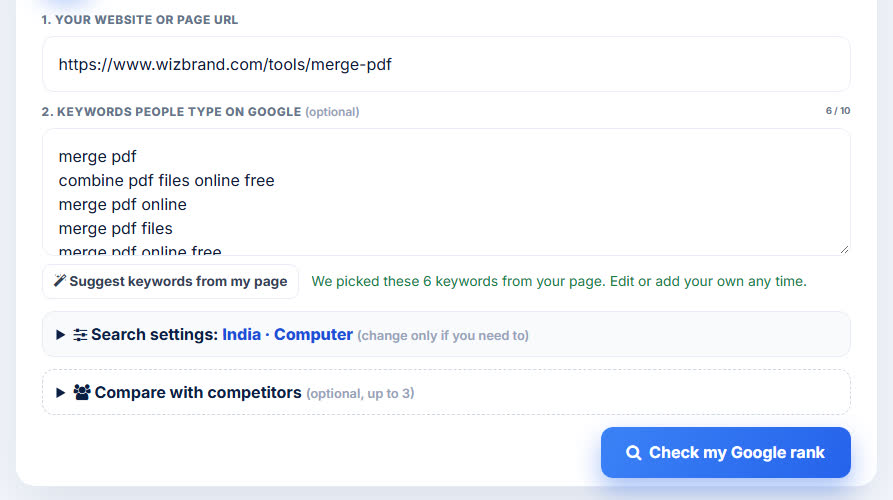
Step 2: Pick the country and device (optional)
Open Search settings to choose the country (India is the default), the language and the device. Open Compare with competitors to add up to three competitor domains.

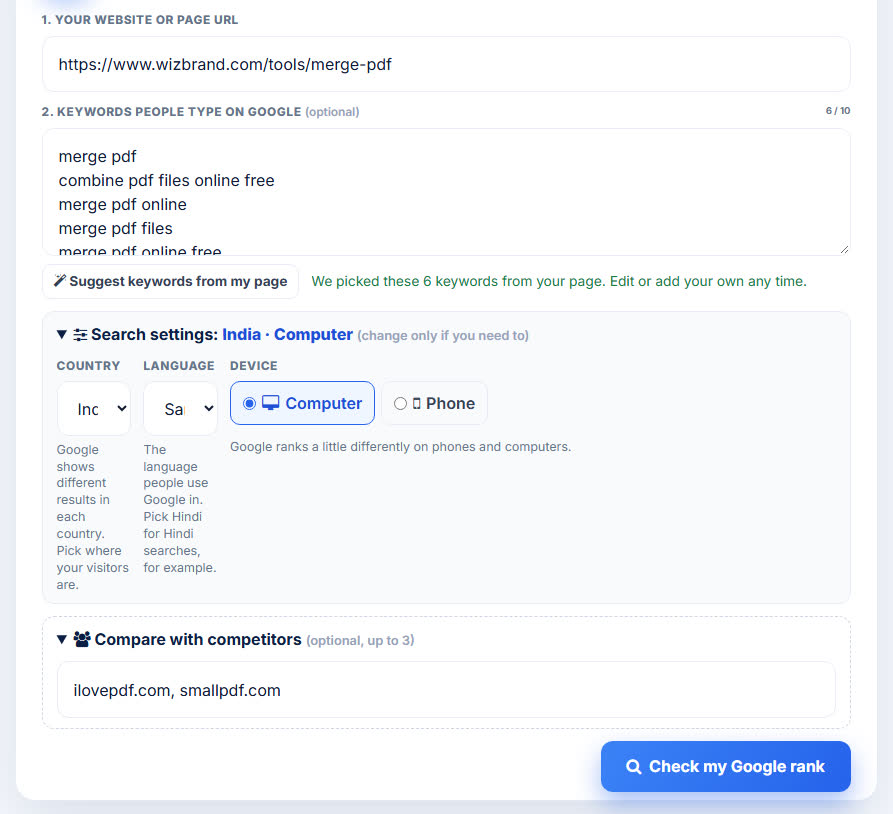
Step 3: Click “Check my Google rank”
Results appear keyword by keyword in a few seconds. First you get a plain summary table: your rank, which page of Google it is on, and which of your pages ranks.

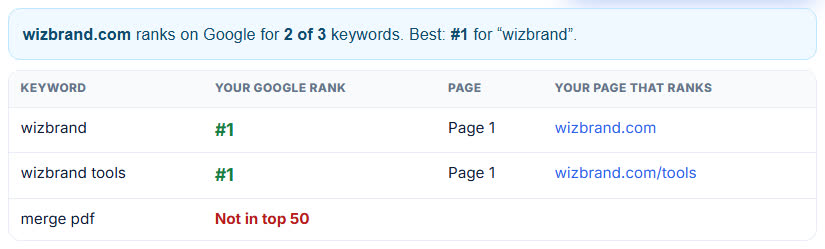
Under it, score tiles show the whole picture at a glance.


Our real test results (18 November 2026)
Website: wizbrand.com · Google India · Desktop · competitor: ilovepdf.com.
| Keyword | wizbrand.com | Page that ranks | ilovepdf.com |
|---|---|---|---|
| wizbrand | #1 (page 1) | wizbrand.com | not found |
| wizbrand tools | #1 (page 1) | wizbrand.com/tools | not found |
| merge pdf | not in top 50 | – | #1 |
The honest lesson: people who already know our name find us at #1. But for a big general keyword like “merge pdf”, our page is not in the top 50 yet. iLovePDF, Smallpdf and Adobe hold the top spots. That is exactly the kind of truth a rank checker should tell you, so you know where to work.
See the top 10 – and who is above you
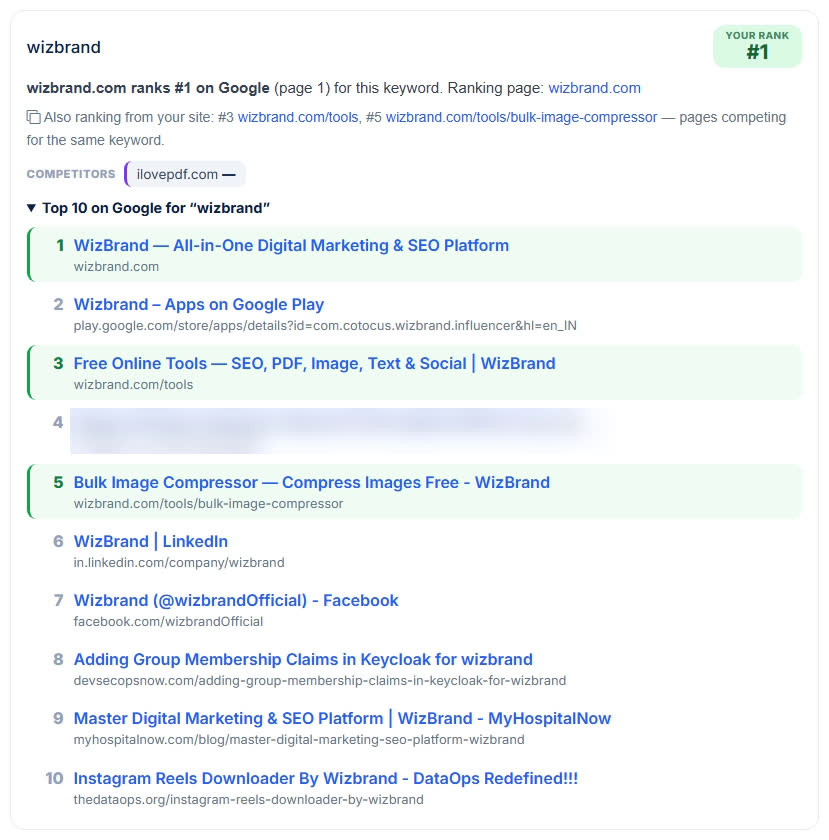
Every keyword has its own card. Open Top 10 on Google to see the pages that rank. Your own pages are highlighted in green. For “wizbrand”, three of our pages are in the top 10 (#1, #3 and #5), and the card says so: “Also ranking from your site”.

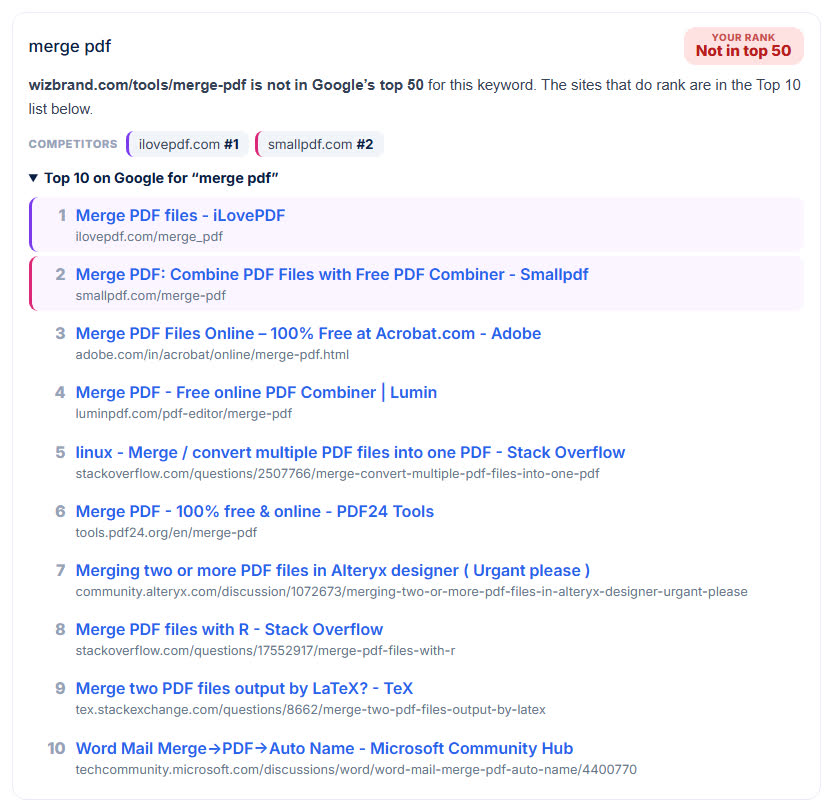
Competitors get their own colour. Here is our Merge PDF page checked against ilovepdf.com and smallpdf.com: they are #1 and #2, and our page is not in the top 50.

The full summary for that Merge PDF page check:


How accurate is it? (Please read)
Right now the tool reads Google’s results through Google’s Custom Search API. The result bar says this clearly and marks the positions approximate:

- Positions are an estimate. They can differ by a place or two from what you see on google.com. Google results also move during the day.
- Desktop only for now. The phone option needs a different data source, and the tool tells you when it used desktop instead.
- Top 50 for now. “Not in top 50” means none of your pages were in the first 50 results checked.
In our own comparison on 18 November 2026 (11 keywords, Google India), the tool gave the same position on 8 of 11 keywords as a paid rank tracker’s data, and was within 1 place on all 11. That is a small sample, so use the numbers as a strong guide, not an exact count.
Works on your phone too
Check your rankings from anywhere. The table and the cards fit a phone screen.

Who uses a Google rank checker?
- Small business owners – see if customers can find your shop, clinic or service on Google.
- Bloggers – find out which posts are on page 1 and which need work.
- SEO freelancers and agencies – show clients real positions and export a CSV report.
- Marketing teams – compare your rank with up to three competitors for the same keywords.
- Anyone who paid for SEO – check the results yourself instead of trusting a screenshot.
Tips to get the most out of it
- Check the keywords customers really type, not only your brand name. Brand keywords are easy; general keywords show your real reach.
- Pick the right country. A shop in India should check Google India.
- Check the exact page you want to rank, not only the domain.
- Check again in 2–4 weeks after changing a page. The “change since last check” line shows if you moved.
- Look at the pages above you in the top 10. What do they cover that your page doesn’t?
- Fix your page with the advice box. See our guide How to improve your Google ranking.
Frequently asked questions
Is the Google Rank Checker free?
Yes. You can check up to 10 keywords at a time without an account. There is a fair daily limit per visitor so it stays free for everyone; keywords checked recently by anyone are reused and don’t count towards it.
Why is my position different when I search myself?
Google personalises results by your location, history and device. The checker searches without your history, from the country you choose. Positions also move during the day, and the current data source gives approximate positions, so a difference of one or two places is normal.
Should I enter a domain or a page address?
Enter a domain (example.com) to find the best position of any page on your site, including subdomains. Enter a full page address to check that exact page; the tool also tells you where the rest of the domain ranks.
What does “not in top 50” mean?
None of your pages appeared in the first 50 organic results that were checked. Pages that far down get almost no clicks, so treat it as “not ranking yet”.
Can I compare my site with competitors?
Yes. Add up to three competitor domains. Their positions come from the same Google results as yours.
Can I check rankings in other countries?
Yes. Open “Search settings” and choose from 40 countries and 23 languages.
Can I download the results?
Yes. Use CSV for Excel or Google Sheets, Copy to paste into a document, or Print / PDF.
Conclusion: know where you stand, then improve it
You can’t improve a ranking you don’t know. In one check we learned that wizbrand.com is #1 for its own name and for “wizbrand tools” – and that our Merge PDF page still has work to do for “merge pdf”. That second result is the useful one.
Check your own website now with the free Google Rank Checker. It is free and needs no login.
More free SEO tools
- Keyword Search – find keyword ideas to target
- Backlink Checker – see which sites link to you
- URL Analyser – check a page’s title, description and headings
- Website Readability Score – is your page easy to read?
- Robots.txt Checker – make sure Google can crawl your site
- Word Counter – check the length of your content
