Introduction
Meal Planning Apps are digital tools designed to help users organize meals, manage grocery shopping, track dietary needs, and optimize nutrition. They simplify meal preparation, reduce food waste, support weight management, and enable users to maintain balanced diets. These apps are popular among busy individuals, families, health-conscious users, and professional nutritionists.
Meal planning apps provide features such as recipe suggestions, shopping list generation, calorie and nutrient tracking, dietary restriction management, and integration with wearable devices. They help users save time, maintain consistency in eating habits, and adhere to personal or family dietary goals.
Real-world use cases include planning weekly family meals, managing calorie intake for weight loss, preparing specialty diet menus, coordinating meal delivery, grocery shopping optimization, and creating menus for athletes or clients in nutrition programs.
Evaluation criteria for buyers include dietary customization, recipe variety, grocery list management, nutritional insights, integration with fitness and health apps, ease of use, collaboration features, offline access, cost, and personalized recommendations.
Best for: Individuals, families, fitness enthusiasts, meal-prep professionals, dietitians, and wellness-focused users.
Not ideal for: Casual users uninterested in structured meal planning or those who prefer spontaneous eating without dietary tracking.
Key Trends in Meal Planning Apps
- AI-powered personalized meal suggestions
- Integration with grocery delivery services
- Nutrition and calorie tracking aligned with health goals
- Multi-diet support including keto, vegan, low-carb, and allergen-free options
- Meal prep optimization and scheduling features
- Integration with wearable devices for holistic health tracking
- Community sharing of recipes and meal plans
- Offline recipe access and grocery lists
- Habit tracking and goal progress reports
- Automated shopping lists based on selected meals
How We Selected These Tools
- Evaluated the quality and breadth of recipe databases
- Assessed dietary customization and nutritional guidance
- Reviewed integration with health apps, fitness trackers, and grocery delivery
- Examined grocery list generation and shopping workflow features
- Prioritized ease of use for beginners and advanced users
- Evaluated offline access and cross-device support
- Reviewed personalization features and AI-assisted recommendations
- Considered meal prep and scheduling capabilities
- Balanced pricing and subscription value
- Verified team and family collaboration features
Top 10 Meal Planning Apps
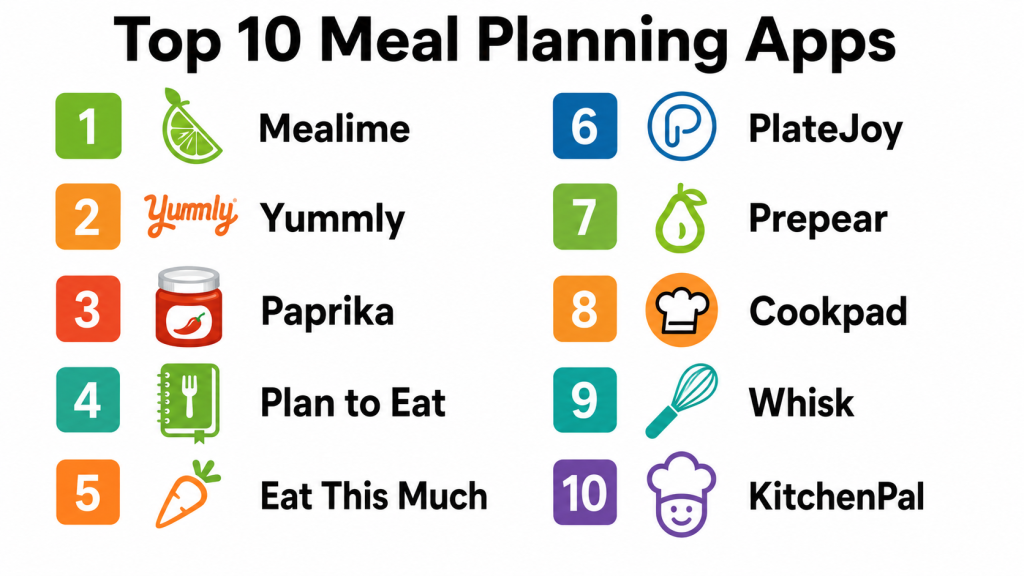
#1 — Paprika Recipe Manager
Short description: Paprika is a comprehensive meal planning app with recipe organization, grocery list creation, and meal scheduling. It is suitable for individuals, families, and cooking enthusiasts who want an organized approach to meal prep.
Key Features
- Recipe import and organization
- Grocery list generation
- Meal calendar for scheduling
- Pantry inventory management
- Cross-device sync
Pros
- Easy-to-use interface
- Excellent recipe management
- Cross-device syncing
- Strong meal planning workflow
Cons
- No integrated nutrition tracking
- Paid app with upfront cost
- Limited social sharing options
- Learning curve for advanced features
Platforms / Deployment
- iOS, Android, Windows, macOS
Security & Compliance
Not publicly stated
Integrations & Ecosystem
Paprika integrates well with device calendars and recipe import tools.
- Cross-device sync
- Grocery list export
- Calendar integration
- Recipe import from web
Support & Community
Documentation, tutorials, and email support available.
#2 — Mealime
Short description: Mealime offers personalized meal plans, nutrition tracking, and grocery list generation for busy individuals and families looking for quick, healthy meals.
Key Features
- Customizable meal plans
- Dietary preference filters
- Grocery list generation
- One-click meal prep instructions
- Nutritional information per meal
Pros
- Simple interface and meal prep guidance
- Customizable for dietary preferences
- Quick recipe ideas for busy schedules
- Grocery list automation
Cons
- Free version limited in features
- Premium subscription needed for full access
- Limited advanced analytics
- Recipe database smaller than competitors
Platforms / Deployment
- iOS, Android, Web
Security & Compliance
Not publicly stated
Integrations & Ecosystem
Integrates with grocery lists and meal prep workflows.
- Grocery delivery integration
- Calendar scheduling
- Meal plan export
Support & Community
Help center, tutorials, and in-app guidance.
#3 — Yummly
Short description: Yummly offers personalized recipe recommendations, meal planning, and grocery list automation using AI. It caters to users looking for inspiration and efficient cooking workflows.
Key Features
- AI-based recipe recommendations
- Meal planning and scheduling
- Grocery list creation
- Dietary filters including allergies
- Nutrition tracking
Pros
- Personalized recipe suggestions
- Integration with grocery shopping
- Good for various dietary restrictions
- Easy-to-follow cooking instructions
Cons
- Free version limited in meal planning features
- Premium subscription required for advanced tracking
- Some recipes may require external links
- Interface can feel cluttered
Platforms / Deployment
- iOS, Android, Web
Security & Compliance
Not publicly stated
Integrations & Ecosystem
Supports integration with shopping and diet tracking.
- Grocery delivery apps
- Calendar integration
- Nutrition tracking apps
Support & Community
Documentation, user guides, and online tutorials.
#4 — PlateJoy
Short description: PlateJoy is a personalized meal planning service that adapts to user dietary preferences, goals, and health conditions. It provides grocery lists and integration with food delivery services.
Key Features
- Personalized meal recommendations
- Dietary customization and health-focused plans
- Grocery list automation
- Integration with food delivery
- Family plan support
Pros
- Tailored meal plans for health and weight goals
- Supports dietary restrictions and preferences
- Grocery delivery integration
- Family-friendly features
Cons
- Premium subscription required
- Limited free content
- Some users may find meal selection repetitive
- Learning curve for health metrics
Platforms / Deployment
- iOS, Android, Web
Security & Compliance
Not publicly stated
Integrations & Ecosystem
Integrates with health platforms and grocery services.
- Grocery delivery
- Meal plan export
- Calendar integration
- Health tracking
Support & Community
Email support, help resources, and customer service.
#5 — Eat This Much
Short description: Eat This Much is an automated meal planning app that creates meal plans based on caloric goals, dietary preferences, and schedules, ideal for diet-focused users and fitness enthusiasts.
Key Features
- Automated meal plan generation
- Calorie and macro tracking
- Grocery list creation
- Custom dietary goals
- Nutrition-focused recipes
Pros
- Generates meal plans quickly
- Supports weight loss and fitness goals
- Grocery list automation
- Flexibility in dietary types
Cons
- Some features require subscription
- Interface may feel complex for beginners
- Limited recipe database compared to Yummly
- Offline access restricted
Platforms / Deployment
- iOS, Android, Web
Security & Compliance
Not publicly stated
Integrations & Ecosystem
Integrates nutrition and diet tracking with meal planning.
- Health and fitness apps
- Grocery list export
- Personalized goals
Support & Community
Help resources, FAQs, and support team access.
#6 — Paprika Meal Planner (Expanded)
Short description: Paprika combines recipe organization with meal planning and grocery management, making it suitable for home cooks and families managing weekly meal routines.
Key Features
- Recipe saving and import
- Meal calendar
- Grocery list creation
- Pantry inventory tracking
- Cross-device sync
Pros
- Comprehensive planning workflow
- Easy recipe management
- Useful for family meal prep
- Offline access
Cons
- Paid app only
- Limited nutritional guidance
- No social/community features
- Interface may feel dated
Platforms / Deployment
- iOS, Android, macOS, Windows
Security & Compliance
Not publicly stated
Integrations & Ecosystem
Integrates recipe databases and grocery planning tools.
- Calendar sync
- Grocery export
- Recipe import
Support & Community
Documentation, tutorials, and email support.
#7 — Cookpad
Short description: Cookpad focuses on user-generated recipes, community sharing, and meal planning. It allows users to find inspiration and organize weekly meals.
Key Features
- Community recipe sharing
- Meal planning calendar
- Grocery list generation
- Recipe discovery
- Personal collection
Pros
- Community-driven content
- Easy meal planning for families
- Free basic use
- Diverse recipe ideas
Cons
- Premium features require subscription
- Nutritional insights limited
- Recipe quality varies
- Fewer advanced planning tools
Platforms / Deployment
- iOS, Android, Web
Security & Compliance
Not publicly stated
Integrations & Ecosystem
Works with grocery list creation and recipe discovery.
- Meal calendars
- Recipe search
- User sharing
Support & Community
Community forum and help documentation.
#8 — MealPrepPro
Short description: MealPrepPro is designed for users who want automated meal prep plans with grocery lists, macros tracking, and step-by-step cooking instructions.
Key Features
- Meal prep plans
- Calorie and macro tracking
- Grocery lists
- Recipe instructions
- Customizable serving sizes
Pros
- Ideal for fitness and weight goals
- Saves time in meal preparation
- Simple step-by-step guides
- Calorie/macros tracking
Cons
- Subscription required
- Limited free features
- Small recipe database
- Less suitable for families needing diverse cuisine
Platforms / Deployment
- iOS, Android, Web
Security & Compliance
Not publicly stated
Integrations & Ecosystem
Integrates with fitness apps for holistic health tracking.
- Calorie tracking apps
- Grocery management
- Recipe scheduling
Support & Community
Support documentation, in-app guides, and tutorials.
#9 — MealBoard
Short description: MealBoard helps users plan meals, track inventory, and generate grocery lists, supporting families and home cooks with efficient meal prep.
Key Features
- Meal calendar planning
- Pantry inventory
- Grocery list generation
- Recipe import
- Family sharing
Pros
- Streamlined meal prep workflow
- Inventory tracking reduces waste
- Family-friendly
- Supports custom recipes
Cons
- Paid app
- Nutritional tracking limited
- Interface less modern
- Offline sync requires setup
Platforms / Deployment
- iOS, Web
Security & Compliance
Not publicly stated
Integrations & Ecosystem
Integrates recipes, pantry, and grocery workflows.
- Calendar sync
- Recipe import/export
- Grocery apps
Support & Community
Documentation, help guides, and email support.
#10 — Plan to Eat
Short description: Plan to Eat is a meal planning and grocery management app emphasizing simplicity. It allows recipe imports, drag-and-drop meal calendar, and shopping list automation.
Key Features
- Meal calendar
- Drag-and-drop recipe planner
- Grocery list generation
- Recipe import from websites
- Family sharing
Pros
- Easy-to-use interface
- Reduces grocery prep time
- Simple calendar planning
- Custom recipe import
Cons
- Paid subscription for full access
- Limited advanced nutrition insights
- Less AI-driven personalization
- Smaller recipe database
Platforms / Deployment
- iOS, Android, Web
Security & Compliance
Not publicly stated
Integrations & Ecosystem
Supports recipe imports, grocery tracking, and meal planning automation.
- Calendar sync
- Recipe import
- Grocery list export
Support & Community
Help guides, email support, and tutorials.
Comparison Table (Top 10)
| Tool Name | Best For | Platforms Supported | Deployment | Standout Feature | Public Rating |
|---|---|---|---|---|---|
| Paprika Recipe Manager | Recipe organization & meal prep | iOS, Android, Windows, macOS | Cloud & local | Cross-device sync | N/A |
| Mealime | Personalized meal planning | iOS, Android, Web | Cloud | Quick meal prep plans | N/A |
| Yummly | Recipe discovery & planning | iOS, Android, Web | Cloud | AI recipe suggestions | N/A |
| PlateJoy | Health-focused plans | iOS, Android, Web | Cloud | Personalized nutrition plans | N/A |
| Eat This Much | Automated meal plans | iOS, Android, Web | Cloud | Calorie & macro focused | N/A |
| Paprika Meal Planner | Family & weekly prep | iOS, Android, macOS, Windows | Cloud & local | Meal calendar & pantry | N/A |
| Cookpad | Community & recipe sharing | iOS, Android, Web | Cloud | User-generated recipes | N/A |
| MealPrepPro | Fitness & macro tracking | iOS, Android, Web | Cloud | Step-by-step meal prep | N/A |
| MealBoard | Pantry & meal prep | iOS, Web | Cloud | Inventory & calendar | N/A |
| Plan to Eat | Simple meal planning | iOS, Android, Web | Cloud | Drag-and-drop calendar | N/A |
Evaluation & Scoring
| Tool Name | Core | Ease | Integrations | Security | Performance | Support | Value | Weighted Total |
|---|---|---|---|---|---|---|---|---|
| Paprika | 9 | 8 | 8 | 7 | 8 | 8 | 8 | 8.0 |
| Mealime | 8 | 9 | 7 | 7 | 8 | 7 | 7 | 7.7 |
| Yummly | 8 | 8 | 7 | 7 | 8 | 7 | 7 | 7.5 |
| PlateJoy | 8 | 8 | 7 | 7 | 8 | 7 | 7 | 7.5 |
| Eat This Much | 8 | 8 | 7 | 7 | 8 | 7 | 7 | 7.5 |
| Paprika Meal Planner | 9 | 8 | 8 | 7 | 8 | 8 | 8 | 8.0 |
| Cookpad | 7 | 8 | 6 | 7 | 7 | 7 | 7 | 7.0 |
| MealPrepPro | 8 | 8 | 7 | 7 | 8 | 7 | 7 | 7.5 |
| MealBoard | 8 | 7 | 7 | 7 | 8 | 7 | 7 | 7.4 |
| Plan to Eat | 8 | 8 | 7 | 7 | 8 | 7 | 7 | 7.5 |
Which Meal Planning App Is Right for You
Solo / Freelancer
Individuals who want quick meal prep and simple grocery management may prefer Mealime, Eat This Much, or Plan to Eat. These apps simplify daily planning and provide basic nutritional insights.
SMB
Families or small groups may benefit from Paprika, Paprika Meal Planner, or Cookpad for shared calendars, recipe organization, and collaborative meal planning.
Mid-Market
Users with nutrition goals, calorie tracking, or health-focused planning can leverage PlateJoy, Eat This Much, or MealPrepPro to automate meal schedules and macro tracking.
Enterprise
Enterprises supporting wellness programs or professional meal prep may implement Paprika Meal Planner, PlateJoy, or MealPrepPro for structured plans, integration with health dashboards, and team-level meal tracking.
Budget vs Premium
Free tiers such as Mealime or Yummly offer good functionality. Premium users get advanced personalization, grocery delivery integration, and expanded meal libraries with apps like PlateJoy or Eat This Much.
Feature Depth vs Ease of Use
Paprika and PlateJoy provide detailed meal prep workflows, while Mealime and Plan to Eat prioritize simplicity and intuitive interfaces.
Integrations & Scalability
Apps integrating with grocery delivery, health tracking apps, and wearables such as PlateJoy, MealPrepPro, and MyFitnessPal offer scalability for multiple users and families.
Security & Compliance
Meal apps collect dietary data, and users should review privacy policies to ensure personal information and health data is handled securely.
Frequently Asked Questions
1. Can meal planning apps help with weight loss?
Yes, by providing calorie tracking, macro analysis, and structured meal plans, these apps help users maintain consistent intake aligned with weight goals.
2. Do these apps support dietary restrictions?
Many apps allow custom diets including vegetarian, vegan, keto, low-carb, gluten-free, and allergy-sensitive meal plans.
3. Can I generate grocery lists automatically?
Most meal planning apps create grocery lists based on chosen meals, reducing shopping time and minimizing missing ingredients.
4. Are these apps suitable for families?
Yes, apps like Paprika Meal Planner, Cookpad, and Plan to Eat allow shared calendars and recipe planning for multiple users.
5. Can I track nutrients with these apps?
Apps such as Eat This Much and PlateJoy provide detailed macro and micronutrient breakdowns for meals.
6. Do meal planning apps integrate with wearables?
Some apps integrate with Fitbit, MyFitnessPal, and other health platforms to combine diet, activity, and health tracking.
7. Can I use these apps offline?
Certain apps allow offline access for recipes and grocery lists, but full features often require internet connectivity.
8. Do apps provide AI-based recommendations?
Yes, apps like Yummly and Eat This Much offer AI-powered personalized meal suggestions based on goals and preferences.
9. Are these apps suitable for beginners?
Most meal planning apps offer simple interfaces, tutorials, and guided workflows suitable for users new to meal planning.
10. How do I choose the right app?
Consider meal prep needs, dietary goals, grocery integration, budget, device ecosystem, and whether you want advanced nutrition insights or simple planning.
Conclusion
Meal Planning Apps are powerful tools for organizing meals, managing grocery shopping, meeting dietary goals, and improving overall nutrition. Choosing the right app depends on your lifestyle, goals, household size, and preferred level of detail. Solo users may benefit from Mealime or Eat This Much for quick planning, while families may prefer Paprika or Cookpad for shared meal calendars. Fitness-focused users may leverage PlateJoy or MealPrepPro for macro tracking and personalized plans. Testing two or three apps, reviewing recipe options, grocery integration, and ease-of-use ensures a sustainable meal planning habit that improves nutrition, reduces food waste, and saves time in everyday life.
