Introduction
Text-to-Speech (TTS) Platforms are AI-driven software solutions that convert written text into natural-sounding speech. These platforms help businesses, educators, content creators, and developers produce high-quality audio from text for multiple use cases without the need for human voiceovers. TTS is increasingly used to enhance accessibility, automate content creation, and scale multilingual communication.
Real-world use cases include producing audiobooks and podcasts, automating e-learning and training content, creating accessibility tools for visually impaired users, generating voice alerts for applications or devices, and enhancing multimedia marketing campaigns. Buyers should evaluate voice quality, language coverage, naturalness, integration capabilities, API support, deployment options, pricing, security, and customer support.
Best for: e-learning platforms, content creators, developers, accessibility services, and marketing teams aiming for scalable voice content.
Not ideal for: projects requiring nuanced artistic voice acting, extremely rare languages, or fully offline operation.
Key Trends in TTS Platforms
- AI models supporting multi-language and multi-voice capabilities.
- Increased adoption of emotion and tone modulation for human-like speech.
- Integration with content management and learning platforms.
- Support for custom voice cloning for consistent brand voice.
- Cloud-first deployment with private and secure options.
- Real-time dynamic voice generation for interactive media and apps.
- Flexible pricing models including subscription and pay-per-use.
- Enhancements in speech clarity and pronunciation accuracy.
- Compliance features for GDPR, HIPAA, and accessibility standards.
- API-first platforms for automation and developer integration.
How We Selected These Tools
- Reviewed market adoption and mindshare across industries.
- Assessed voice naturalness, language coverage, and feature completeness.
- Evaluated reliability and performance metrics reported by users.
- Considered security posture and compliance features.
- Examined integration capabilities with apps, LMS, and CMS.
- Checked suitability for freelancers, SMBs, and enterprises.
- Analyzed ease of use and learning curve for non-technical users.
- Reviewed support quality and community engagement.
- Compared pricing models and perceived value.
- Prioritized platforms with regular updates and AI improvements.
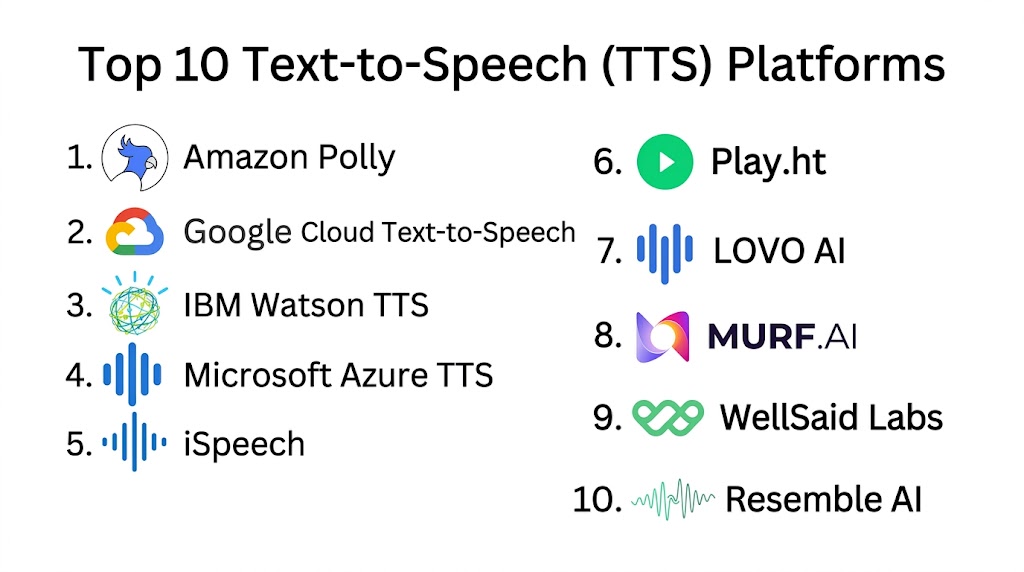
Top 10 Text-to-Speech Platforms
#1 — Amazon Polly
Short description: Amazon Polly converts text into lifelike speech and offers a wide range of voices and languages. It is ideal for developers and enterprises integrating speech into applications and services.
Key Features
- Realistic neural TTS voices
- Multi-language support
- Speech marks for lip-syncing
- Real-time streaming
- Custom lexicons and pronunciations
Pros
- Highly scalable and reliable
- Integration with AWS ecosystem
- Wide variety of voices and languages
Cons
- Learning curve for AWS integration
- Some advanced features require technical setup
- Cloud-only deployment
Platforms / Deployment
- Web, Windows, Linux
- Cloud
Security & Compliance
- Supports encryption, IAM policies
- SOC 2, GDPR
Integrations & Ecosystem
Integrates with AWS services and third-party apps
- API access for automation
- Compatible with LMS and chatbots
- Cloud SDK support
Support & Community
- Documentation and tutorials
- AWS support tiers
- Large developer community
#2 — Google Cloud Text-to-Speech
Short description: Google Cloud TTS provides neural network-based speech synthesis for applications, multimedia, and accessibility tools. It is suitable for developers and enterprises requiring scalable, natural-sounding voices.
Key Features
- 220+ voices and 40+ languages
- WaveNet neural voices
- SSML support for prosody control
- Real-time audio streaming
- Custom voice adaptation
Pros
- High-quality and expressive voices
- Fast and reliable cloud processing
- Flexible SSML controls
Cons
- Cloud-only
- Pricing complexity for large-scale usage
- Requires technical setup for advanced features
Platforms / Deployment
- Web, Windows, Linux
- Cloud
Security & Compliance
- Encryption and IAM controls
- SOC, GDPR
Integrations & Ecosystem
- Google Cloud APIs
- Integrates with apps, LMS, and IoT devices
- REST API for automated workflows
Support & Community
- Extensive documentation
- Cloud support plans
- Active user community
#3 — IBM Watson Text to Speech
Short description: IBM Watson TTS converts text to natural-sounding speech with a focus on enterprise applications, accessibility, and multimedia content.
Key Features
- Multiple voices and languages
- Emotional tone customization
- Neural voice models
- REST API access
- Integration with Watson Assistant
Pros
- High-quality neural voices
- Enterprise-grade security
- Supports voice tone adaptation
Cons
- Cloud-focused deployment
- Premium pricing for advanced features
- Limited offline options
Platforms / Deployment
- Web, Windows, Linux
- Cloud
Security & Compliance
- Supports encryption, IAM
- GDPR and enterprise compliance
Integrations & Ecosystem
- Watson Assistant integration
- REST API for automation
- LMS and media platform support
Support & Community
- Tutorials and documentation
- Enterprise support plans
- Community forums
#4 — Microsoft Azure Text to Speech
Short description: Microsoft Azure TTS offers neural and standard voices for applications, media, and accessibility, targeting developers and enterprises.
Key Features
- Neural TTS and custom voice options
- SSML and prosody controls
- Multi-language support
- Real-time audio streaming
- Custom voice models
Pros
- High-quality, lifelike voices
- Strong integration with Azure ecosystem
- Scalable cloud platform
Cons
- Requires Azure subscription
- Learning curve for advanced features
- Cloud-only
Platforms / Deployment
- Web, Windows, Linux
- Cloud
Security & Compliance
- Encryption and identity controls
- SOC, GDPR, HIPAA
Integrations & Ecosystem
- Azure APIs and SDKs
- LMS and media integrations
- REST API for automation
Support & Community
- Documentation and tutorials
- Microsoft support tiers
- Active developer community
#5 — iSpeech
Short description: iSpeech provides TTS and ASR solutions for developers, businesses, and content creators, focusing on natural voice quality.
Key Features
- Multi-language support
- Neural voices
- Mobile SDKs
- Cloud and on-prem options
- API access for automation
Pros
- Easy to integrate
- Supports mobile and web applications
- Flexible deployment
Cons
- Advanced voices may require premium plan
- Smaller language library than cloud giants
- Limited offline capabilities
Platforms / Deployment
- Web, Windows, macOS, iOS, Android
- Cloud, Hybrid
Security & Compliance
- Not publicly stated
Integrations & Ecosystem
- APIs for app integration
- LMS and media platform support
- Mobile SDKs
Support & Community
- Documentation and support
- Email support
- Community forums
#6 — ReadSpeaker
Short description: ReadSpeaker delivers TTS for education, accessibility, and media content. It provides online and embedded solutions with realistic voices.
Key Features
- Web and mobile integration
- Multiple languages
- Neural voice options
- SSML support
- Offline and online playback
Pros
- Accessible and easy-to-use
- Strong e-learning focus
- Flexible deployment
Cons
- Advanced features require premium plans
- Cloud-only for some services
- Limited voice variety
Platforms / Deployment
- Web, Windows, macOS
- Cloud, On-prem
Security & Compliance
- Not publicly stated
Integrations & Ecosystem
- LMS integration
- API and SDK access
- Web and mobile platforms
Support & Community
- Tutorials and documentation
- Email support
- Not publicly stated community
#7 — Acapela Group
Short description: Acapela Group provides TTS for media, accessibility, and corporate content, offering personalized voices and multi-language support.
Key Features
- Wide range of voices and languages
- Custom voice creation
- SSML support
- Embedded and cloud solutions
- Mobile SDKs
Pros
- Personalized voice options
- Multi-platform support
- Strong accessibility focus
Cons
- Enterprise pricing
- Advanced setup required
- Cloud and on-prem deployment differences
Platforms / Deployment
- Web, Windows, macOS, Linux
- Cloud, On-prem
Security & Compliance
- Not publicly stated
Integrations & Ecosystem
- LMS, media, and app integrations
- API access for automation
- Mobile SDK support
Support & Community
- Documentation
- Email support
- Community not publicly stated
#8 — Speechify
Short description: Speechify converts text to speech for productivity, accessibility, and personal use. It targets students, professionals, and content creators.
Key Features
- Multi-language voices
- High-quality neural voices
- Mobile and web apps
- Cloud storage and sync
- Adjustable speed and pitch
Pros
- Easy-to-use platform
- Mobile and web access
- Good voice naturalness
Cons
- Limited enterprise features
- Cloud-only
- Premium voices require subscription
Platforms / Deployment
- Web, iOS, Android
- Cloud
Security & Compliance
- Not publicly stated
Integrations & Ecosystem
- Mobile and web integration
- Export audio files
- Cloud sync
Support & Community
- Tutorials
- Email support
- Community forums
#9 — Nuance Vocalizer
Short description: Nuance Vocalizer delivers TTS for accessibility, automotive, and enterprise applications, focusing on high-quality, realistic voices.
Key Features
- Multi-language and dialect support
- Neural voices
- Embedded and cloud solutions
- SSML support
- API for integration
Pros
- High-quality voice output
- Flexible deployment
- Strong enterprise focus
Cons
- Premium pricing
- Complex integration for beginners
- Limited consumer-level features
Platforms / Deployment
- Web, Windows, Linux
- Cloud, Embedded
Security & Compliance
- Not publicly stated
Integrations & Ecosystem
- Enterprise applications
- API for developers
- LMS and media support
Support & Community
- Documentation
- Enterprise support
- Not publicly stated community
#10 — Murf AI
Short description: Murf AI also provides TTS alongside its AI dubbing solutions, enabling natural-sounding voices for marketing, education, and corporate content.
Key Features
- Neural voices and multiple languages
- Pitch, speed, and emphasis control
- Brand voice cloning
- Cloud-based editor
- API access
Pros
- High-quality voice output
- Easy to use
- Scalable for teams
Cons
- Limited offline functionality
- Premium plan needed for full features
- Some voices may require manual fine-tuning
Platforms / Deployment
- Web
- Cloud
Security & Compliance
- Not publicly stated
Integrations & Ecosystem
- API and LMS integration
- Export to audio and video editors
- Workflow automation
Support & Community
- Documentation
- Email support
- Active user community
Comparison Table
| Tool Name | Best For | Platform(s) Supported | Deployment | Standout Feature | Public Rating |
|---|---|---|---|---|---|
| Amazon Polly | Developers, enterprises | Web, Windows, Linux | Cloud | Neural voices, multi-language | N/A |
| Google Cloud TTS | Developers, accessibility | Web, Windows, Linux | Cloud | WaveNet neural voices | N/A |
| IBM Watson TTS | Enterprises, education | Web, Windows, Linux | Cloud | Emotional tone customization | N/A |
| Microsoft Azure TTS | Enterprises, apps | Web, Windows, Linux | Cloud | Neural TTS, custom voices | N/A |
| iSpeech | Developers, mobile apps | Web, Windows, macOS, iOS, Android | Cloud, Hybrid | Mobile SDKs, flexible deployment | N/A |
| ReadSpeaker | Education, accessibility | Web, Windows, macOS | Cloud, On-prem | Neural voices, offline options | N/A |
| Acapela Group | Media, corporate | Web, Windows, macOS, Linux | Cloud, On-prem | Personalized voices | N/A |
| Speechify | Students, professionals | Web, iOS, Android | Cloud | Mobile and web apps | N/A |
| Nuance Vocalizer | Enterprise, automotive | Web, Windows, Linux | Cloud, Embedded | Enterprise-grade TTS | N/A |
| Murf AI | Marketing, corporate, education | Web | Cloud | Neural voices, brand voice cloning | N/A |
Evaluation & Scoring
| Tool Name | Core | Ease | Integrations | Security | Performance | Support | Value | Weighted Total |
|---|---|---|---|---|---|---|---|---|
| Amazon Polly | 9 | 8 | 9 | 8 | 9 | 8 | 8 | 8.65 |
| Google Cloud TTS | 9 | 8 | 8 | 8 | 9 | 8 | 8 | 8.55 |
| IBM Watson TTS | 8 | 8 | 8 | 8 | 8 | 8 | 8 | 8.00 |
| Microsoft Azure TTS | 9 | 8 | 8 | 8 | 9 | 8 | 8 | 8.55 |
| iSpeech | 8 | 8 | 7 | 7 | 8 | 7 | 7 | 7.50 |
| ReadSpeaker | 8 | 8 | 7 | 7 | 8 | 7 | 7 | 7.50 |
| Acapela Group | 8 | 7 | 7 | 7 | 8 | 7 | 7 | 7.35 |
| Speechify | 7 | 8 | 7 | 7 | 7 | 7 | 7 | 7.25 |
| Nuance Vocalizer | 8 | 7 | 7 | 7 | 8 | 7 | 7 | 7.35 |
| Murf AI | 8 | 8 | 7 | 7 | 8 | 7 | 7 | 7.55 |
Which TTS Platform Is Right for You
Solo / Freelancer
Speechify and Murf AI offer ease of use and cost efficiency for small-scale content production.
SMB
iSpeech and ReadSpeaker provide multi-language options and scalability for small teams.
Mid-Market
IBM Watson TTS and Microsoft Azure TTS balance custom voice features, API access, and quality for mid-sized teams.
Enterprise
Amazon Polly, Google Cloud TTS, and Nuance Vocalizer provide robust integrations, high-quality voices, and enterprise-level security.
Budget vs Premium
Budget users can leverage Speechify or Murf AI for core TTS needs. Premium platforms like Amazon Polly and Google Cloud TTS provide advanced neural voices and enterprise integration.
Feature Depth vs Ease of Use
Speechify and Murf AI prioritize usability, while AWS and Google Cloud deliver advanced features requiring more technical setup.
Integrations & Scalability
Enterprise users should focus on Amazon Polly, Microsoft Azure, and IBM Watson for scalable cloud-based TTS across multiple platforms.
Security & Compliance Needs
Platforms with strong encryption, IAM controls, and enterprise compliance capabilities are recommended for sensitive content.
Frequently Asked Questions
1. How much do TTS platforms cost?
Pricing varies depending on usage, number of voices, and premium features. Many platforms offer free tiers for basic needs, while enterprise-level plans cover high-volume usage and advanced neural voices.
2. Which languages are supported?
Most TTS platforms cover major global languages. Some tools also provide regional dialects, but support for niche languages may be limited.
3. How natural do the voices sound?
Modern TTS uses neural networks to produce highly realistic voices. While natural, some nuanced emotion or artistic style may require human post-processing.
4. Are TTS platforms secure?
Enterprise tools typically provide encryption, identity controls, and secure cloud hosting. Specific certifications may not always be publicly disclosed.
5. Can TTS integrate with other apps?
Yes, most platforms provide APIs for integration with apps, LMS, CMS, and media editing tools to automate workflows.
6. How fast is the voice generation?
Processing speed depends on content length and platform performance. Most cloud-based TTS generates speech in seconds to minutes per segment.
7. Can I create a custom brand voice?
Several platforms support custom voice cloning, allowing organizations to maintain a consistent tone and style across content.
8. What content types are suitable?
TTS works well for audiobooks, podcasts, training modules, accessibility tools, marketing videos, and interactive media.
9. Is offline usage possible?
Some platforms offer offline SDKs or embedded solutions. Cloud-based platforms require an internet connection for speech generation.
10. How steep is the learning curve?
User-focused platforms like Speechify and Murf AI are easy to use. Developer-centric tools like Amazon Polly or Google Cloud TTS may require technical knowledge for advanced features.
Conclusion
Text-to-Speech Platforms are essential for automating voice content and reaching global audiences. Selection depends on project scale, language needs, voice naturalness, and workflow integration. Freelancers and SMBs benefit from user-friendly platforms, while mid-market and enterprise users need scalable, API-enabled, and secure solutions. Evaluating core features, integration, performance, support, and pricing ensures the right fit. The best approach is to shortlist 2–3 platforms, run a pilot for output quality and workflow compatibility, verify security and compliance, and then scale production. By following this method, organizations can efficiently deliver high-quality audio across multiple languages and platforms.

This article provides a useful comparison of text-to-speech platforms and their core capabilities. The clear feature breakdown and practical insights make it easier to evaluate which solution best fits different accessibility and content creation needs.