Introduction
Digital Proofing Tools are software platforms designed to streamline the review and approval process for creative content, marketing collateral, and design assets. They enable teams to annotate, comment, track revisions, and approve content efficiently, reducing bottlenecks and ensuring brand consistency.
Real-world use cases include reviewing marketing materials such as brochures and social media posts, coordinating design approvals for campaigns, managing multi-stakeholder feedback in agencies or enterprises, tracking revisions and version history, and integrating proofing workflows with project management and creative platforms.
Evaluation Criteria for Buyers: Collaboration and annotation features, version control, workflow automation, multi-format support, integration with design and project management tools, user experience, scalability, reporting and analytics, security/compliance, and cost-effectiveness.
Best for: Creative teams, marketing departments, agencies, and enterprises managing multi-channel content creation and approvals.
Not ideal for: Organizations with minimal content creation or simple, low-volume approval needs.
Key Trends in Digital Proofing Tools
- Cloud-based collaboration with real-time commenting and annotations
- AI-powered version tracking and content comparison
- Support for multiple file types including images, PDFs, and video
- Integration with design, project management, and marketing platforms
- Automated workflow approvals and notifications
- Multi-stakeholder feedback management
- Analytics dashboards to monitor review cycles and bottlenecks
- Security and access control for confidential content
- Mobile-friendly interfaces for on-the-go approvals
- Scalable for teams of all sizes from SMBs to enterprises
How We Selected These Tools
- Evaluated adoption and reputation among creative teams and agencies
- Assessed collaboration, annotation, and version control features
- Reviewed workflow automation and multi-format support
- Considered integration options with design and project management tools
- Evaluated analytics, reporting, and performance tracking
- Assessed scalability for small teams to enterprise operations
- Examined user experience and ease of adoption
- Evaluated security, compliance, and access control features
- Considered cost-effectiveness and subscription options
- Reviewed customer support, documentation, and training resources
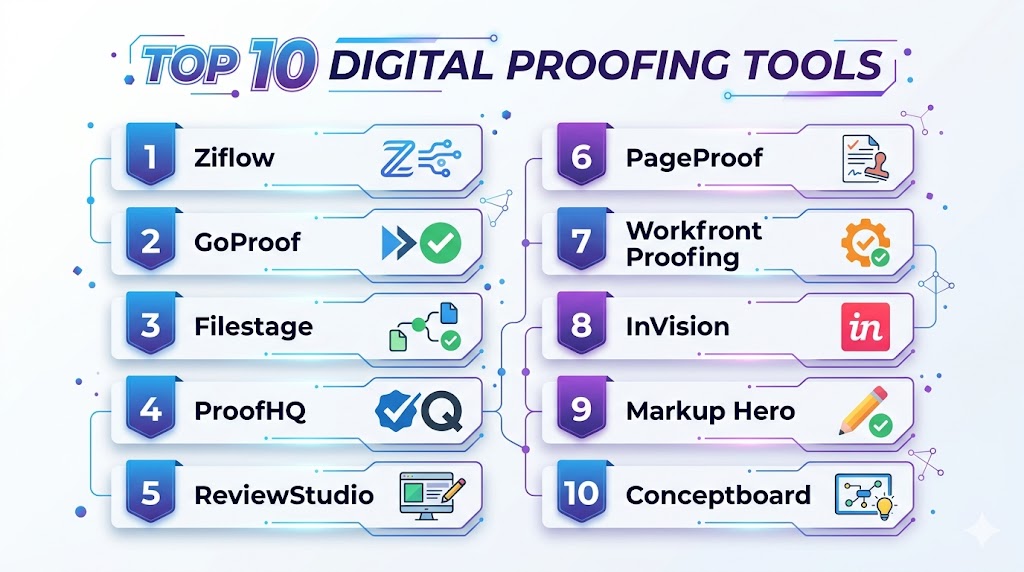
Top 10 Digital Proofing Tools
#1 — Filestage
Short description: Filestage is a digital proofing platform that enables teams to review, annotate, and approve content collaboratively. It supports multiple file formats and tracks revisions efficiently.
Key Features
- Real-time collaboration and annotations
- Version control and revision tracking
- Multi-format support (PDF, image, video)
- Automated workflow approvals
- Analytics dashboards
Pros
- Intuitive interface for reviewers
- Efficient feedback management
- Tracks revisions and approval status
Cons
- Pricing higher for enterprise plans
- Limited offline functionality
- Some advanced features require training
Platforms / Deployment
- Web iOS Android
- Cloud
Security & Compliance
- Not publicly stated
Integrations & Ecosystem
- Slack, Trello, Asana
- Design tools like Adobe Creative Cloud
- Project management platforms
Support & Community
Documentation, webinars, and customer support.
#2 — GoProof
Short description: GoProof is a collaborative proofing tool designed for Adobe Creative Cloud users, enabling in-app feedback, annotations, and approval workflows.
Key Features
- In-app review and annotation
- Version control
- Workflow automation
- Multi-format support
- Integration with Adobe CC
Pros
- Seamless integration with Adobe
- Efficient in-app collaboration
- Supports creative teams’ workflows
Cons
- Limited CRM or project management integrations
- Best suited for Adobe users
- Pricing may be high for SMBs
Platforms / Deployment
- Web
- Cloud
Security & Compliance
- Not publicly stated
Integrations & Ecosystem
- Adobe Creative Cloud
- Slack and Trello
- Project management tools
Support & Community
Documentation, tutorials, and support team.
#3 — Ziflow
Short description: Ziflow provides digital proofing and review management for marketing and creative teams. It offers annotations, approval workflows, and multi-format support to accelerate content delivery.
Key Features
- Online proofing and annotation
- Version control and workflow management
- Multi-format support including PDFs, images, video
- Approval and notification automation
- Analytics and reporting
Pros
- Scalable for agencies and enterprises
- Supports diverse file formats
- Streamlines approval workflows
Cons
- Pricing may be high for small teams
- Learning curve for complex workflows
- Offline access limited
Platforms / Deployment
- Web iOS Android
- Cloud
Security & Compliance
- Not publicly stated
Integrations & Ecosystem
- Slack, Trello, Asana
- Adobe Creative Cloud
- Project management platforms
Support & Community
Documentation, webinars, and customer support.
#4 — Workfront Proof
Short description: Workfront Proof is a digital proofing tool integrated with Workfront, helping enterprises manage content approvals, annotations, and feedback efficiently.
Key Features
- Proofing and annotations
- Automated approval workflows
- Multi-format file support
- Version control
- Integration with Workfront and other tools
Pros
- Enterprise-ready
- Streamlines feedback and approval
- Comprehensive reporting
Cons
- Complex for small teams
- Higher pricing
- Requires Workfront familiarity
Platforms / Deployment
- Web
- Cloud
Security & Compliance
- Not publicly stated
Integrations & Ecosystem
- Workfront, Adobe CC
- Slack, Trello
- Project management tools
Support & Community
Documentation, enterprise support, and tutorials.
#5 — ApproveMe
Short description: ApproveMe is a simple digital proofing and e-signature tool that helps teams approve content, contracts, and creative assets quickly.
Key Features
- Proofing and approval workflows
- Version control and audit trails
- E-signature integration
- Notifications and reminders
- Multi-format support
Pros
- Simple and user-friendly
- Affordable for small teams
- Tracks approval history
Cons
- Limited advanced collaboration
- Analytics are basic
- Less suitable for large enterprises
Platforms / Deployment
- Web iOS Android
- Cloud
Security & Compliance
- Not publicly stated
Integrations & Ecosystem
- Google Drive, Dropbox
- CRM and project management tools
- Email notifications
Support & Community
Documentation, tutorials, and email support.
#6 — ProofHQ (Workfront)
Short description: ProofHQ provides online proofing for marketing and creative teams, allowing annotation, approval workflows, and content tracking.
Key Features
- Digital proofing and annotations
- Approval workflow management
- Multi-format support
- Version control
- Analytics dashboards
Pros
- Streamlines content review
- Scalable for teams
- Supports diverse file formats
Cons
- Pricing higher for SMBs
- Learning curve for advanced workflows
- Some features require training
Platforms / Deployment
- Web
- Cloud
Security & Compliance
- Not publicly stated
Integrations & Ecosystem
- Adobe CC, Slack, Trello
- Project management tools
- CRM platforms
Support & Community
Documentation, webinars, and customer support.
#7 — Conceptboard
Short description: Conceptboard is an online collaborative whiteboard with digital proofing capabilities for visual content, designs, and marketing materials.
Key Features
- Digital annotation and feedback
- Collaborative boards
- Version tracking
- Multi-format support
- Workflow notifications
Pros
- Visual and interactive collaboration
- Easy adoption for remote teams
- Supports creative workflows
Cons
- Less suited for complex approval chains
- Limited analytics
- Pricing for premium plans
Platforms / Deployment
- Web iOS Android
- Cloud
Security & Compliance
- Not publicly stated
Integrations & Ecosystem
- Slack, Trello, Asana
- Google Drive, Dropbox
- Project management tools
Support & Community
Documentation, tutorials, and support team.
#8 — GoProof
Short description: GoProof allows in-app annotations and approvals within Adobe Creative Cloud, streamlining feedback for creative teams.
Key Features
- In-app proofing for Adobe CC
- Annotations and comments
- Version control
- Automated workflow
- Multi-format support
Pros
- Seamless Adobe integration
- Streamlines feedback
- Supports creative workflows
Cons
- Limited to Adobe users
- Less suitable for non-design files
- Pricing may be high for SMBs
Platforms / Deployment
- Web
- Cloud
Security & Compliance
- Not publicly stated
Integrations & Ecosystem
- Adobe Creative Cloud
- Slack, Trello
- Project management tools
Support & Community
Documentation and tutorials.
#9 — Approval Studio
Short description: Approval Studio provides online proofing for images, videos, and creative content with annotation, commenting, and approval tracking.
Key Features
- Online proofing and annotation
- Version control
- Workflow approvals
- Multi-format support
- Feedback and analytics
Pros
- Supports multiple content formats
- Efficient collaboration
- Tracks revisions and approvals
Cons
- Premium pricing
- Learning curve for new users
- Limited integration options
Platforms / Deployment
- Web
- Cloud
Security & Compliance
- Not publicly stated
Integrations & Ecosystem
- Google Drive, Dropbox
- Slack, Trello
- Project management tools
Support & Community
Documentation, tutorials, and customer support.
#10 — GoVisually
Short description: GoVisually is a visual proofing platform for marketing and design teams, allowing annotation, commenting, and approvals for images, videos, and documents.
Key Features
- Visual annotation and commenting
- Approval workflows
- Version control
- Multi-format support
- Notifications and reminders
Pros
- Simple, intuitive interface
- Real-time collaboration
- Supports creative workflows
Cons
- Limited analytics
- Advanced workflows require premium plan
- Smaller integration ecosystem
Platforms / Deployment
- Web iOS Android
- Cloud
Security & Compliance
- Not publicly stated
Integrations & Ecosystem
- Slack, Trello, Asana
- Google Drive, Dropbox
- Project management tools
Support & Community
Documentation, tutorials, and support resources.
Comparison Table
| Tool Name | Best For | Platform(s) Supported | Deployment | Standout Feature | Public Rating |
|---|---|---|---|---|---|
| Filestage | Multi-format approvals | Web iOS Android | Cloud | Real-time annotation | N/A |
| GoProof | Adobe Creative Cloud users | Web | Cloud | In-app proofing | N/A |
| Ziflow | Marketing & creative teams | Web iOS Android | Cloud | Multi-format support | N/A |
| Workfront Proof | Enterprise content approvals | Web | Cloud | Integrated workflow | N/A |
| ApproveMe | Simple approvals & e-sign | Web iOS Android | Cloud | Easy-to-use interface | N/A |
| ProofHQ | Marketing & creative teams | Web | Cloud | Digital proofing | N/A |
| Conceptboard | Visual collaboration | Web iOS Android | Cloud | Collaborative boards | N/A |
| GoProof | In-app Adobe annotations | Web | Cloud | Seamless Adobe integration | N/A |
| Approval Studio | Images & videos | Web | Cloud | Visual proofing | N/A |
| GoVisually | Creative content approvals | Web iOS Android | Cloud | Visual annotation | N/A |
Evaluation & Scoring
| Tool Name | Core 25% | Ease 15% | Integrations 15% | Security 10% | Performance 10% | Support 10% | Value 15% | Weighted Total |
|---|---|---|---|---|---|---|---|---|
| Filestage | 10 | 9 | 8 | 8 | 9 | 8 | 8 | 8.7 |
| GoProof | 9 | 8 | 8 | 8 | 8 | 8 | 7 | 8.0 |
| Ziflow | 9 | 8 | 8 | 8 | 8 | 7 | 7 | 7.9 |
| Workfront Proof | 9 | 7 | 8 | 8 | 8 | 7 | 7 | 7.8 |
| ApproveMe | 8 | 9 | 7 | 7 | 8 | 7 | 7 | 7.6 |
| ProofHQ | 8 | 8 | 7 | 7 | 8 | 7 | 7 | 7.5 |
| Conceptboard | 7 | 9 | 7 | 7 | 7 | 7 | 7 | 7.3 |
| GoProof | 9 | 7 | 8 | 8 | 8 | 7 | 7 | 7.8 |
| Approval Studio | 8 | 8 | 7 | 7 | 8 | 7 | 7 | 7.5 |
| GoVisually | 8 | 8 | 7 | 7 | 8 | 7 | 7 | 7.5 |
Which Digital Proofing Tool Is Right for You
Solo / Freelancer
ApproveMe, GoVisually, or Conceptboard for lightweight, affordable proofing.
SMB
Filestage, Ziflow, or Approval Studio for multi-format reviews and workflow management.
Mid-Market
GoProof, ProofHQ, or Workfront Proof for structured approval workflows and analytics.
Enterprise
Filestage, Workfront Proof, Ziflow for scalable multi-location creative operations and analytics.
Budget vs Premium
Budget: ApproveMe, GoVisually
Premium: Filestage, Ziflow, Workfront Proof
Feature Depth vs Ease of Use
Conceptboard and GoVisually are simple to adopt; Filestage and Workfront Proof provide advanced features for large teams.
Integrations & Scalability
Enterprise teams should prioritize Ziflow, Workfront Proof, or Filestage for CRM, project management, and multi-format integrations.
Security & Compliance
Enterprise-grade platforms provide role-based access control, secure cloud deployment, and workflow compliance tracking.
Frequently Asked Questions
1. What is a digital proofing tool?
A software platform that allows collaborative review, annotation, and approval of creative content and marketing assets.
2. Can small teams use these tools?
Yes, ApproveMe, GoVisually, or Conceptboard are affordable, simple options for SMBs.
3. Do they support multiple file types?
Yes, most platforms support PDFs, images, videos, and design files for review and annotation.
4. Can they track revisions and versions?
Yes, digital proofing tools provide version control and audit trails for content changes.
5. Are workflow automations available?
Enterprise platforms like Filestage, Ziflow, and Workfront Proof support automated approvals and notifications.
6. Can multiple stakeholders collaborate?
Yes, all tools support commenting, annotation, and collaborative reviews across teams.
7. Are analytics dashboards included?
Many platforms provide insights into review cycles, approval times, and bottlenecks.
8. Can these tools integrate with design software?
Yes, platforms like GoProof integrate directly with Adobe Creative Cloud, and others integrate with project management tools.
9. Are they cloud-based?
Yes, all major digital proofing tools provide cloud deployment for remote and distributed teams.
10. How long does onboarding take?
Simple tools can be adopted within hours; enterprise platforms may require days for setup and training.
Conclusion
Digital Proofing Tools streamline content review and approval processes, ensuring accurate feedback, faster approval cycles, and consistent brand presentation. Small teams and freelancers can benefit from ApproveMe, GoVisually, or Conceptboard for lightweight, affordable proofing, while mid-market and enterprise teams should consider Filestage, Ziflow, or Workfront Proof for scalable workflows and analytics. Use the comparison and scoring tables to shortlist two to three platforms, pilot their features, and ensure integrations and approval workflows align with your organization. The right digital proofing tool improves collaboration, accelerates content delivery, and strengthens quality control for creative and marketing teams.

A well-structured article that clearly compares digital proofing tools and their collaboration features. The concise breakdown of strengths and limitations makes it easier to select the right platform for review and approval workflows.