Introduction
eLearning Authoring Tools are software platforms used to create interactive, multimedia-based educational content such as courses, quizzes, simulations, and training modules. These tools enable instructional designers, educators, and organizations to build engaging learning experiences that can be delivered through Learning Management Systems (LMS) or online platforms.
Modern authoring tools go far beyond static slides by supporting video, animations, branching scenarios, and assessments. They allow teams to design responsive, mobile-friendly content and track learner progress using standards like SCORM and xAPI. With the rise of remote learning and corporate training, these tools have become essential for scalable and efficient content creation.
Common use cases include:
- Corporate training and onboarding
- Online course creation
- Compliance training programs
- Interactive simulations and scenarios
- Microlearning and mobile learning
What buyers should evaluate:
- Ease of use and learning curve
- Interactivity and multimedia support
- Templates and content libraries
- Integration with LMS platforms
- Collaboration features
- Publishing formats (SCORM, xAPI, HTML5)
- Scalability
- Security and compliance
Best for: Instructional designers, educators, enterprises, training teams, and content creators.
Not ideal for: Teams needing only simple document-based training.
Key Trends in eLearning Authoring Tools
- AI-powered content generation and automation
- Cloud-based collaborative authoring tools
- Gamification and interactive learning experiences
- Mobile-first and responsive course design
- Video-based and simulation-driven learning
- Integration with LMS and analytics platforms
- No-code and drag-and-drop course builders
- Real-time learner engagement tracking
How We Selected These Tools (Methodology)
- Market adoption and credibility
- Feature completeness for course creation
- Ease of use and learning curve
- Integration ecosystem strength
- Reliability and performance
- Security and compliance readiness
- Innovation in AI and automation
- Customer feedback and usability
Top 10 eLearning Authoring Tools
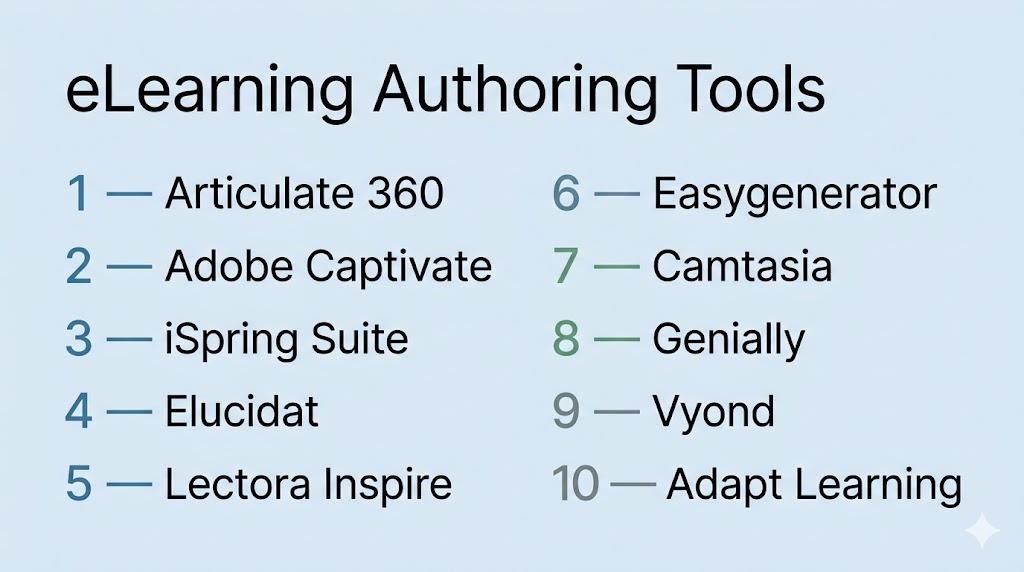
#1 — Articulate 360
Short description: Industry-leading authoring suite with tools for interactive and rapid course creation.
Key Features
- Storyline 360 for advanced interactions
- Rise 360 for rapid course creation
- Templates and asset library
- SCORM and xAPI support
- Collaboration tools
Pros
- User-friendly interface
- Highly versatile
Cons
- Expensive
- Requires training for advanced features
Platforms / Deployment
Web / Desktop / Cloud
Security & Compliance
Not publicly stated
Integrations & Ecosystem
- LMS tools
- APIs
Support & Community
Strong community
#2 — Adobe Captivate
Short description: Advanced authoring tool for responsive and simulation-based learning.
Key Features
- Responsive design
- Software simulations
- VR and interactive learning
- Multimedia integration
- Analytics
Pros
- Powerful customization
- Great for technical training
Cons
- Steeper learning curve
- Complex interface
Platforms / Deployment
Desktop / Cloud
Security & Compliance
Not publicly stated
Integrations & Ecosystem
- Adobe ecosystem
- LMS tools
Support & Community
Professional support
#3 — iSpring Suite
Short description: PowerPoint-based authoring tool ideal for quick course creation.
Key Features
- PowerPoint integration
- Interactive quizzes
- Role-play simulations
- SCORM compliance
- Screen recording
Pros
- Easy to learn
- Fast content creation
Cons
- Limited customization
- Windows dependency
Platforms / Deployment
Desktop / Cloud
Security & Compliance
Not publicly stated
Integrations & Ecosystem
- LMS tools
- APIs
Support & Community
Strong support
#4 — Elucidat
Short description: Cloud-based authoring tool focused on team collaboration and scalability.
Key Features
- Cloud collaboration
- Rapid course creation
- Templates
- Analytics
- Responsive design
Pros
- Great for teams
- Easy to scale
Cons
- Expensive
- Limited offline use
Platforms / Deployment
Web / Cloud
Security & Compliance
Not publicly stated
Integrations & Ecosystem
- LMS tools
- APIs
Support & Community
Enterprise support
#5 — Lectora Inspire
Short description: Flexible authoring tool with strong customization and accessibility features.
Key Features
- Custom course design
- Accessibility compliance
- Responsive courses
- Multimedia support
- Publishing tools
Pros
- Highly customizable
- Strong compliance features
Cons
- Complex UI
- Learning curve
Platforms / Deployment
Desktop / Cloud
Security & Compliance
Not publicly stated
Integrations & Ecosystem
- LMS tools
- APIs
Support & Community
Professional support
#6 — Easygenerator
Short description: Cloud-based authoring tool designed for simplicity and collaboration.
Key Features
- Drag-and-drop editor
- Templates
- Collaboration
- Analytics
- SCORM support
Pros
- Easy to use
- No technical skills required
Cons
- Limited advanced features
- Basic customization
Platforms / Deployment
Web / Cloud
Security & Compliance
Not publicly stated
Integrations & Ecosystem
- LMS tools
- APIs
Support & Community
Good support
#7 — Camtasia
Short description: Video-based authoring tool for screen recording and training content.
Key Features
- Screen recording
- Video editing
- Interactive quizzes
- Annotations
- Export options
Pros
- Great for video tutorials
- Easy to use
Cons
- Limited interactive features
- Not full LMS-focused
Platforms / Deployment
Desktop
Security & Compliance
Not publicly stated
Integrations & Ecosystem
- Video tools
- APIs
Support & Community
Strong community
#8 — Genially
Short description: Interactive content creation tool focused on gamification and engagement.
Key Features
- Interactive content
- Gamification
- Templates
- Analytics
- SCORM compatibility
Pros
- Engaging content
- No coding required
Cons
- Limited advanced features
- Internet dependency
Platforms / Deployment
Web / Cloud
Security & Compliance
SOC 2 aligned; other details Not publicly stated
Integrations & Ecosystem
- LMS tools
- APIs
Support & Community
Active community
#9 — Vyond
Short description: Animation-based authoring tool for creating engaging explainer videos.
Key Features
- Animation creation
- Templates
- Voiceover tools
- Custom characters
- Export options
Pros
- Highly engaging
- Easy animation
Cons
- Limited interactivity
- Subscription cost
Platforms / Deployment
Web / Cloud
Security & Compliance
Not publicly stated
Integrations & Ecosystem
- Video tools
- APIs
Support & Community
Good support
#10 — Adapt Learning
Short description: Open-source authoring framework for responsive eLearning content.
Key Features
- Responsive design
- Open-source customization
- Plugins
- Collaboration
- Publishing tools
Pros
- Free and flexible
- Highly customizable
Cons
- Requires technical skills
- Setup complexity
Platforms / Deployment
Web / Self-hosted
Security & Compliance
Not publicly stated
Integrations & Ecosystem
- LMS tools
- Plugins
Support & Community
Community-driven
Comparison Table (Top 10)
| Tool Name | Best For | Platform(s) Supported | Deployment | Standout Feature | Public Rating |
|---|---|---|---|---|---|
| Articulate 360 | All-in-one | Web/Desktop | Cloud | Interactive courses | N/A |
| Adobe Captivate | Advanced learning | Desktop | Cloud | Simulations & VR | N/A |
| iSpring Suite | Beginners | Desktop | Cloud | PowerPoint integration | N/A |
| Elucidat | Teams | Web | Cloud | Collaboration | N/A |
| Lectora Inspire | Customization | Desktop | Cloud | Accessibility | N/A |
| Easygenerator | SMB | Web | Cloud | Simplicity | N/A |
| Camtasia | Video learning | Desktop | Local | Screen recording | N/A |
| Genially | Interactive content | Web | Cloud | Gamification | N/A |
| Vyond | Animation | Web | Cloud | Video storytelling | N/A |
| Adapt Learning | Developers | Web | Self-hosted | Open-source | N/A |
Evaluation & Scoring of eLearning Authoring Tools
| Tool Name | Core (25%) | Ease (15%) | Integrations (15%) | Security (10%) | Performance (10%) | Support (10%) | Value (15%) | Weighted Total |
|---|---|---|---|---|---|---|---|---|
| Articulate 360 | 9 | 8 | 9 | 8 | 9 | 9 | 7 | 8.5 |
| Adobe Captivate | 9 | 7 | 9 | 8 | 9 | 8 | 6 | 8.2 |
| iSpring Suite | 8 | 9 | 8 | 7 | 8 | 8 | 8 | 8.2 |
| Elucidat | 8 | 8 | 8 | 7 | 8 | 8 | 7 | 7.9 |
| Lectora Inspire | 8 | 7 | 8 | 8 | 8 | 7 | 7 | 7.8 |
| Easygenerator | 7 | 9 | 7 | 7 | 7 | 7 | 8 | 7.6 |
| Camtasia | 7 | 9 | 6 | 6 | 7 | 7 | 8 | 7.4 |
| Genially | 8 | 9 | 7 | 7 | 8 | 7 | 8 | 7.9 |
| Vyond | 7 | 9 | 6 | 6 | 7 | 7 | 7 | 7.3 |
| Adapt Learning | 8 | 6 | 7 | 7 | 8 | 6 | 9 | 7.6 |
Scores are comparative and reflect balance across usability, features, and value.
Which eLearning Authoring Tool Is Right for You?
Solo / Freelancer
iSpring Suite or Genially
SMB
Easygenerator or Camtasia
Mid-Market
Articulate 360 or Elucidat
Enterprise
Adobe Captivate or Lectora Inspire
Budget vs Premium
Budget tools focus on simplicity; premium tools offer advanced interactivity
Feature Depth vs Ease of Use
Simple tools are easier; advanced tools require training
Integrations & Scalability
Enterprise tools provide stronger integrations
Security & Compliance Needs
Large organizations should prioritize compliance-focused tools
Frequently Asked Questions (FAQs)
What are eLearning authoring tools?
They are used to create interactive learning content.
How are they different from LMS?
Authoring tools create content, LMS delivers it.
Do they support mobile learning?
Yes, most tools support responsive design.
Are they easy to use?
Some are beginner-friendly, others require training.
Do they support SCORM?
Yes, most tools support SCORM and xAPI.
Are they expensive?
Pricing varies depending on features.
Can they create interactive content?
Yes, they support quizzes, simulations, and scenarios.
Do they integrate with LMS?
Yes, integration is a core feature.
Are they secure?
Security varies by platform.
What are alternatives?
PowerPoint or manual training tools.
Conclusion
eLearning authoring tools have become essential for organizations and educators aiming to create engaging, scalable, and interactive learning experiences. While advanced platforms like Articulate 360 and Adobe Captivate offer deep customization and enterprise capabilities, tools such as iSpring Suite and Genially provide simplicity and speed for smaller teams. The right choice depends on your content complexity, technical expertise, and integration needs rather than a single universal solution. It is important to evaluate tools based on usability, interactivity, and scalability before making a decision. Testing a few tools in real scenarios can help identify the best fit. A well-chosen authoring tool ultimately enables effective learning and long-term knowledge retention.
