Introduction
Video Surveillance Management Software, often called VMS, is a centralized platform that helps organizations monitor, record, manage, and analyze video feeds from multiple cameras. Instead of handling each camera separately, VMS provides a unified interface for real-time monitoring, playback, analytics, and incident response.
In modern environments, VMS has evolved far beyond simple video recording. It now includes AI-powered analytics, facial recognition, behavior detection, and automated alerts. These capabilities are critical for security teams managing large facilities, smart cities, retail stores, and industrial sites. A well-implemented VMS improves situational awareness, speeds up investigations, and enhances overall security operations.
Common use cases include:
- Real-time monitoring of multiple locations
- Incident detection and response
- Video analytics and behavior tracking
- Compliance and audit logging
- Smart city and infrastructure monitoring
When evaluating VMS tools, buyers should consider:
- Camera compatibility and scalability
- AI analytics and automation features
- Storage and video retention options
- Integration with access control and IoT systems
- Performance and reliability
- Security and data protection
- Ease of deployment and usability
- Cost and licensing model
Best for: Enterprises, security teams, government agencies, retail chains, industrial facilities, and smart city operators managing multiple surveillance systems.
Not ideal for: Small setups with only a few cameras where basic NVR systems may be sufficient.
Key Trends in Video Surveillance Management Software
- AI-powered video analytics such as facial recognition and anomaly detection
- Cloud-based VMS platforms enabling remote monitoring
- Hybrid deployments combining edge and cloud processing
- Integration with access control and IoT systems
- Real-time alerts with automated incident response workflows
- Cybersecurity enhancements including encryption and role-based access
- Open-platform ecosystems supporting multiple camera vendors
- Mobile-first monitoring dashboards
- Edge AI reducing latency and bandwidth usage
- Subscription-based pricing replacing traditional licensing
How We Selected These Tools Methodology
We evaluated the top VMS platforms based on:
- Market leadership and industry adoption
- Feature depth including monitoring, analytics, and automation
- Scalability across multi-site environments
- Integration with hardware and third-party systems
- Performance reliability in enterprise deployments
- Security features and access control capabilities
- Ease of deployment and usability
- Vendor ecosystem and support
- Innovation in AI and cloud-based surveillance
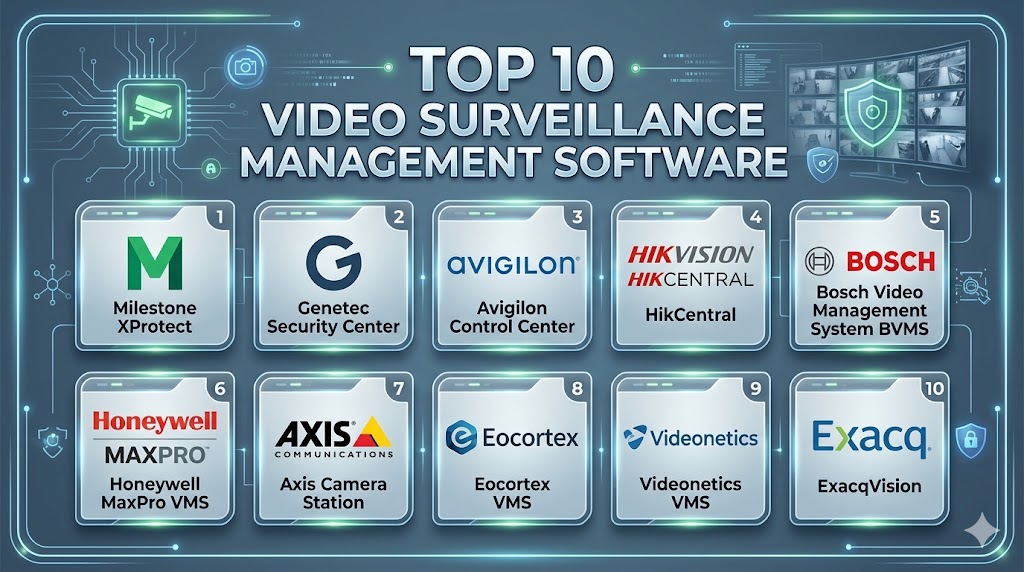
Top 10 Video Surveillance Management Software Tools
#1 — Milestone XProtect
Short description: An open-platform video management system widely used across industries. It supports thousands of devices and is known for scalability and flexibility in enterprise deployments.
Key Features
- Centralized video monitoring
- Open-platform architecture
- Advanced analytics integrations
- Multi-site management
- Scalable deployment
- Mobile access
Pros
- Highly scalable
- Extensive integration ecosystem
Cons
- Requires technical setup
- Licensing complexity
Platforms / Deployment
Windows / Web / Hybrid
Security & Compliance
Encryption, role-based access, MFA support
Integrations & Ecosystem
Supports thousands of devices and integrations
- IP camera compatibility
- API integrations
- Analytics add-ons
Support & Community
Strong enterprise support and ecosystem
#2 — Genetec Security Center
Short description: A unified security platform combining video surveillance, access control, and analytics into a single interface for enterprise environments.
Key Features
- Unified security dashboard
- AI-powered analytics
- Dynamic mapping
- Multi-site monitoring
- Access control integration
- Incident management
Pros
- Comprehensive platform
- Strong integration capabilities
Cons
- High cost
- Complex implementation
Platforms / Deployment
Windows / Cloud / Hybrid
Security & Compliance
Not publicly stated
Integrations & Ecosystem
Integrates video, access control, and analytics systems
- IoT integrations
- API ecosystem
- Security systems
Support & Community
Enterprise-level support
#3 — Avigilon Control Center
Short description: A powerful VMS with AI-driven analytics and high-definition video capabilities, designed for enterprise surveillance.
Key Features
- AI video analytics
- High-definition video support
- Smart search
- Real-time alerts
- Centralized control
- Mobile access
Pros
- Strong AI capabilities
- High video quality
Cons
- Expensive
- Requires compatible hardware
Platforms / Deployment
Windows / Cloud
Security & Compliance
Not publicly stated
Integrations & Ecosystem
Supports integrations with security systems
- IoT integration
- API support
- Device ecosystem
Support & Community
Reliable support
#4 — Verkada Command
Short description: A cloud-native VMS platform designed for easy deployment and remote management across multiple locations.
Key Features
- Cloud-based monitoring
- AI analytics
- Remote access
- Real-time alerts
- Device health monitoring
- Video playback
Pros
- Easy deployment
- Cloud-first architecture
Cons
- Subscription-based
- Limited customization
Platforms / Deployment
Cloud
Security & Compliance
Not publicly stated
Integrations & Ecosystem
Supports cloud integrations
- IoT devices
- API access
- Security integrations
Support & Community
Strong support
#5 — Axis Camera Station
Short description: A user-friendly VMS designed for Axis hardware, offering efficient video monitoring and analytics.
Key Features
- Live video monitoring
- Smart search
- Event alerts
- Mobile access
- Device management
- Analytics
Pros
- Easy to use
- Reliable performance
Cons
- Limited to Axis ecosystem
- Less flexible
Platforms / Deployment
Windows / Cloud
Security & Compliance
Not publicly stated
Integrations & Ecosystem
Works with Axis devices
- IoT integration
- API support
- Hardware ecosystem
Support & Community
Good support
#6 — Bosch Video Management System BVMS
Short description: A high-performance VMS designed for large-scale and mission-critical surveillance environments.
Key Features
- High-performance video processing
- Centralized control
- Advanced analytics
- Failover support
- Multi-site management
- Event handling
Pros
- Enterprise-grade reliability
- Strong performance
Cons
- Complex deployment
- Expensive
Platforms / Deployment
Windows / Hybrid
Security & Compliance
Not publicly stated
Integrations & Ecosystem
Supports integrations with Bosch systems
- IoT integration
- API support
- Security systems
Support & Community
Enterprise support
#7 — Honeywell MaxPro VMS
Short description: A scalable video management system offering monitoring, analytics, and integration with enterprise security systems.
Key Features
- Video monitoring
- Event-based recording
- Analytics
- Multi-site support
- Alerts
- Playback
Pros
- Scalable
- Reliable
Cons
- Interface complexity
- Limited customization
Platforms / Deployment
Windows / Hybrid
Security & Compliance
Not publicly stated
Integrations & Ecosystem
Supports integration with security systems
- IoT integration
- API support
- Access control systems
Support & Community
Reliable support
#8 — Cisco Meraki MV
Short description: A cloud-managed video surveillance platform offering centralized monitoring and analytics.
Key Features
- Cloud-based monitoring
- Real-time analytics
- Motion alerts
- Remote access
- Device management
- Secure storage
Pros
- Easy management
- Cloud scalability
Cons
- Subscription model
- Limited customization
Platforms / Deployment
Cloud
Security & Compliance
Encryption, role-based access
Integrations & Ecosystem
Integrates with Cisco ecosystem
- IoT integration
- API support
- Network systems
Support & Community
Strong enterprise support
#9 — ExacqVision
Short description: A flexible VMS platform supporting multiple camera brands and offering scalable deployment for mid-market environments.
Key Features
- Multi-camera support
- Video playback
- Event alerts
- Remote access
- Storage management
- Analytics
Pros
- Flexible deployment
- Good compatibility
Cons
- UI may feel outdated
- Limited advanced analytics
Platforms / Deployment
Windows / Linux / Hybrid
Security & Compliance
Not publicly stated
Integrations & Ecosystem
Supports multiple devices and systems
- IoT integration
- API support
- Camera ecosystem
Support & Community
Good support
#10 — Qognify VMS
Short description: A video management platform designed for enterprise environments with strong integration and analytics capabilities.
Key Features
- Centralized monitoring
- Advanced analytics
- Event management
- Multi-site support
- Integration capabilities
- Real-time alerts
Pros
- Strong integration capabilities
- Enterprise-ready
Cons
- Complex setup
- Premium pricing
Platforms / Deployment
Windows / Hybrid
Security & Compliance
Not publicly stated
Integrations & Ecosystem
Supports integration with enterprise systems
- IoT integration
- API support
- Security ecosystem
Support & Community
Enterprise support
Comparison Table
| Tool Name | Best For | Platform Supported | Deployment | Standout Feature | Public Rating |
|---|---|---|---|---|---|
| Milestone XProtect | Enterprise | Windows Web | Hybrid | Open platform | N/A |
| Genetec Security Center | Unified security | Windows | Hybrid | Unified system | N/A |
| Avigilon | AI analytics | Windows | Cloud | AI search | N/A |
| Verkada | Cloud users | Web | Cloud | Remote management | N/A |
| Axis Camera Station | Axis users | Windows | Hybrid | Hardware integration | N/A |
| Bosch BVMS | Large scale | Windows | Hybrid | High performance | N/A |
| Honeywell MaxPro | Enterprise | Windows | Hybrid | Scalability | N/A |
| Cisco Meraki | Cloud monitoring | Web | Cloud | Cloud VMS | N/A |
| ExacqVision | Mid-market | Windows Linux | Hybrid | Flexibility | N/A |
| Qognify | Enterprise | Windows | Hybrid | Integration | N/A |
Evaluation & Scoring of Video Surveillance Management Software
| Tool Name | Core | Ease | Integrations | Security | Performance | Support | Value | Weighted Total |
|---|---|---|---|---|---|---|---|---|
| Milestone | 9 | 7 | 10 | 8 | 9 | 9 | 8 | 8.7 |
| Genetec | 9 | 7 | 9 | 8 | 9 | 9 | 7 | 8.5 |
| Avigilon | 9 | 8 | 8 | 8 | 9 | 8 | 7 | 8.4 |
| Verkada | 8 | 9 | 8 | 7 | 8 | 8 | 8 | 8.3 |
| Axis | 8 | 8 | 7 | 7 | 8 | 7 | 8 | 7.8 |
| Bosch | 9 | 7 | 8 | 8 | 9 | 8 | 7 | 8.3 |
| Honeywell | 8 | 7 | 8 | 7 | 8 | 7 | 8 | 7.8 |
| Cisco | 8 | 9 | 8 | 8 | 8 | 8 | 8 | 8.2 |
| ExacqVision | 7 | 8 | 7 | 7 | 8 | 7 | 8 | 7.6 |
| Qognify | 8 | 7 | 9 | 7 | 8 | 8 | 7 | 7.9 |
These scores are comparative and reflect typical enterprise use cases. Higher scores indicate broader capabilities and scalability, while lower scores may reflect specialization or trade-offs. Always evaluate tools based on your environment and requirements.
Which Video Surveillance Management Software Is Right for You
Solo / Freelancer
Basic VMS solutions or cloud camera apps are sufficient for small setups.
SMB
Verkada and Cisco Meraki provide easy deployment and cloud-based management.
Mid-Market
ExacqVision and Axis Camera Station offer flexibility and good integration.
Enterprise
Milestone XProtect and Genetec Security Center are ideal for large-scale deployments.
Budget vs Premium
Budget tools focus on simplicity, while premium platforms offer AI analytics and deep integration.
Feature Depth vs Ease of Use
Advanced platforms provide powerful features but require expertise, while simpler tools prioritize usability.
Integrations & Scalability
Choose platforms with strong API ecosystems and device compatibility.
Security & Compliance Needs
Enterprise users should prioritize encryption, access control, and audit capabilities.
Frequently Asked Questions FAQs
1. What is video surveillance management software
It is a platform that manages and monitors video feeds from multiple cameras in one system. It allows real-time viewing, recording, and analytics. Advanced tools also provide AI-based alerts and automation.
2. How is VMS different from NVR
VMS is software-based and more flexible, while NVR is hardware-based. VMS supports integrations, analytics, and scalability, making it suitable for larger systems.
3. Can VMS handle multiple locations
Yes, most modern VMS platforms support multi-site monitoring. This allows centralized control across different facilities.
4. Is cloud VMS better than on-premise
Cloud VMS offers easier deployment and remote access, while on-premise provides more control. Hybrid models combine both advantages.
5. Are these systems secure
Most platforms include encryption and access controls. However, organizations should follow security best practices to protect data.
6. Can VMS integrate with other systems
Yes, many VMS platforms integrate with access control, IoT, and analytics tools. This enables unified security operations.
7. Do I need special hardware
Yes, VMS typically requires compatible cameras and servers. Some cloud solutions reduce hardware requirements.
8. How much does VMS cost
Pricing varies based on features, number of cameras, and deployment type. Enterprise solutions are usually more expensive.
9. Can I use AI with VMS
Yes, many platforms include AI features like facial recognition and anomaly detection. These improve security and automation.
10. Is VMS scalable
Yes, most modern VMS platforms are highly scalable. You can add more cameras and features as your needs grow.
Conclusion
Video Surveillance Management Software has become a critical component of modern security infrastructure by enabling centralized monitoring, intelligent analytics, and rapid incident response. These platforms have evolved from simple recording tools into advanced systems powered by AI and cloud technologies. The right choice depends on your scale, integration needs, and budget. Enterprise platforms provide deep functionality and scalability, while cloud-based solutions offer ease of deployment and flexibility. It is essential to evaluate compatibility, security features, and long-term costs before making a decision. Start by shortlisting a few tools and testing them in real-world scenarios. A well-chosen VMS can significantly enhance security, operational efficiency, and situational awareness.

A practical factor to consider is how well these platforms handle growing numbers of cameras and data over time. Scalability can be just as important as advanced monitoring features, especially for organizations planning future expansion.