If you are new to online publishing and wondering how to post a blog without building a website, you are not alone. Many beginners feel confused about where to start. The good news is that there are simple platforms available that allow you to publish content instantly without technical knowledge.
One of the easiest platforms for beginners is JustPaste.it.
In this guide, I will explain everything in simple language so that even if you are completely new, you can publish your first blog confidently.
What is JustPaste.it?
JustPaste.it is a simple online publishing platform where you can quickly create and share articles, blogs, notes, announcements, or any written content.
You do not need:
- Coding knowledge
- Website hosting
- Domain name
- Technical experience
You can simply write, format, and publish.
Why Beginners Prefer JustPaste.it
Many new bloggers and digital marketers use this platform because:
- It is free to use
- It requires no technical setup
- You can publish instantly
- It generates a shareable link
- It helps in basic SEO and backlink building
If you are just starting your blogging journey, this is one of the easiest platforms to learn content publishing.
Step-by-Step Guide to Posting a Blog
Step 1: Open the Website
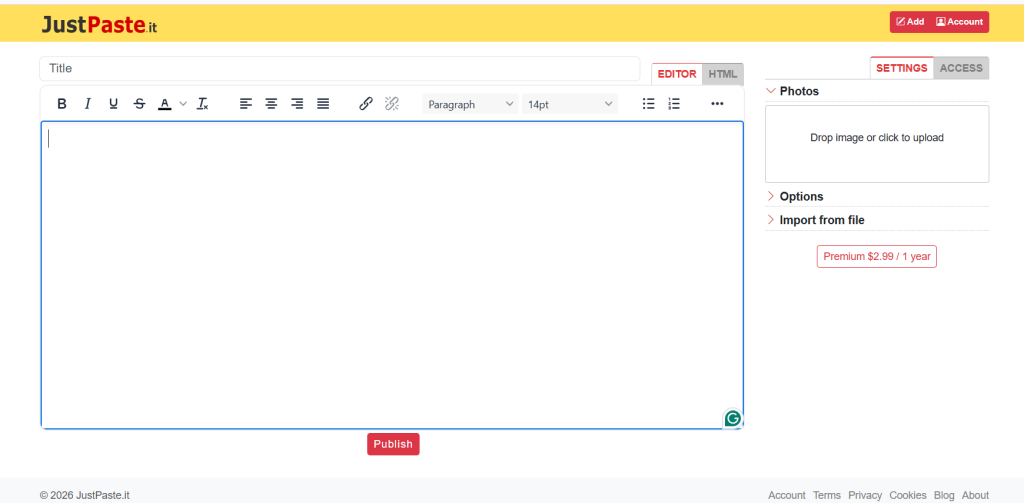
Visit the website and you will see a writing editor directly on the homepage. It looks similar to Microsoft Word or Google Docs.
Step 2: Create an Account (Recommended)
You can post without logging in, but creating an account is better.
Why create an account?
- You can edit your blog later
- You can manage multiple posts
- You can delete or update content
- You can build consistency
Registration is simple and free.
Step 3: Add a Strong Title
At the top of the editor, you will see a Title field.
Your title should:
- Be clear
- Be specific
- Include keywords
- Be attractive
Example:
“Complete Guide to AWS Certified Data Engineer – Associate”
A strong title increases clicks and visibility.
Step 4: Paste Your Blog Content
Copy your content from Word or Google Docs and paste it into the main editor.
You can format your blog using:
- Bold text
- Headings
- Bullet points
- Numbered lists
- Links
- Images
Keep paragraphs short and readable.
How to Structure Your Blog for Better Results
Even if the platform is simple, structure matters.
Follow this format:
Introduction
Explain what the blog is about and why it matters.
Main Content Sections
Break content into clear headings.
Bullet Points
Use bullet points to improve readability.
FAQs
Add 3–5 common questions and answers.
Conclusion
Summarize the key message clearly.
This structure improves reader experience.
Adding Images to Your Blog
If you want to make your blog more engaging:
- Click the image upload option
- Upload from your computer
- Place it under relevant sections
Images increase readability and engagement.
Adding Tags for Better Reach
Tags are very important.
They help your content get discovered.
For example, if your blog is about AWS certification, you can add tags like:
- AWS
- Data Engineering
- Cloud Certification
- DevOps
- Software Engineering
Use relevant keywords only.
Choosing Privacy Settings
Before publishing, you will see privacy options:
- Public
- Unlisted
- Private
If you want visibility and SEO benefits, choose Public.
If you want to share with specific people only, choose Unlisted.
Publishing Your Blog
Once everything looks good:
- Review your content
- Check spelling
- Check formatting
- Click Publish
The platform will generate a unique URL.
You can now share it on:
- With your interns
- For backlink work
Common Mistakes Beginners Should Avoid
Many new users make these mistakes:
- Posting without formatting
- Writing very long paragraphs
- Not using headings
- Forgetting tags
- Not checking grammar
- Publishing without reviewing
Avoid these, and your content will look professional.
How to Use JustPaste.it for SEO and Backlinks
If you are doing digital marketing or promoting your website:
- Add contextual links inside your blog
- Use natural anchor text
- Do not spam links
- Focus on value-driven content
Search engines prefer helpful content over promotional content.
Who Should Use This Platform?
This platform is perfect for:
- Beginners in blogging
- Students
- Digital marketing interns
- Freelancers
- Course promoters
- Affiliate marketers
- Small business owners
If you want quick publishing without technical stress, this is ideal.
Final Thoughts
Starting online publishing can feel overwhelming in the beginning. But platforms like JustPaste.it make the process simple and beginner-friendly.
You do not need to wait for the perfect website. You can start today.
Create an account, write your first blog, format it properly, add tags, and publish confidently.
The most important thing is not perfection. It is consistency.
If you publish regularly and focus on value, your content will improve with time.
