Introduction
Time Blocking Apps are task and calendar management tools designed to help users allocate specific blocks of time to tasks, projects, and routines. Time blocking promotes focus, prevents multitasking overload, and supports productivity by structuring days into defined sessions. These apps typically integrate with calendars, task lists, reminders, and work routines.
Real‑world use cases include planning focused work sessions, allocating daily routines like exercise or study blocks, breaking large projects into manageable time segments, balancing work and personal commitments, and visualizing priorities across days or weeks. Buyers should evaluate ease of blocking workflows, calendar integrations, task syncing, reminders/alerts, recurring blocks, customization, cross‑device sync, analytics and reporting, collaboration/sharing, and pricing.
Best for: knowledge workers, students, freelancers, managers coordinating schedules, and anyone aiming to improve focus, time awareness, and task execution.
Not ideal for: users who prefer unstructured to‑do lists, or those who resist strict schedule habits.
Key Trends in Time Blocking Apps
- Deep integration with digital calendars and task managers
- AI‑assisted scheduling suggestions based on priorities
- Cross‑device sync and real‑time updates
- Integration with focus timers and Pomodoro systems
- Blocking for personal and work life balance
- Shared blocks for teams and collaboration
- Recurring block templates and routines
- Analytics and time usage dashboards
- Push reminders and smart notifications
- Privacy and data export features
How We Selected These Tools
- Reviewed adoption and popularity among knowledge workers
- Assessed calendar and scheduling integration
- Evaluated ease of creating, adjusting, and visualizing blocks
- Checked sync across devices including web and mobile
- Measured analytics, reporting, and focus support
- Compared recurring blocks and routine support
- Considered collaboration and shared time blocks
- Reviewed reminders and alert customization
- Examined pricing models, free vs premium value
- Reviewed support resources and product guidance
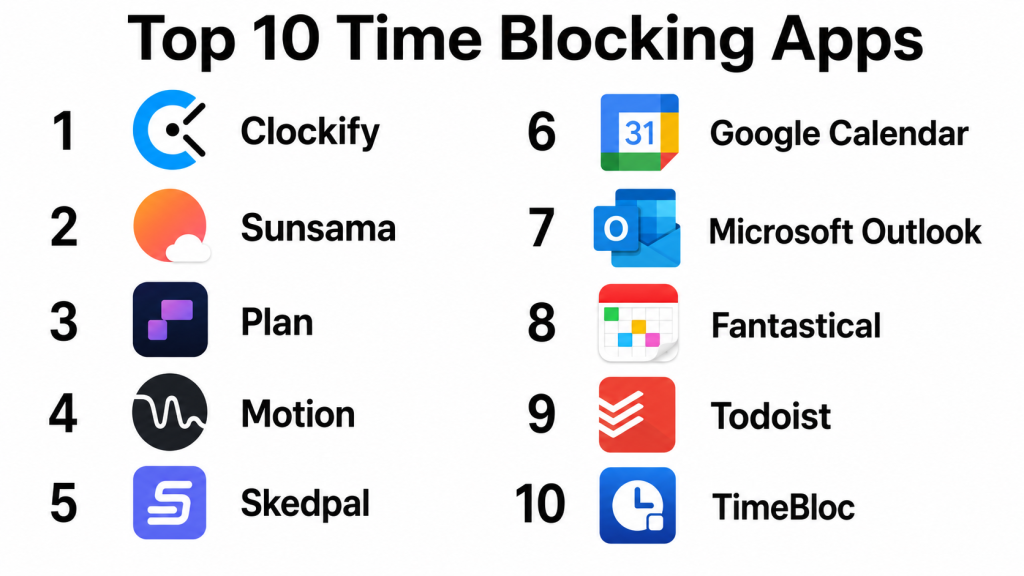
Top 10 Time Blocking Apps
#1 — Google Calendar
Short description: Google Calendar is a widely used calendar app with robust time‑blocking capabilities. Users can create, edit, and schedule time blocks with reminders, color codes, and integrations with task lists and email.
Key Features
- Calendar blocks and reminders
- Task and event integration
- Color‑coded scheduling
- Recurring block support
- Cross‑device sync
Pros
- Free and easy to use
- Excellent calendar integrations
- Syncs with email and task lists
- Simple setup for blocks
Cons
- Not designed purely for time blocking
- Limited analytics and reporting
- No native Pomodoro support
- Not ideal for advanced task workflows
Platforms / Deployment
- Web / iOS / Android
- Cloud
Security & Compliance
- Google standard security and account protections
Integrations & Ecosystem
Connects with Google ecosystem and third‑party calendars.
- Gmail and Workspace
- Task lists
- Shared calendars
- Alerts and reminders
- Color labels
Support & Community
Documentation, help center, and community forums.
#2 — Fantastical
Short description: Fantastical is an advanced calendar app with intuitive time‑blocking features, smart scheduling suggestions, natural language input, and powerful task/calendar integration.
Key Features
- Smart block scheduling
- Natural language input
- Multiple calendar support
- Recurring events and blocks
- Visual timeline views
Pros
- Excellent UI and visuals
- Powerful recurring block tools
- Cross‑calendar support
- Smart entries
Cons
- Subscription required for full features
- Not purely task‑centric
- Advanced tools may overwhelm beginners
- Limited built‑in analytics
Platforms / Deployment
- iOS / macOS
- Cloud
Security & Compliance
- Apple and vendor security practices
Integrations & Ecosystem
Integrates across calendars and task platforms.
- Apple Calendar sync
- Task integrations
- Shared calendars
- Alerts and notifications
Support & Community
Official documentation and support options.
#3 — Todoist
Short description: Todoist is a powerful task management app that supports time blocking through scheduled tasks, recurring blocks, and calendar integrations. It is ideal for focus‑oriented task workflows.
Key Features
- Task scheduling and blocks
- Recurring tasks and templates
- Calendar sync
- Priority and labels
- Productivity insights
Pros
- Great for task‑centric time blocking
- Cross‑platform support
- Projects and labels for organization
- Productivity trends
Cons
- Time blocking not visually calendar‑centric
- Some features require subscription
- No native time analytics dashboard
- Pomodoro support requires extensions
Platforms / Deployment
- Web / iOS / Android / Windows / macOS
- Cloud
Security & Compliance
- Standard cloud security features
Integrations & Ecosystem
Todoist works well with calendars and productivity tools.
- Google/Outlook calendar sync
- App integrations
- Priority workflows
- Labels and filters
Support & Community
Documentation, tutorials, and active forums.
#4 — Clockify
Short description: Clockify is a time tracking and productivity app with time‑blocking and reporting features. It helps users allocate blocks for tasks and measure how time was spent versus scheduled.
Key Features
- Time tracking and blocks
- Billable time flags
- Reporting dashboards
- Project and task grouping
- Cross‑device sync
Pros
- Strong time tracking paired with blocking
- Detailed reports
- Free tier with robust features
- Suitable for freelancers and teams
Cons
- UI can be complex for simple blocks
- More tracking than blocking focus
- Some reports require premium
- Learning curve for deep analytics
Platforms / Deployment
- Web / iOS / Android / Windows / macOS
- Cloud
Security & Compliance
- Standard security protections
Integrations & Ecosystem
Integrates with productivity stacks and calendars.
- Calendar sync
- Project tools
- Reporting exports
Support & Community
Documentation and community forums.
#5 — TimeBloc
Short description: TimeBloc is a dedicated time‑blocking app with focus on blocks, routines, and visual timelines. It helps users structure days with pre‑set routines and flexible scheduling.
Key Features
- Drag‑and‑drop block scheduling
- Daily routine templates
- Focus timer modes
- Recurring block support
- Visual timeline view
Pros
- Designed specifically for time blocking
- Easy schedule creation
- Routines and templates
- Focus support
Cons
- Some features require subscription
- Limited task integration
- Cross‑device sync may require plan
- Analytics basic
Platforms / Deployment
- iOS / Android
- Cloud
Security & Compliance
- Not publicly stated
Integrations & Ecosystem
TimeBloc fits into personal scheduling workflows.
- Timeline views
- Focus timers
- Routine templates
- Alerts
Support & Community
Documentation and guides available.
#6 — Sunsama
Short description: Sunsama is a daily planner that combines tasks, time blocks, and calendar integration into a focused workflow. It emphasizes daily planning with guided prioritization.
Key Features
- Daily block scheduling
- Task and calendar integration
- Reflection prompts
- Cross‑device sync
- Focus mode
Pros
- Encourages daily planning habits
- Strong prioritization framework
- Integrates with multiple calendars
- Reflective planning prompts
Cons
- Subscription required
- Not ideal for casual users
- Some feature overlap with task tools
- Analytics not deep
Platforms / Deployment
- Web / iOS / Android
- Cloud
Security & Compliance
- Standard cloud protections
Integrations & Ecosystem
Connects with calendars and tasks.
- Google/Outlook sync
- Task lists
- Daily planning prompts
Support & Community
Help resources and guides available.
#7 — Plan by Zapier
Short description: Plan is a collaboration‑focused planning tool that lets teams map time blocks, tasks, and project schedules together. It supports work planning across individuals and teams.
Key Features
- Shared blocks and calendars
- Task mapping
- Project scheduling
- Priority views
- Cross‑device sync
Pros
- Works well for teams
- Shared scheduling views
- Task and block integration
- Supports project planning
Cons
- Not focused on individual blocks alone
- More complex workflows
- Premium tier needed for full features
- Analytics less robust
Platforms / Deployment
- Web
- Cloud
Security & Compliance
- Standard enterprise features
Integrations & Ecosystem
Integrates with task and project tools.
- Calendar sync
- Task management
- Shared views
Support & Community
Documentation and support materials.
#8 — Structured
Short description: Structured is a visual time‑blocking app designed to help users build routines and visualize time blocks with customizable themes, blocks, and routines.
Key Features
- Drag‑and‑drop interface
- Visual block timelines
- Recurring routines
- Themes and custom views
- Reminders
Pros
- Visually appealing interface
- Easy block creation
- Routine templates
- Tailored views
Cons
- Subscription for advanced features
- Not strong on analytics
- Limited task integration
- Sync features vary by plan
Platforms / Deployment
- iOS / Android
- Cloud
Security & Compliance
- Not publicly stated
Integrations & Ecosystem
Structured focuses on individual scheduling.
- Visual timelines
- Block categories
- Template routines
Support & Community
Help documentation and guides.
#9 — Motion (by Keep Productive)
Short description: Motion combines scheduling automation with task and block scheduling. It uses AI to allocate tasks into time blocks based on priorities and deadlines.
Key Features
- AI‑driven scheduling
- Task integration
- Auto block allocation
- Calendar sync
- Priority and deadline focus
Pros
- AI suggestions save time
- Automated block creation
- Integrates tasks and calendar
- Useful for knowledge workers
Cons
- Subscription required
- Learning curve
- Not purely manual block control
- Analytics limited
Platforms / Deployment
- Web / iOS / Android
- Cloud
Security & Compliance
- Standard protections
Integrations & Ecosystem
Motion integrates tasks, calendars, and AI workflows.
- Calendar sync
- Task workflows
- AI allocation
Support & Community
Documentation and support resources.
#10 — TickTick (Calendar & Blocks)
Short description: TickTick is a hybrid task and calendar app with block scheduling support, habit tracking, reminders, and Pomodoro timer features. It is versatile for time management routines.
Key Features
- Block scheduling with calendar
- Pomodoro timer
- Habit tracker
- Reminders and alerts
- Priority and tags
Pros
- All‑in‑one productivity toolkit
- Pomodoro integration
- Habit tracking
- Cross‑platform support
Cons
- Block view less prominent than calendar
- Some features behind subscription
- Learning curve for new users
- Analytics limited
Platforms / Deployment
- Web / iOS / Android / Windows / macOS
- Cloud
Security & Compliance
- Standard cloud protections
Integrations & Ecosystem
TickTick spans tasks and time blocks.
- Calendar sync
- Reminder workflows
- Pomodoro
- Habit tracking
Support & Community
Documentation, tutorials, and active forums.
Comparison Table
| Tool Name | Best For | Platforms Supported | Deployment | Standout Feature | Public Rating |
|---|---|---|---|---|---|
| Google Calendar | Simple free blocking | Web, iOS, Android | Cloud | Calendar integration | N/A |
| Fantastical | Smart scheduling | iOS, macOS | Cloud | Natural language input | N/A |
| Todoist | Task‑centric blocks | Web, iOS, Android, Windows, macOS | Cloud | Task and labels | N/A |
| Clockify | Time tracking + blocks | Web, iOS, Android, Windows, macOS | Cloud | Time tracking | N/A |
| TimeBloc | Purpose‑built blocks | iOS, Android | Cloud | Visual timeline | N/A |
| Sunsama | Daily planner | Web, iOS, Android | Cloud | Daily focus workflow | N/A |
| Plan | Team planning | Web | Cloud | Shared schedules | N/A |
| Structured | Visual routines | iOS, Android | Cloud | Block visualization | N/A |
| Motion | AI scheduling | Web, iOS, Android | Cloud | AI‑driven blocks | N/A |
| TickTick | Task + blocks | Web, iOS, Android, Windows, macOS | Cloud | Pomodoro + habits | N/A |
Evaluation & Scoring
| Tool Name | Core | Ease | Integrations | Security | Performance | Support | Value | Weighted Total |
|---|---|---|---|---|---|---|---|---|
| Google Calendar | 8 | 9 | 9 | 8 | 8 | 8 | 8 | 8.40 |
| Fantastical | 8 | 8 | 8 | 8 | 8 | 8 | 7 | 8.00 |
| Todoist | 9 | 8 | 9 | 8 | 8 | 8 | 8 | 8.40 |
| Clockify | 8 | 7 | 8 | 8 | 8 | 7 | 8 | 7.75 |
| TimeBloc | 8 | 8 | 7 | 7 | 8 | 7 | 8 | 7.85 |
| Sunsama | 8 | 8 | 8 | 8 | 8 | 8 | 7 | 8.00 |
| Plan | 7 | 7 | 8 | 8 | 8 | 7 | 7 | 7.50 |
| Structured | 8 | 8 | 7 | 7 | 8 | 7 | 8 | 7.85 |
| Motion | 9 | 7 | 9 | 8 | 8 | 8 | 7 | 8.10 |
| TickTick | 9 | 8 | 8 | 8 | 8 | 8 | 8 | 8.25 |
Which Time Blocking App Is Right for You
Simple & Free Users
Google Calendar and Clockify are excellent for basic blocking with calendar sync and free access. Google Calendar works well if you already use it daily.
Task‑Centric Workers
Todoist and TickTick serve users focused on tasks and priorities, offering robust lists alongside time blocks and reminders.
Visual Planners
TimeBloc and Structured provide appealing visual timelines for users who plan by drag‑and‑drop blocks and routines.
Daily Planners & Focus
Sunsama excels for daily reflection and planning habits with directive workflows and focus prompts.
AI & Smart Automation
Motion uses AI to allocate blocks automatically based on priorities, deadlines, and task lists for efficient scheduling.
Team & Collaboration
Plan fits teams coordinating shared schedules, priorities, and planning across organizations or departments.
All‑in‑One Productivity
TickTick balances blocks with habit tracking, Pomodoro timers, and reminders for holistic productivity workflows.
Feature Depth vs Ease of Use
Google Calendar, Todoist, and TickTick balance powerful features with intuitive workflows. Apps like Plan and Motion introduce advanced scheduling that may require learning time.
Frequently Asked Questions
1. What is time blocking?
Time blocking is a productivity method where users assign specific time slots for tasks and routines to improve focus, reduce multitasking, and increase productivity.
2. Do time blocking apps sync with calendars?
Yes, most apps like Google Calendar, Fantastical, and TickTick sync with digital calendars so blocks appear alongside events and meetings.
3. Can time blocking improve productivity?
Many users find that structuring work into blocks helps maintain focus, clarify priorities, and reduce procrastination by creating intentional work periods.
4. Do these apps support reminders?
Yes, reminders and alerts are common features to notify users when a time block begins or needs attention.
5. Are there collaborative time blocks?
Yes, tools like Plan support shared blocks and team planning so groups can coordinate schedules and priorities.
6. Do time blocking apps help with habit tracking?
Some tools like TickTick include habit tracking alongside blocks, which helps users maintain routines beyond schedule management.
7. Is AI scheduling useful?
AI scheduling, like Motion’s automated block allocation, can save time and help users plan intelligently based on priorities and deadlines.
8. Can I block personal and work activities separately?
Most apps allow category labels or separate calendars so users can visualize personal and professional blocks distinctly.
9. Are time blocking apps good for students?
Yes, students benefit by scheduling study blocks, assignments, classes, and routines to manage time effectively.
10. Can I export my schedule?
Many tools support exporting events or blocks to calendar files or reports for offline review or sharing with others.
Conclusion
Time Blocking Apps help users structure their days by allocating specific blocks for tasks, routines, and goals. Google Calendar and Todoist offer reliable block scheduling with task and calendar sync for everyday users, while TimeBloc and Structured provide visual planning tools for intuitive schedule creation. TickTick balances productivity with Pomodoro and habit tracking, and Motion brings AI‑driven automation for smarter scheduling. Sunsama supports reflective daily workflows, and Plan fits teams coordinating shared schedules. The right choice depends on your workflow, whether you need task integration, visual timelines, team collaboration, or automated planning; testing a few apps with your calendars, tasks, and routines helps identify the best fit for focus and productivity.

A well-written comparison that makes it easy to understand the benefits of different time-blocking apps. The detailed feature overview helps readers choose a tool that fits their productivity and scheduling needs.