Introduction
Voiceover Tools are software platforms that enable the creation of professional-quality voice recordings using either AI-generated voices, real human narration, or a combination of both. These tools are essential for content production, e-learning, marketing campaigns, audiobooks, podcasts, and multimedia projects where clear and high-quality audio enhances engagement.
The importance of voiceover solutions has grown due to the rise of AI-driven voice synthesis, remote content production, and multilingual content demands. Organizations can now quickly produce voiceovers without large in-house talent teams, accelerating project timelines and reducing costs.
Real-world use cases include creating corporate training modules, producing podcast series with consistent narration, generating audiobooks for self-publishing, adding localized voiceovers for video content, and enhancing accessibility for websites and apps.
Evaluation criteria for buyers should focus on voice quality and naturalness, variety of accents and languages, ease of use, integration with editing platforms and APIs, scalability for multiple projects, pricing and licensing models, security and compliance, and customization options.
Best for: Marketing teams, e-learning providers, content creators, small studios, and enterprises requiring scalable voice production.
Not ideal for: Individuals needing occasional recordings, hobbyists preferring DIY solutions, or projects with minimal audio requirements.
Key Trends in Voiceover Tools
- AI-powered voice synthesis has reached near-human realism
- Multilingual and regional accent support has expanded
- Voice cloning allows branded or consistent voices
- Cloud-based production enables remote scalable workflows
- API-first platforms allow voice generation embedded in SaaS tools
- Real-time editing and automated adjustments of pitch, speed, and tone
- Enhanced compliance and licensing for data privacy and intellectual property
- Flexible subscription and pay-as-you-go pricing models
- Hybrid human plus AI workflows combine speed with quality review
- Cross-platform deployment ensures access from web, desktop, and mobile
How We Selected These Tools
- Evaluated market adoption and mindshare among enterprises and creators
- Assessed feature completeness including AI voice options, editing, and automation
- Considered reliability and performance for consistent output
- Verified security posture including encryption and access controls
- Examined integration capabilities with popular content creation and collaboration platforms
- Prioritized solutions that fit diverse user segments including freelancers, SMBs, and enterprise teams
- Evaluated scalability and multi-user management for team workflows
- Compared deployment flexibility across cloud, hybrid, or local options
- Considered quality of support, documentation, and community engagement
- Balanced pricing models with feature depth and usage allowances
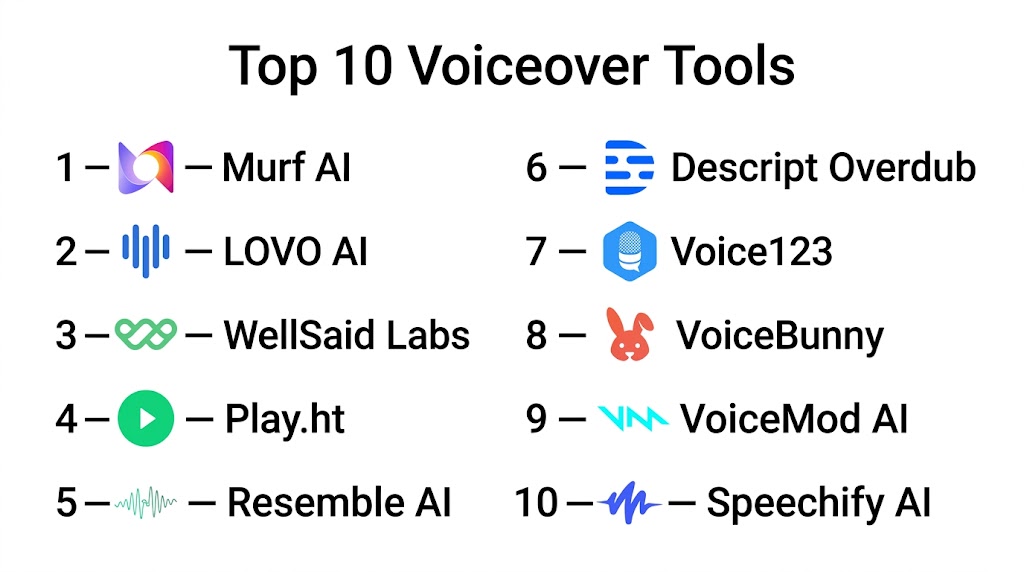
Top 10 Voiceover Tools
#1 — Descript Overdub
Short description: Descript Overdub allows content creators to generate professional voiceovers using AI-driven synthetic voices. Ideal for podcasters, marketing teams, and educators seeking editable audio and high-quality narration without repeated studio sessions.
Key Features
- AI-generated synthetic voice cloning
- Multi-track audio editing
- Real-time corrections and overdubbing
- Support for multiple languages and accents
- Text-to-speech for automated narration
- Export in multiple audio formats
Pros
- Quick content turnaround
- Highly realistic AI voices
- Seamless integration with editing workflows
Cons
- Custom voice creation may require verification
- Limited free-tier usage
- Some accents may sound less natural
Platforms / Deployment
- Web, Windows, macOS
- Cloud
Security & Compliance
- Not publicly stated
Integrations & Ecosystem
Descript integrates with video editors, podcast platforms, and productivity tools.
- Zoom
- Adobe Premiere
- Slack
- Google Drive
- Zapier
Support & Community
Robust documentation, community forums, email support, and onboarding tutorials
#2 — Murf AI
Short description: Murf AI enables businesses and individuals to generate studio-quality voiceovers for videos, presentations, and training. Widely used by marketing teams, course creators, and video producers needing fast, professional narration.
Key Features
- Over 120 AI voices
- Custom voice cloning
- Multi-language support
- Pitch, speed, and emphasis control
- Background music integration
Pros
- High-quality, natural-sounding voices
- Intuitive editing interface
- Flexible pricing for teams and individuals
Cons
- Limited offline capability
- Some languages have fewer voice options
- Advanced features behind paid tiers
Platforms / Deployment
- Web
- Cloud
Security & Compliance
- SOC 2 compliance claimed
- Data encrypted in transit and at rest
Integrations & Ecosystem
Supports video editors, learning platforms, and team collaboration tools
- Canva
- PowerPoint
- Slack
- Zapier
- API access
Support & Community
Email support, tutorials, and active user community
#3 — Play.ht
Short description: Play.ht is a voiceover tool for generating natural AI voices for content creators, podcasters, and video producers. It allows quick voiceover creation, downloadable audio, and multiple language support.
Key Features
- 600+ AI voices
- Commercial licensing included
- Multilingual voice support
- Realistic intonation and pacing
- Batch audio generation
Pros
- Wide selection of voices
- Easy content export
- Commercial-friendly license
Cons
- User interface may feel overwhelming
- Some voices less expressive
- Limited free-tier output
Platforms / Deployment
- Web
- Cloud
Security & Compliance
- Not publicly stated
Integrations & Ecosystem
Supports content management and video workflows, offers API for automation
- WordPress
- Zapier
- Podcast platforms
- Video editors
Support & Community
Email support, tutorials, knowledge base, and active user community
#4 — WellSaid Labs
Short description: WellSaid Labs focuses on AI-powered voiceovers for marketing, e-learning, and enterprise video content, delivering human-like narration with professional tone.
Key Features
- Studio-quality AI voices
- Voice cloning for brand consistency
- Multi-language support
- Audio editing and fine-tuning
- Team collaboration tools
Pros
- Realistic, natural-sounding voices
- Strong brand voice capabilities
- Easy to manage team projects
Cons
- Pricing can be high for small teams
- Limited offline editing
- Some AI voices sound slightly robotic
Platforms / Deployment
- Web
- Cloud
Security & Compliance
- GDPR compliant
- Data encrypted in transit and at rest
Integrations & Ecosystem
Integrates with learning platforms, video editors, and marketing tools
- Slack
- Zapier
- Articulate 360
- Camtasia
Support & Community
Dedicated support, onboarding sessions, active professional forums
#5 — Synthesia
Short description: Synthesia combines AI voice and avatar video generation for corporate videos, training, and marketing content. It offers multilingual voiceovers and scalable team solutions.
Key Features
- AI avatars with voice
- 60+ languages and accents
- Script-to-video generation
- Custom voice options
- Branding and style consistency
Pros
- End-to-end video and voice solution
- Supports large-scale content production
- Easy localization
Cons
- Audio-only workflows less flexible
- Higher learning curve for full features
- Costly for small teams
Platforms / Deployment
- Web
- Cloud
Security & Compliance
- Not publicly stated
Integrations & Ecosystem
- PowerPoint export
- Learning platforms
- Zapier
- Video editors
Support & Community
Documentation, email support, and customer webinars
#6 — Replica Studios
Short description: Replica Studios provides AI voice generation for games, animations, and storytelling projects. Designed for creatives needing expressive and character-driven narration.
Key Features
- Character voice library
- Emotion-driven delivery
- Custom voice cloning
- Real-time adjustments
- Multi-language support
Pros
- Highly expressive voices
- Suited for creative media
- Easy experimentation with character voices
Cons
- Less suitable for corporate narration
- Premium pricing
- Limited integrations for enterprise workflows
Platforms / Deployment
- Web
- Cloud
Security & Compliance
- Not publicly stated
Integrations & Ecosystem
Supports game engines and video editors
- Unity
- Unreal Engine
- API access
Support & Community
Email support, documentation, and creative community forums
#7 — LOVO AI
Short description: LOVO AI provides AI-generated voiceovers for marketing, e-learning, and personal projects. It offers a large variety of voices and flexible output formats.
Key Features
- 180+ AI voices
- Multiple languages and accents
- Commercial license included
- Text-to-speech with intonation control
- Background music and soundscapes
Pros
- Wide variety of voices
- Intuitive interface
- Flexible audio export
Cons
- Limited offline functionality
- Certain voices may sound synthetic
- Some premium voices behind subscription
Platforms / Deployment
- Web
- Cloud
Security & Compliance
- Not publicly stated
Integrations & Ecosystem
- Video editors
- Learning platforms
- Zapier
- API integration
Support & Community
Email support, tutorials, and active forums
#8 — Speechify
Short description: Speechify is a text-to-speech tool for accessibility, e-learning, and content consumption. It converts text into natural-sounding speech across devices.
Key Features
- Multi-device support
- AI and human-like voices
- Multi-language support
- Speed and pitch adjustment
- Offline reading
Pros
- Excellent for accessibility and learning
- Cross-platform
- User-friendly
Cons
- Limited enterprise collaboration
- Free version has constraints
- Fewer customization options for voice
Platforms / Deployment
- Web, iOS, Android, Windows, macOS
- Cloud
Security & Compliance
- Not publicly stated
Integrations & Ecosystem
- PDF and eBook import
- Learning platforms
- Mobile apps
Support & Community
Email support, knowledge base, tutorials
#9 — 11Labs Prime Voice
Short description: 11Labs Prime Voice provides studio-grade AI voice generation for content creators, podcasters, and video producers, with emphasis on realistic and expressive audio.
Key Features
- Advanced AI voices
- Emotion and style controls
- Multi-language support
- Voice cloning
- API access for developers
Pros
- Extremely natural voice quality
- Fine control over tone and style
- Scalable for multiple projects
Cons
- Pricing may be high for casual users
- Learning curve for advanced features
- Limited offline options
Platforms / Deployment
- Web
- Cloud
Security & Compliance
- Not publicly stated
Integrations & Ecosystem
- Video editors
- Podcast platforms
- API for custom workflows
Support & Community
Email support, tutorials, community forum
#10 — Resemble AI
Short description: Resemble AI offers dynamic AI voice generation for marketing, gaming, and multimedia projects. It supports custom voice cloning, real-time synthesis, and multilingual output.
Key Features
- Voice cloning
- Real-time speech synthesis
- Emotion and style control
- API for automation
- Multi-language support
Pros
- High-fidelity voices
- Real-time generation
- Flexible integration options
Cons
- Premium pricing for full features
- Limited offline support
- Smaller voice library than competitors
Platforms / Deployment
- Web
- Cloud
Security & Compliance
- SOC 2 certified
- Not publicly stated for other certifications
Integrations & Ecosystem
Supports learning platforms, video editors, and developer APIs
- Zapier
- Unity
- API
Support & Community
Email support, tutorials, developer documentation, active community
Comparison Table (Top 10)
| Tool Name | Best For | Platform(s) Supported | Deployment | Standout Feature | Public Rating |
|---|---|---|---|---|---|
| Descript Overdub | Podcasters, marketing | Web, Windows, macOS | Cloud | AI overdubbing | N/A |
| Murf AI | E-learning, enterprise | Web | Cloud | Voice cloning & editing | N/A |
| Play.ht | Creators, podcasts | Web | Cloud | Batch audio generation | N/A |
| WellSaid Labs | Enterprise, marketing | Web | Cloud | Brand voice creation | N/A |
| Synthesia | Video marketing, training | Web | Cloud | Avatar + voice | N/A |
| Replica Studios | Games, animation | Web | Cloud | Expressive character voices | N/A |
| LOVO AI | Marketing, e-learning | Web | Cloud | Large voice variety | N/A |
| Speechify | Accessibility, e-learning | Web, iOS, Android, Windows, macOS | Cloud | Multi-device TTS | N/A |
| 11Labs Prime Voice | Podcasters, content dev | Web | Cloud | Emotion controls | N/A |
| Resemble AI | Marketing, multimedia | Web | Cloud | Real-time voice synthesis | N/A |
Evaluation & Scoring
| Tool Name | Core | Ease | Integrations | Security | Performance | Support | Value | Weighted Total |
|---|---|---|---|---|---|---|---|---|
| Descript Overdub | 9 | 9 | 8 | 7 | 9 | 8 | 8 | 8.5 |
| Murf AI | 9 | 8 | 8 | 7 | 8 | 8 | 8 | 8.3 |
| Play.ht | 8 | 8 | 7 | 7 | 8 | 7 | 8 | 7.9 |
| WellSaid Labs | 9 | 8 | 8 | 8 | 8 | 8 | 7 | 8.3 |
| Synthesia | 8 | 7 | 8 | 7 | 8 | 7 | 7 | 7.6 |
| Replica Studios | 8 | 7 | 7 | 7 | 8 | 7 | 7 | 7.4 |
| LOVO AI | 8 | 8 | 7 | 7 | 8 | 7 | 7 | 7.7 |
| Speechify | 7 | 9 | 7 | 7 | 8 | 7 | 7 | 7.6 |
| 11Labs Prime Voice | 9 | 8 | 8 | 7 | 9 | 8 | 7 | 8.3 |
| Resemble AI | 9 | 8 | 8 | 7 | 9 | 8 | 7 | 8.3 |
Interpretation: Higher scores indicate stronger feature sets, usability, and integration capabilities. Scores are comparative across enterprise, SMB, and freelance scenarios.
Which Voiceover Tools Tool Is Right for You
Solo / Freelancer
Choose low-cost plans, simple UI, and minimal integration needs. Descript Overdub, LOVO AI, and Play.ht are ideal.
SMB
Teams benefit from collaboration, voice cloning, and multi-language support. Murf AI, WellSaid Labs, and Resemble AI provide robust scalability.
Mid-Market
Organizations needing branded voice and cross-platform deployment may prefer WellSaid Labs, Synthesia, and 11Labs Prime Voice.
Enterprise
Large-scale operations requiring consistency, security, and high-volume content can rely on WellSaid Labs, Murf AI, and Resemble AI.
Budget vs Premium
Freelancers can opt for Descript Overdub and Play.ht. Enterprises investing in brand voice and automation may prioritize Murf AI or WellSaid Labs.
Feature Depth vs Ease of Use
Simple UI tools like Speechify offer fast results. Advanced customization with AI voice control is better with 11Labs or Resemble AI.
Integrations & Scalability
Teams requiring integration with video editors, learning platforms, or APIs should consider Murf AI, Resemble AI, and Synthesia.
Security & Compliance Needs
Enterprises handling sensitive scripts or training content should evaluate platforms with encryption and compliance claims like Murf AI and Resemble AI.
Frequently Asked Questions
1. What are the typical pricing models for voiceover tools?
Most platforms offer subscription plans, pay-as-you-go credits, or enterprise licensing. Prices vary based on usage, voice options, and number of users.
2. How long does it take to generate a voiceover?
AI tools can produce narration in seconds to minutes depending on text length. Real-time editing and batch generation are common features.
3. Can I create custom branded voices?
Several tools support voice cloning to maintain brand consistency across multiple projects and channels.
4. Are these tools suitable for multilingual projects?
Most leading platforms offer dozens of languages and regional accents, allowing localized content creation for global audiences.
5. What security measures do voiceover platforms provide?
Many platforms encrypt audio in transit and at rest and offer access controls. Compliance with SOC 2 or GDPR may vary by tool.
6. Can voiceovers be edited after generation?
Yes, most platforms allow pitch, speed, emphasis, and tone adjustments, as well as multi-track editing for complex projects.
7. How scalable are these solutions for teams?
Cloud-based platforms enable multiple users, shared projects, and enterprise-level content pipelines.
8. Do tools support API integrations?
Yes, most platforms provide API access to automate voice generation, integrate with learning systems, or connect with video editors.
9. What types of content are best suited for AI voiceovers?
Marketing videos, training modules, podcasts, audiobooks, and accessibility narration are ideal use cases.
10. Can I use AI voices for commercial projects?
Most tools provide commercial licensing or options to purchase rights, but users should verify terms for each platform.
Conclusion
Choosing the right voiceover tool depends on your project size, budget, content type, and team needs. Freelancers and small teams may prioritize ease of use and low cost, while enterprises require scalability, brand consistency, and security. AI-driven features such as voice cloning, multilingual support, and real-time editing enhance production speed and quality. Integration with video editors, learning management systems, and APIs is critical for efficient workflows. Experimenting with multiple tools through trial versions

A very useful comparison that breaks down voiceover tools in an easy-to-understand format. The feature highlights and pros-and-cons section make it simple to compare options and find the right solution for different projects.