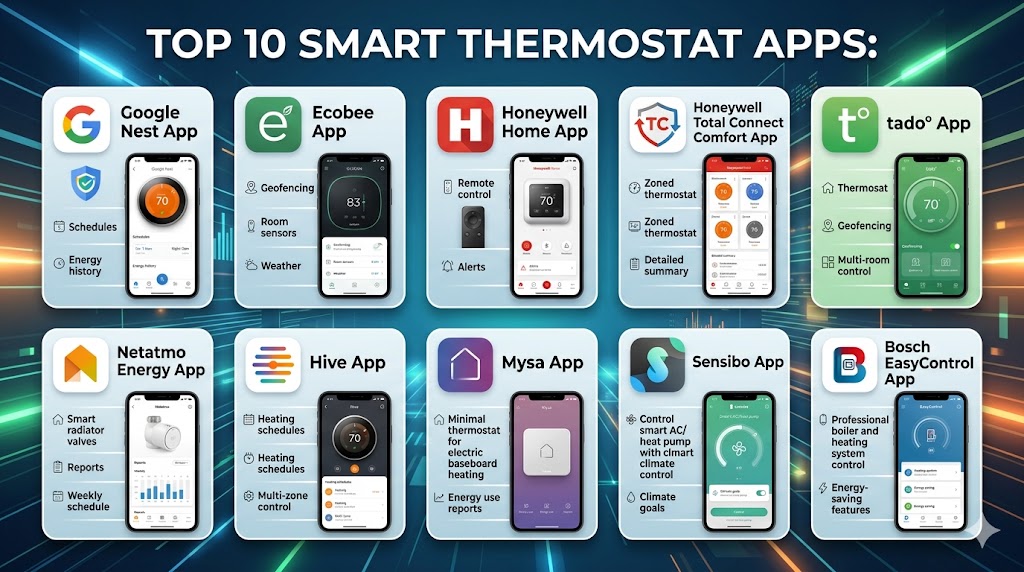
Introduction
Smart Thermostat Apps are mobile applications that allow users to remotely control heating and cooling systems, automate temperature settings, and optimize energy usage. These apps connect with smart thermostats, HVAC systems, and IoT devices to provide real-time control and intelligent climate management.
In modern smart homes, thermostat apps are no longer just remote controllers. They now use AI, geofencing, and predictive learning to adjust temperatures automatically based on user behavior, weather, and occupancy. This results in improved comfort, reduced energy bills, and better sustainability outcomes.
Common use cases include:
- Remote temperature control from anywhere
- Automated heating and cooling schedules
- Energy usage monitoring and optimization
- Multi-room climate management
- Integration with smart home ecosystems
When evaluating smart thermostat apps, buyers should consider:
- Compatibility with HVAC systems
- Automation and AI capabilities
- Mobile app usability
- Integration with smart home platforms
- Security and privacy features
- Energy-saving capabilities
- Multi-zone support
- Scalability
Best for: Homeowners, smart home users, property managers, and anyone looking to improve comfort while reducing energy costs.
Not ideal for: Users with simple heating setups or those who prefer manual thermostat control.
Key Trends in Smart Thermostat Apps
- AI-driven temperature learning and predictive automation
- Geofencing for automatic adjustments based on location
- Integration with renewable energy systems and EV charging
- Advanced energy analytics and cost-saving insights
- Voice assistant integration becoming standard
- Multi-home and multi-zone management capabilities
- Increased adoption of interoperability standards
- Edge computing for faster local decision-making
- Subscription-based advanced features
- Enhanced mobile dashboards and UX
How We Selected These Tools Methodology
We evaluated the top smart thermostat apps based on:
- Market adoption and popularity
- Feature completeness and automation capabilities
- Ease of use and onboarding experience
- Integration with smart home ecosystems
- Performance and reliability
- Security and privacy features
- Compatibility with HVAC systems
- Scalability across multiple environments
- Vendor support and community
Top 10 Smart Thermostat Apps Tools
#1 — Google Home App
Short description: A widely used smart home app that controls Nest thermostats and integrates with multiple smart devices. It is ideal for users already invested in the Google ecosystem.
Key Features
- Remote thermostat control
- AI-based scheduling
- Voice control integration
- Multi-device automation
- Energy tracking
- Smart notifications
Pros
- Easy to use
- Strong ecosystem
Cons
- Limited advanced customization
- Cloud dependency
Platforms / Deployment
Android / iOS / Cloud
Security & Compliance
Encryption, account-based security
Integrations & Ecosystem
Integrates with Google ecosystem and smart devices
- Google Assistant
- Smart home APIs
- IoT devices
Support & Community
Large global user base and support
#2 — Ecobee App
Short description: A feature-rich thermostat app that offers intelligent temperature control and energy optimization for residential and commercial users.
Key Features
- Smart scheduling
- Room sensors integration
- Energy reports
- Remote control
- Voice assistant support
- Automation features
Pros
- Strong energy optimization
- Advanced automation
Cons
- Requires compatible hardware
- Premium features may cost extra
Platforms / Deployment
Android / iOS / Cloud
Security & Compliance
Not publicly stated
Integrations & Ecosystem
Supports multiple integrations
- Smart home platforms
- IoT devices
- API support
Support & Community
Reliable support and documentation
#3 — Honeywell Home App
Short description: A widely adopted thermostat app designed to control Honeywell smart thermostats with strong multi-device and remote control capabilities.
Key Features
- Remote temperature control
- Scheduling and automation
- Multi-device management
- Alerts and notifications
- Energy monitoring
- User-friendly interface
Pros
- Reliable performance
- Broad compatibility
Cons
- Limited customization
- UI could be improved
Platforms / Deployment
Android / iOS / Cloud
Security & Compliance
Not publicly stated
Integrations & Ecosystem
Supports integrations with HVAC systems and smart devices
- IoT integrations
- API support
- Smart home platforms
Support & Community
Good support and resources
#4 — Amazon Alexa App
Short description: A voice-first smart home app that allows users to control thermostats using Alexa-enabled devices and automation routines.
Key Features
- Voice control
- Automation routines
- Device grouping
- Smart home dashboard
- Multi-device integration
- Scheduling
Pros
- Easy voice control
- Large ecosystem
Cons
- Cloud dependency
- Limited advanced controls
Platforms / Deployment
Android / iOS / Cloud
Security & Compliance
Account-based security
Integrations & Ecosystem
Supports wide integrations
- Alexa ecosystem
- Smart devices
- API support
Support & Community
Strong ecosystem and support
#5 — tado° App
Short description: A smart thermostat app focused on energy savings and automation, offering geofencing and intelligent heating control.
Key Features
- Geolocation-based automation
- Energy-saving insights
- Smart scheduling
- Remote control
- Multi-home management
- AI-based adjustments
Pros
- Strong energy savings
- Advanced automation
Cons
- Subscription required for full features
- Limited device compatibility
Platforms / Deployment
Android / iOS / Cloud
Security & Compliance
Not publicly stated
Integrations & Ecosystem
Supports smart home integrations
- IoT devices
- API support
- Smart ecosystem
Support & Community
Reliable support
#6 — Netatmo Energy App
Short description: A smart energy management app designed to control Netatmo thermostats and optimize home heating efficiency.
Key Features
- Remote control
- Energy tracking
- Smart scheduling
- Weather-based adjustments
- Notifications
- Automation
Pros
- Strong energy insights
- Easy to use
Cons
- Limited ecosystem
- Requires compatible devices
Platforms / Deployment
Android / iOS / Cloud
Security & Compliance
Not publicly stated
Integrations & Ecosystem
Supports integrations with smart home platforms
- IoT integrations
- API support
- Smart ecosystem
Support & Community
Good documentation
#7 — Hive App
Short description: A smart heating app that allows users to control thermostats and track energy usage with detailed insights.
Key Features
- Remote heating control
- Scheduling
- Energy tracking
- Alerts
- Smart home integration
- Budget tracking
Pros
- Easy to use
- Good energy insights
Cons
- Requires subscription for advanced features
- Limited advanced automation
Platforms / Deployment
Android / iOS / Cloud
Security & Compliance
Not publicly stated
Integrations & Ecosystem
Supports smart home integrations
- IoT devices
- API support
- Smart ecosystem
Support & Community
Reliable support
#8 — Mysa App
Short description: A smart thermostat app designed for electric heating systems, offering automation and energy savings.
Key Features
- Smart scheduling
- Remote control
- Energy usage insights
- Voice assistant support
- Multi-device control
- Automation
Pros
- Designed for electric heating
- Energy-efficient
Cons
- Limited compatibility
- Smaller ecosystem
Platforms / Deployment
Android / iOS / Cloud
Security & Compliance
Not publicly stated
Integrations & Ecosystem
Supports integrations with smart home systems
- IoT devices
- API support
- Smart ecosystem
Support & Community
Good support
#9 — Sensibo App
Short description: A smart climate control app that works with air conditioners and HVAC systems, offering remote control and automation.
Key Features
- Remote control
- AI climate automation
- Energy monitoring
- Scheduling
- Multi-device support
- Smart alerts
Pros
- Works with AC systems
- Strong automation
Cons
- Requires hardware
- Limited advanced customization
Platforms / Deployment
Android / iOS / Cloud
Security & Compliance
Not publicly stated
Integrations & Ecosystem
Supports integrations with smart home platforms
- IoT integrations
- API support
- Smart ecosystem
Support & Community
Active support
#10 — Bosch EasyControl App
Short description: A smart thermostat app designed for Bosch heating systems, offering efficient temperature control and energy optimization.
Key Features
- Remote control
- Smart scheduling
- Energy monitoring
- Alerts
- Automation
- User-friendly interface
Pros
- Reliable performance
- Good integration with Bosch systems
Cons
- Limited ecosystem
- Device-specific
Platforms / Deployment
Android / iOS / Cloud
Security & Compliance
Not publicly stated
Integrations & Ecosystem
Works with Bosch systems and smart home devices
- IoT integration
- API support
- Smart ecosystem
Support & Community
Reliable support
Comparison Table
| Tool Name | Best For | Platform Supported | Deployment | Standout Feature | Public Rating |
|---|---|---|---|---|---|
| Google Home | Nest users | Android iOS | Cloud | AI automation | N/A |
| Ecobee App | Energy optimization | Android iOS | Cloud | Smart sensors | N/A |
| Honeywell Home | HVAC control | Android iOS | Cloud | Multi-device control | N/A |
| Amazon Alexa | Voice control | Android iOS | Cloud | Voice automation | N/A |
| tado° | Energy saving | Android iOS | Cloud | Geofencing | N/A |
| Netatmo | Energy tracking | Android iOS | Cloud | Weather automation | N/A |
| Hive | Budget tracking | Android iOS | Cloud | Energy insights | N/A |
| Mysa | Electric heating | Android iOS | Cloud | Energy efficiency | N/A |
| Sensibo | AC control | Android iOS | Cloud | AI climate control | N/A |
| Bosch EasyControl | Bosch users | Android iOS | Cloud | System integration | N/A |
Evaluation & Scoring of Smart Thermostat Apps
| Tool Name | Core | Ease | Integrations | Security | Performance | Support | Value | Weighted Total |
|---|---|---|---|---|---|---|---|---|
| Google Home | 8 | 9 | 9 | 7 | 8 | 8 | 9 | 8.5 |
| Ecobee | 9 | 8 | 8 | 7 | 8 | 8 | 8 | 8.3 |
| Honeywell | 8 | 8 | 8 | 7 | 8 | 7 | 8 | 8.0 |
| Alexa | 8 | 9 | 9 | 7 | 8 | 8 | 9 | 8.4 |
| tado° | 9 | 8 | 8 | 7 | 8 | 8 | 8 | 8.3 |
| Netatmo | 8 | 8 | 7 | 7 | 8 | 7 | 8 | 7.9 |
| Hive | 8 | 8 | 7 | 7 | 8 | 7 | 8 | 7.9 |
| Mysa | 7 | 8 | 7 | 7 | 7 | 7 | 8 | 7.6 |
| Sensibo | 8 | 8 | 7 | 7 | 8 | 7 | 8 | 7.9 |
| Bosch | 7 | 8 | 7 | 7 | 7 | 7 | 7 | 7.5 |
These scores are comparative and reflect real-world usability and capabilities. Higher scores indicate more complete solutions, while lower scores highlight niche use cases.
Which Smart Thermostat App Is Right for You
Solo / Freelancer
Google Home and Hive offer simple and affordable control.
SMB
Ecobee and Honeywell provide strong automation and reliability.
Mid-Market
tado° and Netatmo offer advanced analytics and energy optimization.
Enterprise
Sensibo and Bosch solutions work well for complex environments.
Budget vs Premium
Budget apps provide basic control, while premium apps offer automation and AI features.
Feature Depth vs Ease of Use
Advanced apps offer customization, while simpler apps prioritize usability.
Integrations & Scalability
Choose apps with strong ecosystem compatibility.
Security & Compliance Needs
Look for apps with strong authentication and encryption.
Frequently Asked Questions FAQs
1. What is a smart thermostat app
A smart thermostat app allows users to control heating and cooling systems remotely. It connects to smart thermostats and enables scheduling, automation, and energy monitoring. These apps improve comfort and efficiency.
2. Can smart thermostat apps save energy
Yes, they optimize heating and cooling schedules based on usage patterns. Some apps use AI to adjust temperatures automatically, helping reduce energy consumption and costs.
3. Do I need a smart thermostat device
Yes, most apps require compatible hardware to function. Some apps can integrate with existing systems, but full features depend on device compatibility.
4. Are these apps secure
Most apps include security features like encryption and authentication. However, users should follow best practices such as updating apps and using secure networks.
5. Can I control multiple homes
Yes, many apps support multi-home management. This allows users to control temperature settings across different properties from one account.
6. Do these apps work offline
Some apps support limited local control, but most features require internet connectivity for remote access and automation.
7. Can I integrate with smart home systems
Yes, most apps integrate with platforms like Google Home and Alexa. This allows unified control of multiple smart devices.
8. How much do smart thermostat apps cost
Most apps are free, but advanced features may require subscriptions. Hardware costs are usually separate.
9. Are these apps easy to use
Most apps are designed for ease of use with simple interfaces. Advanced features may require some learning.
10. Can I upgrade later
Yes, smart thermostat systems are scalable. You can add devices and expand automation over time.
Conclusion
Smart Thermostat Apps have become essential tools for modern homes by enabling intelligent climate control, energy savings, and remote accessibility. These apps go beyond simple temperature adjustment by offering AI-driven automation, geolocation features, and deep integration with smart home ecosystems. Choosing the right app depends on your existing devices, desired level of automation, and budget. Beginner-friendly apps provide quick setup and ease of use, while advanced platforms deliver powerful customization and analytics. It is important to evaluate compatibility with HVAC systems and future expansion needs. Testing a few options before full adoption can help ensure the best fit. With the right app, users can achieve better comfort, lower energy costs, and smarter home management.

A practical consideration is how well these apps learn and adapt to daily routines over time. The ability to balance comfort with energy savings automatically can provide more value than simply offering remote temperature control.