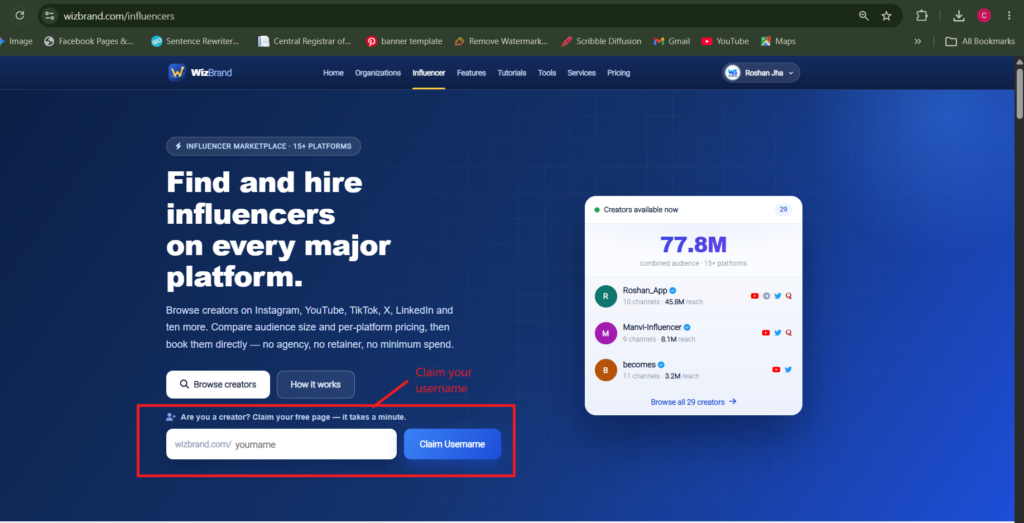
Your WizBrand profile is a public page with its own address. Everything you publish — a short update, a photo, a YouTube video — lands there, gets a link of its own, and stays searchable. Here is the whole flow, start to finish.
Before you start
You need a WizBrand account and your profile URL. Your profile lives at your username:
wizbrand.com/your-usernameThat page is public. Anyone can read it without signing in, which is the point — it is the page you send to a brand, put in a bio, or share in a group.
Publishing a post
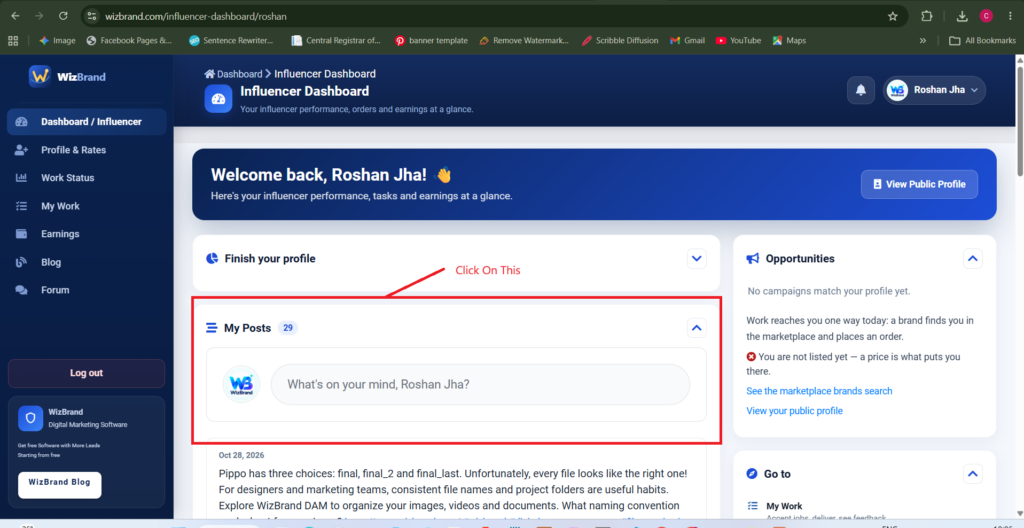
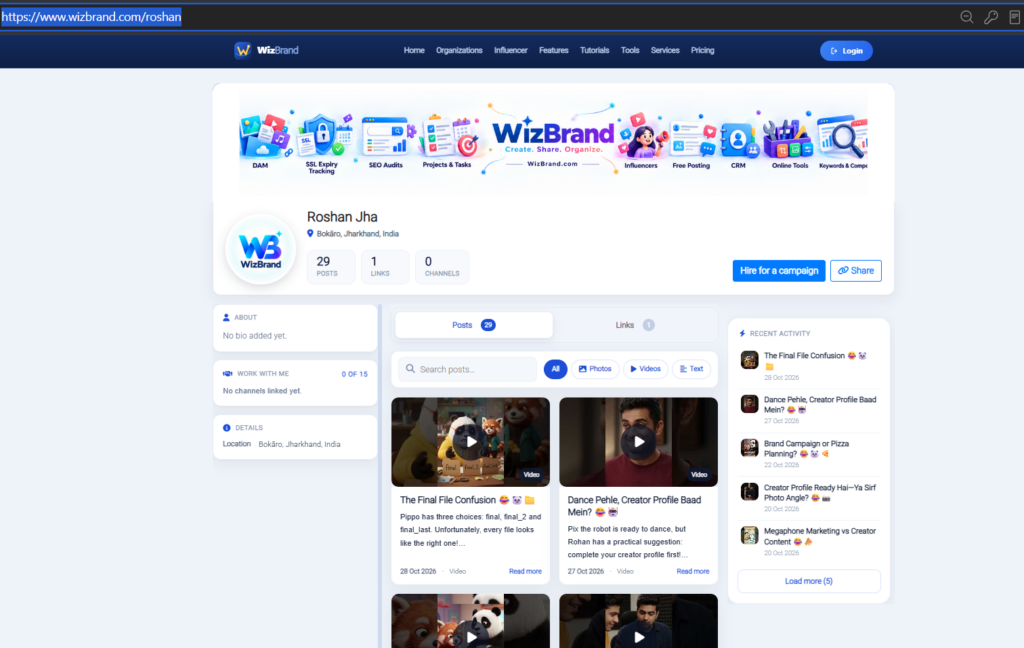
- Open your profileSign in and go to your own profile page. You will see your name, your location, and counters for posts, links and channels.
- Press Create PostOn a computer the button sits in the card at the top of the page, next to Share. On a phone it is in the Manage Profile list. Both open the same composer.
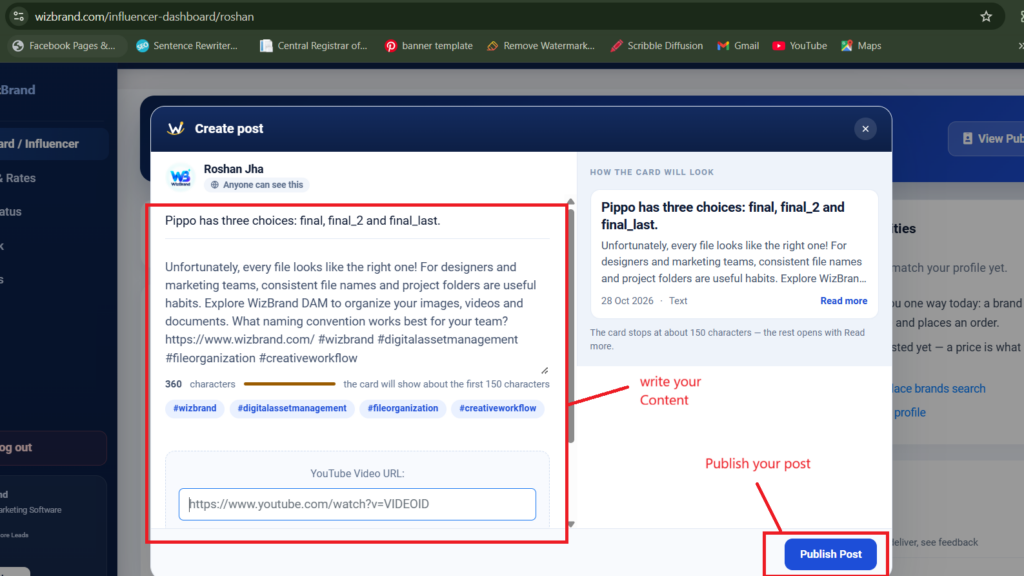
- Write the postThe composer has one required field and several optional ones. Write the body first — it is the only thing you cannot skip. The headline, photo and video are all optional, and a post with just text is a perfectly normal post.
- Add a photo or a video, if you have oneThe photo button takes an image file from your device. The YouTube button takes a link — you paste the URL, you do not upload the video.
- Post itIt appears on your profile immediately, at the top of the Posts tab, and in the Recent Activity list in the sidebar.
What goes in each field
| Field | What it takes | |
|---|---|---|
| Headline | Optional | Up to 180 characters. It becomes the post’s title on the card and on its own page. Leave it out and the post leads with its text. |
| Description | Required | The body of the post. No length limit. Line breaks are kept, so you can write in paragraphs. |
| Photo | Optional | One image: JPEG, PNG, GIF or SVG, up to 2 MB. Larger files are refused, so resize before uploading. |
| YouTube URL | Optional | A link to a YouTube video, in the form https://www.youtube.com/watch?v=VIDEOID or https://youtu.be/VIDEOID. |
Three things that happen on their own
Links become links
Paste a web address anywhere in your text and it is turned into a working link when the post is saved. You do not need to format anything.
Hashtags become links too
Write #seo or #contentmarketing and it becomes a link to that tag. Use the ones people would actually search for, and only a few per post — a wall of tags reads as spam.
The post gets its own address
Every post is given a short identifier and its own page, so you can share one post without sending someone to your whole profile:wizbrand.com/your-username/posts/a1b2c3d4e5f
That page shows the post on its own, with a More from link underneath back to everything else you have published.
Where your post shows up
Your profile has two tabs. Posts holds everything you publish here; Links is a separate list of web links you want to show. Each tab carries a count, so a visitor can see at a glance how much there is.
Above the posts sit a search box and four filters — All, Photos, Videos and Text. A reader who only wants your videos can get to them in one tap, which is a good reason to add a photo or a video when the post warrants one.
Posts and web links are not the same thing
A post is something you wrote. A web link is a destination you want to point at — your site, your portfolio, an article you were featured in. They live in different tabs on purpose, and the Add Web Links button is the one that fills the second.
Writing posts people actually read
- Lead with the point. The card in your feed shows the first few lines before it cuts to Read more. Put the reason to care in them.
- Use the headline when the post has a subject. An announcement or a how-to earns one. A one-line thought does not.
- Break the text up. Line breaks survive, so use them. A single block of twelve lines gets skipped.
- Add the picture if you have one. A post with an image is the one that stops a reader scrolling, and it is the one your Photos filter will surface later.
- Resize before you upload. The limit is 2 MB. A photo straight off a modern phone is often larger than that.
A worked example
Headline
Five keyword mistakes that cost us three months of traffic
Description
We rebuilt our keyword list last quarter and found five habits that had been quietly holding the site back.
The biggest one: we were tracking brand terms we already ranked first for, which told us nothing and filled the report.
Full breakdown on the blog — https://example.com/keyword-mistakes
#seo #keywordresearch
Photo
A screenshot of the rankings chart, exported at about 1200px wide and saved under 2 MB.
Published, that post carries a working link, two tag links, a picture, and an address of its own to share. It will show up under All and under Photos, and it will be findable by anyone who searches your profile for “keyword”.
Then, Check your Post For Example:- Roshan Jha — Influencer Profile | Wizbrand
