Introduction
Grammar & Spell Checking Tools are software solutions that help writers, editors, marketers, and professionals identify and correct grammatical, spelling, punctuation, and stylistic errors in their text. These tools enhance content quality, ensure professional communication, and save time during writing or editing processes.
With the increasing demand for high-quality digital content, these tools have become essential for producing error-free documents, emails, articles, and web content. Modern grammar checkers often incorporate AI-powered suggestions, tone analysis, readability scores, and multilingual support, making them more than simple spellcheckers.
Real-world use cases include proofreading marketing copy, ensuring accurate academic writing, improving email and business communications, editing blog posts or website content, and supporting multilingual document creation.
Evaluation criteria for buyers should include grammar and spell-check accuracy, AI suggestions for style and tone, multilingual support, integration with other writing or productivity tools, collaboration features, reporting and analytics, ease of use, pricing model, and platform compatibility.
Best for: Writers, content creators, marketing teams, students, editors, and enterprise communications teams.
Not ideal for: Casual users requiring only occasional spellcheck or small teams who rely on basic word processor tools.
Key Trends in Grammar & Spell Checking Tools
- AI-powered contextual grammar and style suggestions
- Tone and readability analysis for professional and creative writing
- Integration with word processors, browsers, and collaboration platforms
- Real-time error detection for emails, documents, and online content
- Multilingual support expanding globally
- Cloud-based platforms for scalable, multi-user access
- Collaborative editing and suggestion management
- Flexible pricing models including subscriptions and enterprise licensing
- Automated plagiarism detection integration in some platforms
- Customizable dictionaries and writing style guides
How We Selected These Tools
- Evaluated market adoption among individual and enterprise users
- Assessed feature completeness including AI suggestions, style, and tone
- Verified performance and reliability in real-world writing scenarios
- Reviewed integration capabilities with productivity, CMS, and collaboration tools
- Considered security and privacy of user data
- Prioritized ease of use for various user segments
- Evaluated scalability for teams and enterprises
- Balanced feature depth against cost and pricing flexibility
- Checked support quality, documentation, and community engagement
- Verified cross-platform availability: web, desktop, and mobile
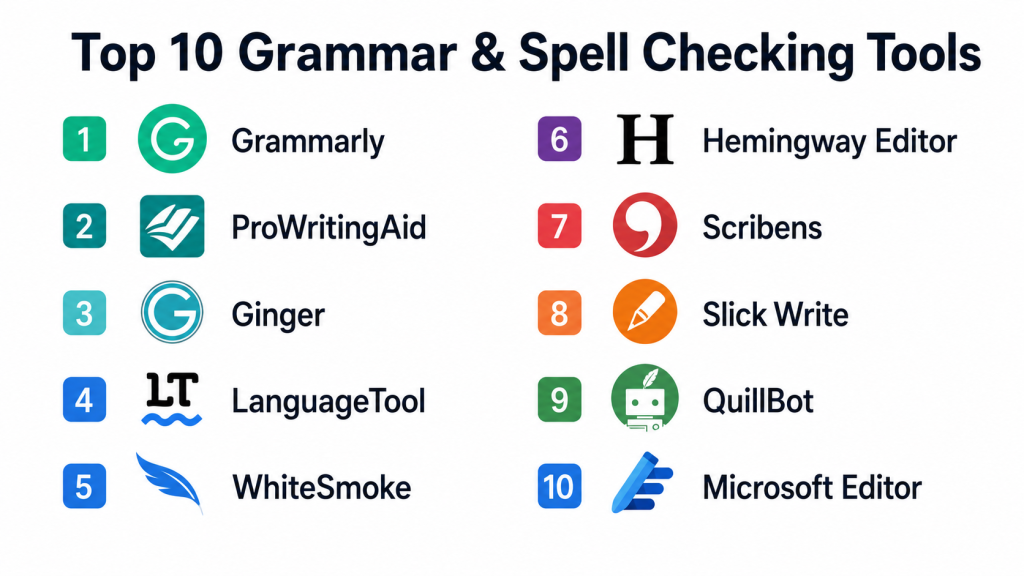
Top 10 Grammar & Spell Checking Tools
#1 — Grammarly
Short description: Grammarly is a widely-used AI-powered writing assistant that helps users detect and correct grammar, spelling, punctuation, and style errors across multiple platforms.
Key Features
- AI-powered grammar and spell checking
- Tone and clarity suggestions
- Browser, desktop, and mobile support
- Integration with Word, Google Docs, and email
- Plagiarism detection and vocabulary enhancement
Pros
- High accuracy and real-time suggestions
- Supports multiple platforms
- User-friendly interface
Cons
- Premium features behind subscription
- Some suggestions may be context-sensitive
- Limited offline functionality
Platforms / Deployment
- Web, Windows, macOS, iOS, Android
- Cloud
Security & Compliance
- Not publicly stated
Integrations & Ecosystem
Integrates with productivity apps and CMS platforms
- Microsoft Word
- Google Docs
- Email clients
- Slack
- API for enterprise usage
Support & Community
Email support, tutorials, knowledge base, active forums
#2 — ProWritingAid
Short description: ProWritingAid is a comprehensive writing tool that provides grammar and spell checking, style suggestions, and in-depth writing reports for authors and professionals.
Key Features
- Grammar, spelling, and style suggestions
- Detailed writing reports
- Integrates with word processors and browsers
- Contextual thesaurus and readability analysis
- Customizable writing style guides
Pros
- Comprehensive reports and suggestions
- Integrates with popular tools
- Supports long-form content editing
Cons
- Interface can be complex for beginners
- Some features require premium subscription
- Limited mobile support
Platforms / Deployment
- Web, Windows, macOS
- Cloud
Security & Compliance
- Not publicly stated
Integrations & Ecosystem
Integrates with writing, editing, and publishing tools
- Microsoft Word
- Google Docs
- Scrivener
- Chrome extension
Support & Community
Documentation, email support, online tutorials
#3 — Ginger Software
Short description: Ginger Software provides grammar and spell checking, sentence rephrasing, and translation tools suitable for students, professionals, and content creators.
Key Features
- Grammar, punctuation, and spell check
- Sentence rephrasing suggestions
- Translation for multiple languages
- Text reader for accessibility
- Mobile and desktop support
Pros
- Real-time corrections and rephrasing
- Supports multilingual content
- User-friendly interface
Cons
- Some advanced features require subscription
- Accuracy may vary with complex sentences
- Limited integration options
Platforms / Deployment
- Windows, macOS, iOS, Android
- Cloud
Security & Compliance
- Not publicly stated
Integrations & Ecosystem
Integrates with browsers, productivity, and office tools
- Microsoft Word
- Chrome and Edge extensions
- Email clients
Support & Community
Email support, tutorials, knowledge base
#4 — WhiteSmoke
Short description: WhiteSmoke is an AI-powered grammar and spell checker that provides writing corrections and translation features for professional content.
Key Features
- Grammar, punctuation, and spell check
- Style and tone suggestions
- Translation in multiple languages
- Web and desktop integration
- Templates for emails and documents
Pros
- Real-time grammar suggestions
- Translation feature
- Supports multiple platforms
Cons
- User interface feels dated
- Limited collaboration features
- Subscription required for full features
Platforms / Deployment
- Windows, macOS, Web, Mobile
- Cloud
Security & Compliance
- Not publicly stated
Integrations & Ecosystem
- Web-based text editor
- Email and document templates
Support & Community
Email support and online tutorials
#5 — LanguageTool
Short description: LanguageTool is an open-source grammar and spell checker supporting multiple languages, suitable for individual writers and organizations.
Key Features
- Grammar and spell checking
- Style and clarity suggestions
- Multi-language support
- Browser extensions and API access
- Integration with office suites
Pros
- Supports many languages
- Open-source and flexible
- Real-time suggestions
Cons
- Premium subscription needed for advanced checks
- Less polished interface than competitors
- Limited offline support
Platforms / Deployment
- Web, Windows, macOS, Linux, iOS, Android
- Cloud
Security & Compliance
- Not publicly stated
Integrations & Ecosystem
- Google Docs
- Microsoft Word
- Browser extensions
- API access
Support & Community
Email support, active forums, documentation
#6 — Hemingway Editor
Short description: Hemingway Editor is a writing tool focused on readability, grammar, and clarity, ideal for authors, bloggers, and content marketers.
Key Features
- Readability scoring
- Grammar and style checking
- Sentence simplification suggestions
- Highlights complex sentences
- Offline desktop and web editor
Pros
- Improves clarity and readability
- Simple and intuitive interface
- Desktop and online access
Cons
- Limited AI suggestions
- Fewer integrations
- Not multilingual
Platforms / Deployment
- Web, Windows, macOS
- Cloud
Security & Compliance
- Not publicly stated
Integrations & Ecosystem
- Standalone tool, minimal external integrations
Support & Community
Documentation and online tutorials
#7 — Scribens
Short description: Scribens provides grammar, spelling, and style corrections, with support for multiple languages and educational features.
Key Features
- Grammar and spell checking
- Style suggestions
- Vocabulary enhancement
- Multi-language support
- Browser and desktop support
Pros
- Multi-language capability
- User-friendly for students and professionals
- Free tier available
Cons
- Limited integration with productivity tools
- Ads in free version
- Less advanced AI suggestions
Platforms / Deployment
- Web, Windows, macOS
- Cloud
Security & Compliance
- Not publicly stated
Integrations & Ecosystem
- Browser extensions
- Office tools
Support & Community
Documentation, email support
#8 — After the Deadline
Short description: After the Deadline is an AI-based grammar and spell checker focusing on web content and writing style improvements.
Key Features
- Grammar and spell check
- Style suggestions
- Context-aware corrections
- Browser plugin support
- Free to use
Pros
- Lightweight and simple
- Works in multiple web platforms
- Contextual grammar suggestions
Cons
- Limited advanced features
- No desktop app
- Smaller language support
Platforms / Deployment
- Web
- Cloud
Security & Compliance
- Not publicly stated
Integrations & Ecosystem
- WordPress plugin
- Chrome and Firefox extensions
Support & Community
Email support and online documentation
#9 — Slick Write
Short description: Slick Write is an online grammar and spell checker with style suggestions and analytics for writers and bloggers.
Key Features
- Grammar, spelling, and style checks
- Readability analysis
- Customizable feedback settings
- Real-time writing analysis
- Browser-based editor
Pros
- Lightweight and easy to use
- Supports multiple writing styles
- Real-time suggestions
Cons
- No offline app
- Limited language support
- Fewer integrations than enterprise tools
Platforms / Deployment
- Web
- Cloud
Security & Compliance
- Not publicly stated
Integrations & Ecosystem
- Browser extension
- Word processors
Support & Community
Online documentation and tutorials
#10 — Grammarly Business
Short description: Grammarly Business provides enterprise-grade grammar and spell checking with advanced collaboration, style guides, and analytics for teams.
Key Features
- Grammar, spelling, and tone detection
- Team style guides and consistency checks
- Analytics and reporting for team performance
- Multi-platform support
- Centralized admin dashboard
Pros
- Enterprise collaboration features
- Consistency across teams
- Detailed analytics for workflow improvement
Cons
- Premium subscription required
- Some AI suggestions may be overly rigid
- Complex setup for large teams
Platforms / Deployment
- Web, Windows, macOS, iOS, Android
- Cloud
Security & Compliance
- Not publicly stated
Integrations & Ecosystem
- Microsoft Word, Google Docs
- Slack, Gmail
- API for enterprise workflows
Support & Community
Dedicated business support, documentation, tutorials
Comparison Table (Top 10)
| Tool Name | Best For | Platform(s) Supported | Deployment | Standout Feature | Public Rating |
|---|---|---|---|---|---|
| Grammarly | Writers, enterprises | Web, Windows, macOS, iOS, Android | Cloud | AI suggestions & tone | N/A |
| ProWritingAid | Authors, marketers | Web, Windows, macOS | Cloud | In-depth reports | N/A |
| Ginger Software | Students, professionals | Windows, macOS, iOS, Android | Cloud | Rephrasing & translation | N/A |
| WhiteSmoke | Professionals | Windows, macOS, Web, Mobile | Cloud | Grammar & translation | N/A |
| LanguageTool | Multilingual writers | Web, Windows, macOS, Linux, iOS, Android | Cloud | Open-source & multi-language | N/A |
| Hemingway Editor | Bloggers, authors | Web, Windows, macOS | Cloud | Readability & style | N/A |
| Scribens | Students, content teams | Web, Windows, macOS | Cloud | Multi-language support | N/A |
| After the Deadline | Web writers | Web | Cloud | Contextual grammar | N/A |
| Slick Write | Bloggers, writers | Web | Cloud | Real-time analysis | N/A |
| Grammarly Business | Teams & enterprises | Web, Windows, macOS, iOS, Android | Cloud | Collaboration & analytics | N/A |
Evaluation & Scoring
| Tool Name | Core | Ease | Integrations | Security | Performance | Support | Value | Weighted Total |
|---|---|---|---|---|---|---|---|---|
| Grammarly | 9 | 9 | 8 | 7 | 9 | 8 | 8 | 8.5 |
| ProWritingAid | 9 | 8 | 8 | 7 | 8 | 8 | 7 | 8.0 |
| Ginger Software | 8 | 8 | 7 | 7 | 8 | 7 | 7 | 7.6 |
| WhiteSmoke | 8 | 7 | 7 | 7 | 8 | 7 | 7 | 7.5 |
| LanguageTool | 8 | 8 | 7 | 7 | 8 | 7 | 7 | 7.6 |
| Hemingway Editor | 7 | 9 | 6 | 7 | 7 | 6 | 7 | 7.3 |
| Scribens | 7 | 8 | 6 | 7 | 7 | 6 | 7 | 7.1 |
| After the Deadline | 6 | 8 | 5 | 6 | 7 | 6 | 7 | 6.7 |
| Slick Write | 6 | 8 | 5 | 6 | 7 | 6 | 7 | 6.7 |
| Grammarly Business | 9 | 8 | 8 | 8 | 9 | 8 | 7 | 8.3 |
Which Grammar & Spell Checking Tool Is Right for You
Solo / Freelancer
Grammarly, Hemingway Editor, and LanguageTool provide affordable and user-friendly options for individual content creation.
SMB
Teams benefit from ProWritingAid, Scribens, or Ginger for collaborative proofreading and style suggestions.
Mid-Market
Organizations needing integration with productivity platforms and workflow automation may prefer Grammarly Business or ProWritingAid.
Enterprise
Large-scale operations requiring team collaboration, style consistency, analytics, and compliance should choose Grammarly Business or WhiteSmoke.
Budget vs Premium
Freelancers can use LanguageTool or Hemingway Editor for low-cost solutions. Enterprises may prioritize Grammarly Business or ProWritingAid for advanced features.
Feature Depth vs Ease of Use
Hemingway Editor and Slick Write offer simplicity, while Grammarly Business and ProWritingAid provide advanced style and grammar analytics for teams.
Integrations & Scalability
Enterprise teams needing integration with office suites, CMS, email, and browser tools should prioritize Grammarly Business, ProWritingAid, or Ginger Software.
Security & Compliance Needs
Organizations handling sensitive corporate communications should evaluate platforms with enterprise-grade security and compliance such as Grammarly Business.
Frequently Asked Questions
1. What content can grammar tools check?
They check emails, documents, blog posts, social media content, marketing copy, and academic writing for grammar, spelling, and style.
2. Are AI suggestions reliable?
Modern AI tools provide high accuracy, but human review is recommended for complex or context-sensitive content.
3. Do these tools support multiple languages?
Yes, many platforms support several languages, enabling translation and multilingual writing assistance.
4. Can multiple users collaborate?
Enterprise versions like Grammarly Business support collaborative editing and centralized style guides for teams.
5. Are these tools available offline?
Some desktop apps allow offline usage, but most cloud-based features require an internet connection.
6. How do these tools integrate with other software?
They integrate with word processors, browsers, email clients, CMS, and productivity platforms to streamline workflow.
7. Can these tools improve writing style?
Yes, most provide tone, clarity, and readability suggestions in addition to grammar and spelling corrections.
8. Are free versions sufficient?
Free tiers provide basic grammar and spell check, but advanced suggestions, style analysis, and collaboration require premium subscriptions.
9. How is user data handled?
Enterprise platforms implement encryption, access controls, and compliance standards such as GDPR to protect content.
10. How do I select the right tool?
Consider content volume, user needs, team size, integrations, multilingual requirements, and whether analytics or collaboration features are needed.
Conclusion
Grammar & Spell Checking Tools are essential for producing professional, error-free content across individual, team, and enterprise workflows. The right platform depends on user needs, team size, integration requirements, and budget. Freelancers and small teams benefit from user-friendly tools like Hemingway Editor and LanguageTool, while enterprises require scalable platforms with collaboration, analytics, and compliance features like Grammarly Business or ProWritingAid. AI-powered suggestions, tone analysis, and real-time feedback accelerate content creation and enhance communication quality. Evaluating multiple platforms and piloting solutions ensures consistent, accurate, and polished writing for any context. Implementing the right tool improves efficiency, reduces errors, and supports high-quality content creation across all channels.

This was an informative read that compares grammar and spell-checking tools in a simple and practical way. The clear overview of features and limitations helps readers find the right tool to improve their writing.