Introduction
Newsletter Platforms are software tools that allow organizations to create, schedule, and distribute email newsletters and campaigns. They help marketers, content teams, and businesses engage their audiences, nurture leads, and communicate news or updates effectively. Modern platforms combine drag-and-drop editors, automation workflows, personalization, analytics, and integrations with CRMs and marketing systems.
Real-world use cases include:
- Sending company announcements or product updates to customers and subscribers.
- Running automated lead nurturing campaigns for sales and marketing.
- Tracking engagement metrics like open rates, click-through rates, and conversions.
- Segmenting audiences for personalized and targeted campaigns.
- Integrating email campaigns with CRM and marketing automation systems.
Evaluation criteria for buyers include:
- Ease of email creation and template flexibility
- Automation and scheduling capabilities
- Personalization and segmentation options
- Integration with CRM, analytics, and e-commerce platforms
- Deliverability and anti-spam compliance
- Reporting and engagement tracking
- Scalability for SMBs to enterprise teams
- Security, privacy, and compliance (GDPR, SOC 2)
- Pricing flexibility and usage limits
- Multi-channel support and API accessibility
Best for: Marketing teams, content creators, e-commerce businesses, SaaS companies, and enterprises seeking to manage newsletters efficiently and engage audiences.
Not ideal for: Organizations sending minimal email campaigns or those relying on manual email clients.
Key Trends in Newsletter Platforms
- AI-powered content recommendations and subject line optimization
- Drag-and-drop visual editors for easy newsletter creation
- Advanced automation workflows for audience segmentation and triggers
- Integration-first platforms connecting with CRM, analytics, and e-commerce tools
- Real-time analytics dashboards to monitor open, click, and conversion rates
- GDPR, SOC 2, and anti-spam compliance built-in
- A/B testing for content, subject lines, and send times
- Personalization using dynamic content and behavioral data
- Multi-channel campaigns including email, SMS, and in-app notifications
- Cloud-based, scalable infrastructure for enterprise and SMB usage
How We Selected These Tools
- Evaluated market adoption and recognition among SMB and enterprise users
- Assessed feature completeness including automation, analytics, and personalization
- Considered deliverability and email performance
- Reviewed integration ecosystem with CRM, marketing, and e-commerce platforms
- Evaluated scalability for small to large mailing lists
- Assessed security, privacy, and compliance features
- Considered AI and automation capabilities for efficiency
- Reviewed reporting, analytics, and campaign insights
- Considered ease of use and onboarding
- Evaluated pricing flexibility and cost-effectiveness
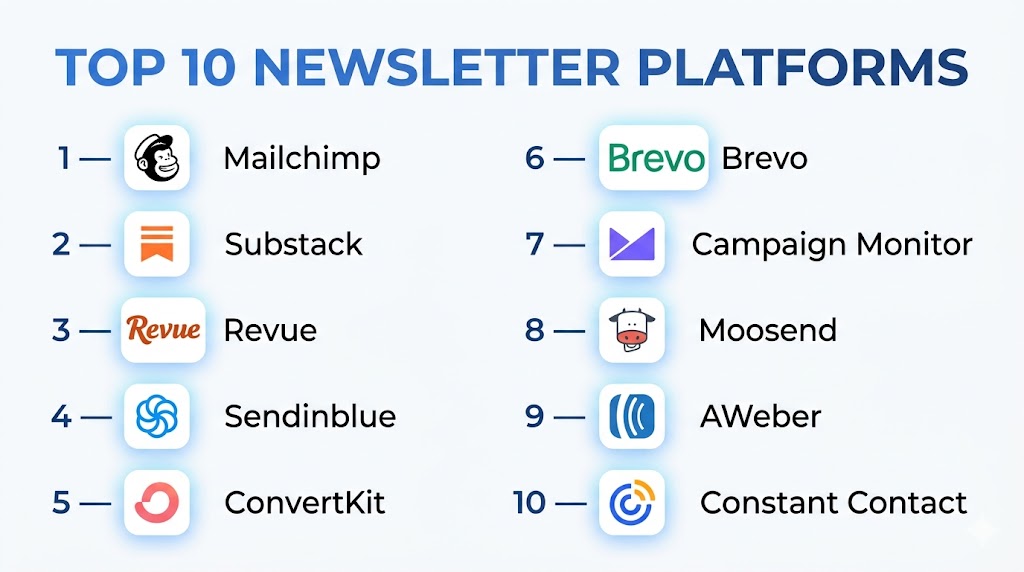
Top 10 Newsletter Platforms
#1 — Mailchimp
Short description: Mailchimp is a widely used newsletter platform offering email marketing, automation, and audience management. It provides drag-and-drop editors, analytics, and integration with multiple tools to engage subscribers efficiently.
Key Features
- Drag-and-drop email builder
- Automated workflows and triggers
- Audience segmentation
- Analytics and reporting
- CRM and e-commerce integrations
Pros
- Easy to use for beginners
- Comprehensive templates and automation
- Multi-channel campaign support
Cons
- Can become costly at scale
- Some advanced features require premium plans
- Limited customization on free tier
Platforms / Deployment
- Web / Cloud
Security & Compliance
- GDPR, SOC 2
Integrations & Ecosystem
- Shopify, Salesforce, Zapier
- Google Analytics, CRMs
Support & Community
- Knowledge base, chat support, user forums
#2 — Constant Contact
Short description: Constant Contact enables marketers to create newsletters and manage email campaigns easily. It focuses on ease-of-use, automation, and templates suitable for SMBs and small enterprises.
Key Features
- Email templates and design editor
- Automated campaigns and triggers
- Contact segmentation
- Reporting dashboards
- Social media integration
Pros
- User-friendly interface
- Quick campaign creation
- Reliable deliverability
Cons
- Limited advanced automation
- Fewer analytics compared to enterprise platforms
- Pricing scales with list size
Platforms / Deployment
- Web / Cloud
Security & Compliance
- GDPR
Integrations & Ecosystem
- Shopify, Salesforce, Facebook Ads
- CRMs and analytics tools
Support & Community
- Email support, webinars, knowledge base
#3 — Sendinblue
Short description: Sendinblue is an email and marketing automation platform that supports newsletters, transactional emails, and SMS campaigns. It offers workflow automation, analytics, and CRM integration.
Key Features
- Drag-and-drop email builder
- Automation workflows
- SMS marketing
- Real-time analytics
- Multi-channel campaign management
Pros
- Affordable for SMBs
- Combines email and SMS campaigns
- Automation workflows for personalized outreach
Cons
- Limited free-tier features
- UI can be complex for beginners
- Advanced analytics require premium plans
Platforms / Deployment
- Web / Cloud
Security & Compliance
- GDPR
Integrations & Ecosystem
- Shopify, WordPress, Salesforce
- Zapier and analytics platforms
Support & Community
- Email support, documentation, training webinars
#4 — HubSpot Email Marketing
Short description: HubSpot’s email marketing platform integrates fully with its CRM and marketing suite. It offers personalized newsletters, automation, analytics, and audience segmentation.
Key Features
- CRM integration for personalization
- Automated workflows
- Templates and A/B testing
- Analytics dashboards
- Multi-channel campaigns
Pros
- Deep integration with HubSpot CRM
- Scalable for SMBs and enterprises
- Powerful analytics and reporting
Cons
- Pricing can be high for premium features
- Learning curve for new users
- Limited flexibility outside HubSpot ecosystem
Platforms / Deployment
- Web / Cloud
Security & Compliance
- GDPR, SOC 2
Integrations & Ecosystem
- HubSpot CRM, Shopify, Salesforce
- Analytics and automation tools
Support & Community
- Knowledge base, enterprise support, user community
#5 — Campaign Monitor
Short description: Campaign Monitor is a newsletter platform focused on delivering visually appealing emails. It offers drag-and-drop editors, personalization, and analytics for email campaigns.
Key Features
- Drag-and-drop editor
- Personalized content and segmentation
- Analytics dashboards
- Automated campaigns
- Multi-list management
Pros
- Excellent design flexibility
- Easy-to-use templates
- Reliable deliverability
Cons
- Fewer automation options than enterprise tools
- Analytics limited in lower tiers
- Some features require premium plans
Platforms / Deployment
- Web / Cloud
Security & Compliance
- GDPR
Integrations & Ecosystem
- Salesforce, Shopify, Zapier
- Analytics and CRM tools
Support & Community
- Documentation, chat support, webinars
#6 — AWeber
Short description: AWeber provides newsletter creation, automation, and analytics for SMBs. It focuses on ease of use with prebuilt templates and automation sequences.
Key Features
- Drag-and-drop editor
- Email automation sequences
- Subscriber segmentation
- Analytics and reporting
- Pre-built templates
Pros
- User-friendly for small businesses
- Affordable pricing tiers
- Reliable email delivery
Cons
- Limited advanced automation
- Less suitable for enterprise-scale campaigns
- Fewer integrations than competitors
Platforms / Deployment
- Web / Cloud
Security & Compliance
- GDPR
Integrations & Ecosystem
- Shopify, WordPress, Zapier
- CRM tools
Support & Community
- Email support, knowledge base, tutorials
#7 — GetResponse
Short description: GetResponse is an all-in-one marketing platform including newsletters, automation, landing pages, and webinars. It allows teams to create segmented and personalized campaigns efficiently.
Key Features
- Email newsletter builder
- Automation workflows
- Landing page creation
- Analytics and reporting
- Webinar integration
Pros
- Comprehensive marketing platform
- Strong automation features
- Scalable for SMBs and mid-market
Cons
- Interface can be complex for beginners
- Some features locked behind higher-tier plans
- Pricing increases with contact volume
Platforms / Deployment
- Web / Cloud
Security & Compliance
- GDPR
Integrations & Ecosystem
- Salesforce, Shopify, Zapier
- CRM and marketing tools
Support & Community
- Knowledge base, chat support, training webinars
#8 — Moosend
Short description: Moosend is an email marketing and newsletter platform with automation, segmentation, and analytics features. It provides marketers with a cost-effective way to send newsletters and track engagement.
Key Features
- Drag-and-drop email editor
- Automation workflows
- Advanced segmentation
- Analytics dashboard
- Multi-language support
Pros
- Affordable for small teams
- Intuitive interface
- Automation for personalized campaigns
Cons
- Limited templates compared to larger tools
- Analytics less comprehensive
- Less suitable for enterprise campaigns
Platforms / Deployment
- Web / Cloud
Security & Compliance
- GDPR
Integrations & Ecosystem
- Shopify, Zapier, CRMs
- Analytics tools
Support & Community
- Email support, documentation, tutorials
#9 — Benchmark Email
Short description: Benchmark Email is a newsletter platform designed for simplicity and reliability. It supports drag-and-drop editors, automation, and real-time reporting for marketers.
Key Features
- Drag-and-drop editor
- Email automation and scheduling
- Audience segmentation
- Analytics dashboards
- Responsive templates
Pros
- Easy-to-use interface
- Good deliverability
- Affordable for SMBs
Cons
- Limited advanced automation
- Fewer templates for creative design
- Some features require premium plans
Platforms / Deployment
- Web / Cloud
Security & Compliance
- GDPR
Integrations & Ecosystem
- Shopify, Salesforce, Zapier
- CRM and analytics tools
Support & Community
- Email support, documentation, user forums
#10 — MailerLite
Short description: MailerLite provides newsletter creation, automation, and analytics for small to mid-sized businesses. It emphasizes simplicity, affordability, and reliable deliverability.
Key Features
- Drag-and-drop editor
- Automation workflows
- Audience segmentation
- Analytics and reporting
- Landing page integration
Pros
- Affordable and simple to use
- Scalable for growing teams
- Reliable email delivery
Cons
- Limited advanced automation features
- Analytics less detailed than enterprise platforms
- Templates are basic
Platforms / Deployment
- Web / Cloud
Security & Compliance
- GDPR
Integrations & Ecosystem
- Shopify, Zapier, CRMs
- Analytics tools
Support & Community
- Email support, documentation, tutorials
Comparison Table (Top 10)
| Tool Name | Best For | Platform(s) Supported | Deployment | Standout Feature | Public Rating |
|---|---|---|---|---|---|
| Mailchimp | SMBs and marketers | Web | Cloud | Drag-and-drop builder | N/A |
| Constant Contact | SMB newsletters | Web | Cloud | Easy campaign creation | N/A |
| Sendinblue | Email + SMS campaigns | Web | Cloud | Automation workflows | N/A |
| HubSpot Email | CRM-integrated campaigns | Web | Cloud | Deep CRM integration | N/A |
| Campaign Monitor | Design-focused campaigns | Web | Cloud | Visual editor and templates | N/A |
| AWeber | SMBs with simple automation | Web | Cloud | Prebuilt templates | N/A |
| GetResponse | All-in-one marketing | Web | Cloud | Automation and webinars | N/A |
| Moosend | Cost-effective automation | Web | Cloud | Affordable automation | N/A |
| Benchmark Email | Simple SMB newsletters | Web | Cloud | Ease of use and deliverability | N/A |
| MailerLite | SMB growth and automation | Web | Cloud | Affordable and reliable | N/A |
Evaluation & Scoring of Newsletter Platforms
| Tool Name | Core (25%) | Ease (15%) | Integrations (15%) | Security (10%) | Performance (10%) | Support (10%) | Value (15%) | Weighted Total |
|---|---|---|---|---|---|---|---|---|
| Mailchimp | 9 | 8 | 8 | 8 | 9 | 8 | 8 | 8.5 |
| Constant Contact | 8 | 8 | 7 | 7 | 8 | 8 | 8 | 7.9 |
| Sendinblue | 8 | 8 | 8 | 7 | 8 | 7 | 7 | 7.8 |
| HubSpot Email | 9 | 7 | 9 | 8 | 9 | 8 | 7 | 8.3 |
| Campaign Monitor | 8 | 8 | 7 | 7 | 8 | 7 | 7 | 7.7 |
| AWeber | 7 | 8 | 7 | 7 | 7 | 6 | 7 | 7.0 |
| GetResponse | 8 | 7 | 8 | 7 | 8 | 7 | 7 | 7.6 |
| Moosend | 7 | 8 | 7 | 7 | 7 | 6 | 7 | 7.0 |
| Benchmark Email | 7 | 8 | 7 | 7 | 7 | 6 | 7 | 6.9 |
| MailerLite | 7 | 8 | 7 | 7 | 7 | 6 | 7 | 7.0 |
Which Newsletter Platform Is Right for You?
Solo / Freelancer
MailerLite or Benchmark Email offer simplicity, affordability, and ease of use for small campaigns.
SMB
Mailchimp or Moosend provide reliable automation, templates, and analytics without high costs.
Mid-Market
Sendinblue or AWeber support multi-channel campaigns, segmentation, and automation for growing teams.
Enterprise
HubSpot Email, Campaign Monitor, or Mailchimp Premium offer advanced automation, CRM integration, and analytics at scale.
Budget vs Premium
Lightweight platforms like MailerLite or Moosend are cost-effective; premium solutions provide enterprise-grade automation and analytics.
Feature Depth vs Ease of Use
MailerLite and AWeber are simple and intuitive; HubSpot Email and Campaign Monitor provide advanced features for enterprise workflows.
Integrations & Scalability
HubSpot Email and Mailchimp integrate broadly with CRM, e-commerce, and marketing tools, suitable for large-scale deployments.
Security & Compliance Needs
Enterprise platforms offer GDPR and SOC 2 compliance, SSO, and encryption for secure communication.
Frequently Asked Questions (FAQs)
1. What is a newsletter platform?
A tool to create, send, and track email campaigns for marketing, engagement, or announcements.
2. Can small teams use these platforms?
Yes, platforms like MailerLite and Benchmark Email are affordable and easy to use.
3. How do these tools integrate with CRMs?
Most platforms integrate with Salesforce, HubSpot, Shopify, and other CRMs to sync contacts and track engagement.
4. Are automation workflows included?
Yes, all top platforms allow automated campaigns, triggers, and sequence scheduling.
5. Do these platforms offer analytics?
Yes, they provide reporting on open rates, clicks, conversions, and campaign performance.
6. Can I personalize emails for segments?
Yes, dynamic content, segmentation, and personalization are standard features.
7. Are these platforms GDPR compliant?
Top platforms follow GDPR, SOC 2, and anti-spam regulations to ensure compliance.
8. Can they handle large mailing lists?
Yes, most platforms scale for SMBs and enterprise email volumes.
9. Is A/B testing available?
Yes, many platforms provide A/B testing for subject lines, content, and send times.
10. How long does setup take?
Lightweight platforms can be ready within hours; enterprise solutions may take days for configuration and integration.
Conclusion
Newsletter Platforms enable businesses to communicate effectively with their audiences, automate campaigns, and analyze engagement. SMBs can leverage MailerLite or Moosend for affordable, easy-to-use email campaigns, while mid-market and enterprise teams benefit from Mailchimp, Sendinblue, or HubSpot Email for advanced automation, segmentation, and analytics. To maximize results, shortlist 2–3 platforms, run pilot campaigns, ensure CRM and security compliance, and scale based on performance. A well-selected newsletter platform improves engagement, conversion, and ROI across marketing efforts.
