Introduction
Music notation software enables composers, arrangers, educators, and musicians to write, edit, and share sheet music digitally. These tools replace traditional pen-and-paper notation with powerful digital workflows, allowing users to compose complex scores, hear playback instantly, and collaborate efficiently.
Modern notation software has evolved beyond static sheet music creation. Today’s tools integrate MIDI input, AI-assisted transcription, real-time collaboration, and seamless export to audio and publishing formats. This makes them essential not only for classical composers but also for film scoring, music education, and content creation.
Common Use Cases
- Composing orchestral and instrumental scores
- Arranging music for bands, choirs, or ensembles
- Music education and teaching
- Film and game scoring
- Sheet music publishing and distribution
What Buyers Should Evaluate
- Notation accuracy and engraving quality
- MIDI input and playback capabilities
- Ease of use vs professional depth
- Support for large orchestral scores
- Collaboration and sharing features
- Integration with DAWs and audio tools
- File format compatibility (MusicXML, MIDI)
- Performance and responsiveness
- Plugin and extension support
- Pricing and licensing
Best for: Composers, music teachers, students, arrangers, and film/game scoring professionals.
Not ideal for: Users who only need basic audio editing or production without sheet music creation.
Key Trends in Music Notation Software
- AI-assisted transcription from audio to notation
- Real-time cloud collaboration for composers
- Integration with DAWs and audio production tools
- Improved playback realism with virtual instruments
- Mobile and tablet-based notation tools
- Automation of engraving and formatting tasks
- Support for large-scale orchestral compositions
- Expansion of open formats like MusicXML
- Cross-platform compatibility and syncing
- Simplified tools for beginners and educators
How We Selected These Tools (Methodology)
- Industry adoption among composers and educators
- Quality of notation and engraving output
- Feature depth for composition and arrangement
- Performance and stability
- Ease of use across skill levels
- Integration with MIDI and DAWs
- Community and learning resources
- Platform availability
- Balance of free and premium tools
- Relevance for modern workflows
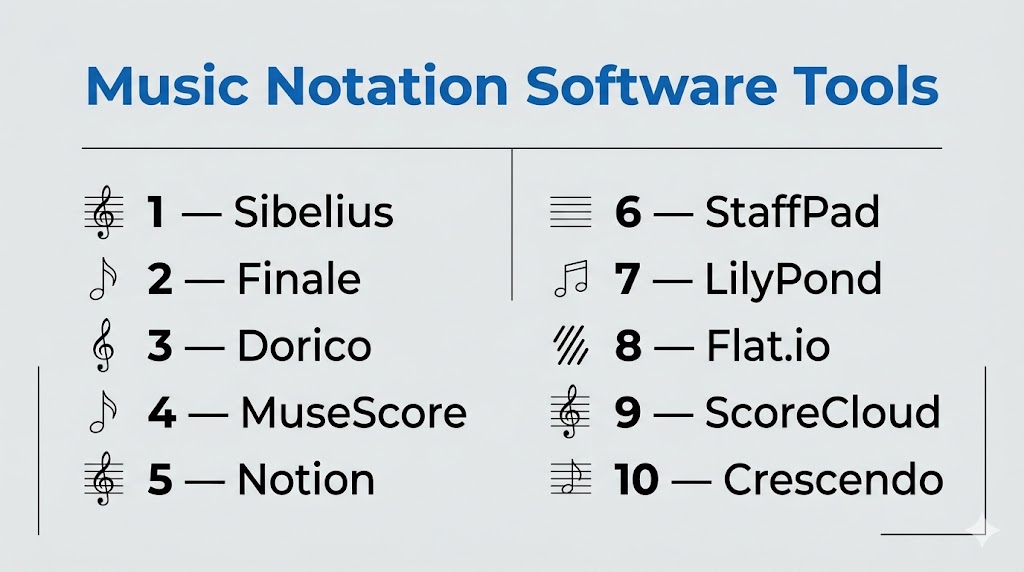
Top 10 Music Notation Software Tools
#1 — Sibelius
Short description: A professional music notation software widely used for composing, arranging, and publishing scores.
Key Features
- Advanced notation and engraving tools
- Realistic playback
- MIDI input support
- Large score handling
- Cloud sharing
- Plugin support
Pros
- Industry-standard notation quality
- Powerful features for professionals
Cons
- Subscription-based
- Learning curve
Platforms / Deployment
Windows / macOS
Cloud / Local
Security & Compliance
Not publicly stated
Integrations & Ecosystem
Works well with audio production workflows and plugins.
- MIDI devices
- Audio tools
- Plugin ecosystem
Support & Community
Large global community with strong educational resources.
#2 — Finale
Short description: A long-standing professional notation tool known for deep customization and engraving precision.
Key Features
- Advanced engraving tools
- Flexible notation options
- MIDI support
- Plugin extensions
- Score customization
- Playback engine
Pros
- Highly customizable
- Professional-grade output
Cons
- Complex interface
- Steeper learning curve
Platforms / Deployment
Windows / macOS
Local
Security & Compliance
Not publicly stated
Integrations & Ecosystem
Supports plugins and MIDI devices.
Support & Community
Established user base and resources.
#3 — Dorico
Short description: A modern notation software focused on intelligent workflows and high-quality engraving.
Key Features
- Smart notation engine
- Automatic engraving
- Advanced playback
- MIDI and VST support
- Large score handling
- Flexible workflows
Pros
- Modern interface
- High-quality output
Cons
- Learning curve
- Paid software
Platforms / Deployment
Windows / macOS
Local
Security & Compliance
Not publicly stated
Integrations & Ecosystem
Supports VST instruments and MIDI workflows.
Support & Community
Growing and active community.
#4 — MuseScore
Short description: A free and open-source notation software widely used by students and hobbyists.
Key Features
- Multi-staff notation
- MIDI input
- Playback engine
- Plugin support
- MusicXML compatibility
- Cross-platform
Pros
- Free and accessible
- Easy to use
Cons
- Limited advanced features
- Performance limitations for large scores
Platforms / Deployment
Windows / macOS / Linux
Local
Security & Compliance
Varies / N/A
Integrations & Ecosystem
Supports plugins and open formats.
Support & Community
Very large open-source community.
#5 — Notion
Short description: A notation software combining score writing with audio production features.
Key Features
- Notation and sequencing
- Realistic playback
- MIDI input
- Built-in instruments
- Automation tools
Pros
- Combines notation and DAW features
- Good playback quality
Cons
- Smaller ecosystem
- Less advanced engraving
Platforms / Deployment
Windows / macOS / iOS
Local
Security & Compliance
Not publicly stated
Integrations & Ecosystem
Works with audio tools and MIDI devices.
Support & Community
Moderate community.
#6 — StaffPad
Short description: A tablet-based notation tool designed for handwriting input.
Key Features
- Handwriting recognition
- Real-time playback
- Touch interface
- MIDI support
- Cloud syncing
Pros
- Natural writing experience
- Innovative interface
Cons
- Limited platform availability
- Requires stylus
Platforms / Deployment
Windows / iOS
Local
Security & Compliance
Not publicly stated
Integrations & Ecosystem
Supports MIDI and audio workflows.
Support & Community
Niche but growing community.
#7 — LilyPond
Short description: A text-based music notation software focused on high-quality engraving.
Key Features
- Text-based input
- Professional engraving output
- Open-source
- Scriptable workflows
- MusicXML support
Pros
- High-quality output
- Free and customizable
Cons
- Steep learning curve
- No visual interface
Platforms / Deployment
Windows / macOS / Linux
Local
Security & Compliance
Varies / N/A
Integrations & Ecosystem
Supports scripting and open formats.
Support & Community
Active developer community.
#8 — Flat.io
Short description: A cloud-based music notation tool designed for collaboration and education.
Key Features
- Browser-based editing
- Real-time collaboration
- MIDI input
- Playback tools
- Sharing features
Pros
- Easy collaboration
- Accessible anywhere
Cons
- Requires internet
- Limited advanced features
Platforms / Deployment
Web
Cloud
Security & Compliance
Not publicly stated
Integrations & Ecosystem
Supports integration with education platforms.
Support & Community
Growing user base.
#9 — ScoreCloud
Short description: A notation tool that converts audio and MIDI into sheet music automatically.
Key Features
- Audio-to-notation conversion
- MIDI input
- Playback tools
- Cloud storage
- Editing features
Pros
- Fast transcription
- Easy to use
Cons
- Limited advanced editing
- Accuracy varies
Platforms / Deployment
Windows / macOS / iOS
Cloud / Local
Security & Compliance
Not publicly stated
Integrations & Ecosystem
Supports MIDI workflows.
Support & Community
Moderate community.
#10 — Crescendo
Short description: A lightweight notation software for beginners and simple compositions.
Key Features
- Basic notation tools
- Playback engine
- MIDI support
- Export options
- Simple interface
Pros
- Easy to learn
- Lightweight
Cons
- Limited features
- Not suitable for complex scores
Platforms / Deployment
Windows / macOS
Local
Security & Compliance
Not publicly stated
Integrations & Ecosystem
Basic integration support.
Support & Community
Limited community resources.
Comparison Table (Top 10)
| Tool Name | Best For | Platform(s) Supported | Deployment | Standout Feature | Public Rating |
|---|---|---|---|---|---|
| Sibelius | Professionals | Windows, macOS | Cloud/Local | Industry standard | N/A |
| Finale | Advanced users | Windows, macOS | Local | Customization | N/A |
| Dorico | Modern workflows | Windows, macOS | Local | Smart engraving | N/A |
| MuseScore | Beginners | Windows, macOS, Linux | Local | Free open-source | N/A |
| Notion | Hybrid workflows | Windows, macOS, iOS | Local | DAW integration | N/A |
| StaffPad | Tablet users | Windows, iOS | Local | Handwriting input | N/A |
| LilyPond | Developers | Windows, macOS, Linux | Local | Text-based engraving | N/A |
| Flat.io | Collaboration | Web | Cloud | Real-time editing | N/A |
| ScoreCloud | Transcription | Windows, macOS, iOS | Cloud/Local | Audio-to-score | N/A |
| Crescendo | Beginners | Windows, macOS | Local | Simplicity | N/A |
Evaluation & Scoring of Music Notation Software
| Tool Name | Core (25%) | Ease (15%) | Integrations (15%) | Security (10%) | Performance (10%) | Support (10%) | Value (15%) | Weighted Total |
|---|---|---|---|---|---|---|---|---|
| Sibelius | 9 | 7 | 8 | 6 | 8 | 9 | 7 | 8.0 |
| Finale | 9 | 6 | 8 | 6 | 8 | 8 | 7 | 7.9 |
| Dorico | 9 | 7 | 8 | 6 | 9 | 8 | 7 | 8.1 |
| MuseScore | 7 | 9 | 6 | 5 | 7 | 9 | 10 | 7.8 |
| Notion | 7 | 8 | 7 | 5 | 7 | 7 | 8 | 7.4 |
| StaffPad | 7 | 8 | 6 | 5 | 7 | 6 | 7 | 7.1 |
| LilyPond | 8 | 5 | 7 | 5 | 8 | 7 | 10 | 7.5 |
| Flat.io | 7 | 9 | 7 | 5 | 7 | 7 | 8 | 7.5 |
| ScoreCloud | 6 | 9 | 6 | 5 | 7 | 6 | 8 | 7.0 |
| Crescendo | 5 | 9 | 5 | 5 | 6 | 6 | 9 | 6.7 |
How to interpret scores:
- Scores compare tools relative to each other
- Higher scores indicate balanced performance
- Lower scores may still fit niche use cases
- Focus on your workflow needs
- Always test tools before choosing
Which Music Notation Software Is Right for You?
Solo / Freelancer
- Best: MuseScore, Flat.io, Crescendo
- Focus on affordability and simplicity
SMB
- Best: Sibelius, Notion
- Balance features and usability
Mid-Market
- Best: Dorico, Finale
- Need advanced engraving and workflows
Enterprise
- Best: Sibelius, Dorico
- Require large-scale scoring capabilities
Budget vs Premium
- Budget: MuseScore, LilyPond
- Premium: Sibelius, Finale
Feature Depth vs Ease of Use
- Advanced: Finale, Dorico
- Easy: MuseScore, Flat.io
Integrations & Scalability
- Strong: Sibelius, Dorico
- Limited: Crescendo
Security & Compliance Needs
- Most tools: Not publicly stated
Frequently Asked Questions (FAQs)
What is music notation software?
It is used to create and edit sheet music digitally.
Which tool is best for beginners?
MuseScore and Flat.io are beginner-friendly.
Are there free tools available?
Yes, MuseScore and LilyPond are free.
Can I convert audio to sheet music?
Yes, tools like ScoreCloud support this.
What is MIDI?
A format for digital musical data.
Do I need plugins?
Optional, but useful for advanced features.
Can I collaborate with others?
Yes, some tools support cloud collaboration.
What formats are supported?
Common formats include MIDI and MusicXML.
Is notation software used professionally?
Yes, tools like Sibelius and Dorico are widely used.
What are common mistakes?
Ignoring formatting and playback quality.
Conclusion
Music notation software plays a vital role in modern composition, education, and music production. From beginner-friendly tools to professional-grade platforms, each offers unique capabilities.
